What's new

Overexposed & Underexposed area in the same picture

Silchuki14

TPF Noob!
Joined
Jul 22, 2013
Messages
46
Reaction score
4
Location
Quebec, Canada
Can others edit my Photos
Photos OK to edit
Hi guys, I need your help on something.

I can't choose how much light the sun will give me when I travel so I have to deal with what I have when I'm there. With that said, when it's clear/sunny outside and you want to take a landscape/nature/outdoor picture, what do you do to avoid have an blown out/overexposed sky and/or an underexposed picture (With okay sky)?

Long and weird question I know but sometimes it seems I have to choose between a blown out sky or an underexposed subject. It's so bad I can't bring it back with LR5...

Is there any tricks I'm missing? Filter I could use? Help?


I'm shooting with a Sony SLTA37 (Lens doesn't matter, happen with all of them) in Aperture Priority. Lastly, I do not use any filter of any sort. ISO is kept as low as possible.

Thanks in advance for the help!
 
I've had some luck with HDR in cases like this, but it'll never make up for better lighting -- harsh midday sun is tough to overcome.
 
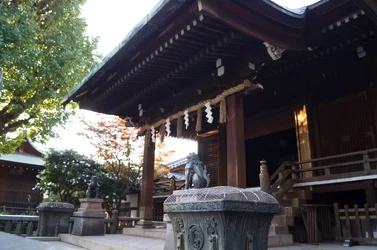
That would help in a situation like this? (Shot is bad, but show well what I mean)


$24112013-DSC04335.webp
(ISO200 - 18mm F3.5 1/40)

In my opinion, Sky is way too bright and to have a correct sky, I would have an underexposed temple which would have been really noisy after LR5.
 
Learn about HDR. (High Dynamic Range) Basically, you take one photo with the blown out sky and correctly exposed foreground, then another with just the opposite, very dark foreground and nicely exposed sky. Later you merge the two into one photo with a variety of methods including software called photomatix which allows you to merge several differently exposed images into one.

High Dynamic Range is the term for just the issue you are talking about. Just google "HDR"
 
^I know about HDR, but didn't think about using it that way. However, do I use photomax before or after PP? Is it possible to keep a "Merged Picture RAW file" and then edit after? Photoshop can do all of that but I don't have that tool. (I wish lol).

Thanks for the quick help by the way, didn't think it would be that fast!
 
Yes, it would help in a situation like that. You know you have to shoot multiple exposures for HDR, right? The easiest is to just shoot an AEB bracket, but done properly, you'd set up a bracket that covers the correct exposure for both the sky and the temple, which could very well turn out to be more than three shots. I always do HDR processing first, then follow up with any additional post-processing, which should be minor.
 
Learn about HDR. (High Dynamic Range) Basically, you take one photo with the blown out sky and correctly exposed foreground, then another with just the opposite, very dark foreground and nicely exposed sky. Later you merge the two into one photo with a variety of methods including software called photomatix which allows you to merge several differently exposed images into one.
Technically, that is not an HDR. An HDR generally requires at least 3 exposures and unless the photographer has a very steady hand, registering multiple exposures post process is greatly aided by using a tripod.

Another issue with using 2 or more exposures is if anything in the scene moves between the exposures.

The scene in post #4 would not benefit from a GND filter and is definitely a candidate for 3 or more exposures and poet process blending in an HDR application like Photomatix.

The best HDR images usually have been edited back and forth in both a dedicated HDR application and a good raster image editing application like Photoshop.
Top quality HDR's take a lot of detailed editing work.
 
You can boost the DRO in the Fn menu and let the camera manage the dark and bright areas.
Also, aim at barely clipping the sky so you can recover those details in LR.

Those are the "free" options.
 
This is a classic problem of photography having to do with dynamic range. The camera can record only so many levels of brightness. If the range is too great, you will lose detail in either the highlights or shadows. This is most often encountered with a bright sky and darker foreground subject. This is not an issue of lens or settings. There are no settings that can take a scene outside of the camera's dynamic range and make it fit. It's the nature of light and cameras.

As a photographer all you can do is make a choice. You can't change the dynamic range of the camera, but you can choose how you record the scene. You can choose to keep the sky and let the foreground go dark. You can choose to expose for the foreground and blow out the sky, or you can make choices that enhance the dynamic range of the capture, such as capturing a bracket of exposures that encompass the full range of the scene and then combining them in post (HDR), or using a neutral density filter to hold back the brighter part of the scene in camera. In some cases, you may be able to use an ND in software, such as Lightroom, to bring back the highlights, if you shoot RAW. Photography is all about choices.

I'd like to address some bad information about HDR. HDR has no set number of captures. It can be two frames, or it can be 12. Three is not the rule and if you're precise about measuring the range of the scene and comparing it to the range of your camera, you'll often find only two captures are necessary. Also, there's no specific technique that defines HDR. HDR is simply a set of techniques used to produce a greater range of brightness than would normally be possible. To suggest that HDR can be done only one way or with only one tool could mislead the inexperienced.
 
Last edited:
In cases like this I shoot in raw, expose for the sky and adjust the darks accordingly in post. It's easier to bring up the darks in a photos than correct for blownout highlights.
 
Oh wait your a37 has in camera HDR. Switch to jpeg and use that if the DRO isn't enough.
 
In cases like this I shoot in raw, expose for the sky and adjust the darks accordingly in post. It's easier to bring up the darks in a photos than correct for blownout highlights.

Aren't there more info to be recovered in the highlighted areas of a RAW file ? Something about the first stop using almost half of the total data.

I usually have better results recovering a blown sky than dark areas. It's a noise feet in these dark parts.
 

Create an account or login to comment

You must be a member in order to leave a comment

Create account

Create an account on our community. It's easy!

Log in

Already have an account? Log in here.

New Topics

Back
Top Bottom