You have two choices. The first choice is to use a tilt-shift lens (Canon refers to them as "tilt shift" lenses, Nikon refers to them as "perspective control" lenses.)
Here's an example of an UNCORRECTED photo (e.g. what you'd expect with a normal lens):
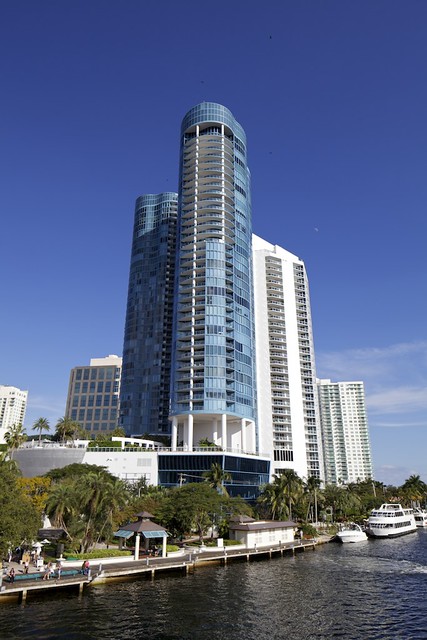 Riverhouse (uncorrected)
 by
Tim Campbell1, on Flickr
And here's the same shot again, using a tilt-shift lens and this time I'm using the "shift" control to correct the leaning effect of the building. Note that I did not do this in post-processing... this is how the camera took the shot:
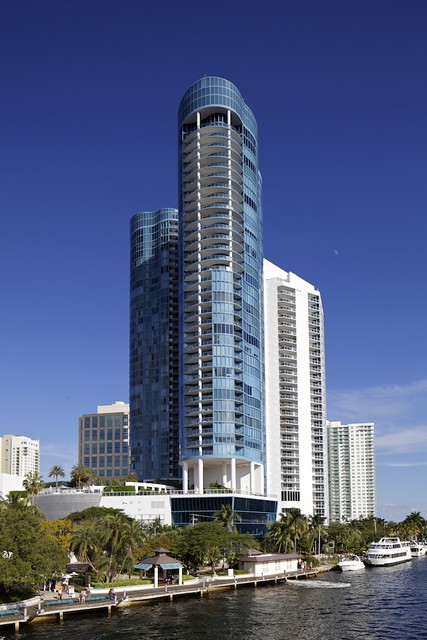 Riverhouse
 by
Tim Campbell1, on Flickr
Tilt-shift lenses are usually expensive. It turns out you can ALSO correct the perspective problem using software such as Photoshop or even Photoshop Elements (and in Photoshop there are a few ways to do this. The "Transform" tool can correct for perspective issues and usually under filters for "lens" distortions there's a tool to to correct for this as well.)
The thing to keep in mind if you plan to use software is that the transform is corrected by stretching part of the image wider OR pinching part of the image to become narrower. In other words you're going to use an area of the photo that really looks like a trapezoid and stretch or pinch it so that the trapezoid turns into a rectangle. Keep this in mind... because it turns out sometimes you realize you need to pinch an area narrow and you run out of image. Leave excess space around your subject when you frame up the photo so that you have room to work on it.
Take a few sample images on tall buildings for the sole purpose of learning to use the transform or lens distortion tools. It's not hard to use and there are numerous video tutorials on the web that demonstrate how to do this.










![[No title]](/data/xfmg/thumbnail/32/32630-d78de94d84be2acf57d5e0923482b4da.jpg?1734162115)