Welcome to the forum Rach

I like the flower one with the crop
personally I would have cropped it into a 1:1 ratio, but that's just down to taste.
On the two pictures with the children, the EXIF data says you were shooting at ISO 1000 and 640, and that you used the "Action" setting on your camera. For portraits like this, that's not going to be the best auto setting - or better still, experiment with the A, S and M settings on your camera to achieve the effect you want. I personally would have brought down the shutter speed (1/200 is plenty fast enough for hand-holding on the lens you were using) in order to reduce the ISO, which will give the image quality a little boost.
I like the composition and the way you used the depth of field with the older child. Reflections from glasses are always tricky to handle but if possible watch for ways to reduce them (by the glasses/head being at a slightly different angle, or removing them for the photo). The paler flesh of the hand/forearm and brightly coloured bands distract from the face which should be key feature of the portrait. (The eye tends to be drawn to the area of biggest contrast on the photo). A slightly different composition, or using a reflector to boost the light to the face, could have improved this. Also, her hand appears rather too large because you were quite close in to her ... zooming in more and increasing your distance from her would have reduced this effect.
I like the photo of the younger child. The background isn't too distracting but moving around a little to find a less complicated background than that trellis might have been worth trying.
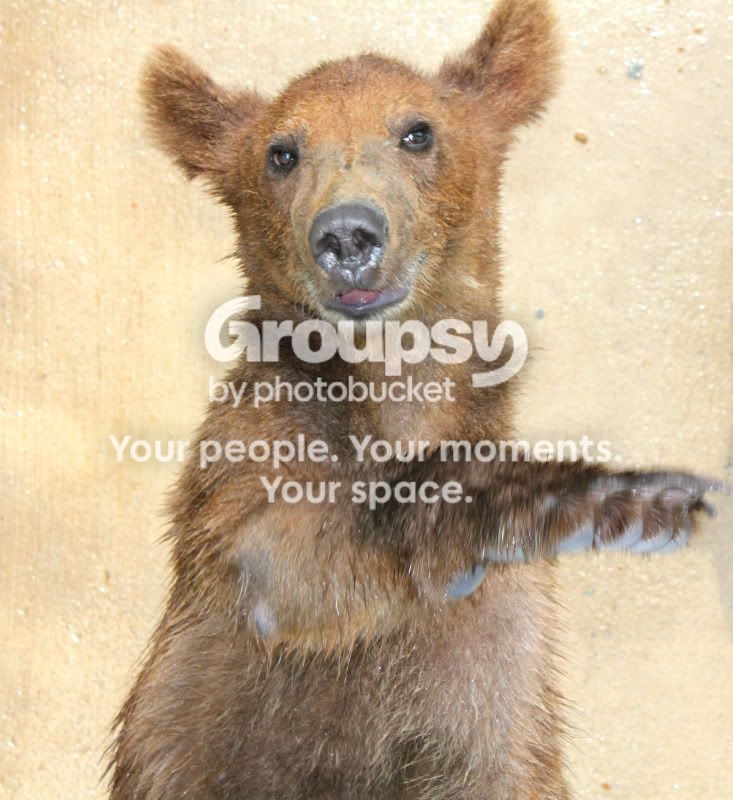
The bear (?) is a nice photo, given that with subjects of that kind it's often hard to get the opportunity for the right photo. You've captured a sense of personality and movement in there, which is probably the hardest part of animal photography. The brown bear against light-brown background isn't ideal - and while it may well have been out of your control, increasing the contrast in brightness between the background and foreground, then converting to monochrome, MIGHT improve the separation of the bear from the background. You took this in Auto mode and the flash fired ... while the f/14 aperture may have been necessary for the flash, it's also given you a huge depth of field and showed up every bump in the background ... using a much bigger aperture (smaller number) would have allowed you to shoot in natural light and blur out the background a little ... although at 55mm I think the maximum aperture for your lens is f/5.6 which may not have been good enough.
By the way, do you only have the kit lens? For portrait shots, if you're on a budget it's well worth investing in Canon's 50mm f/1.8 lens ...










![[No title]](/data/xfmg/thumbnail/31/31703-20d81c98f43a64450882572a96c8f266.jpg?1734160374)
![[No title]](/data/xfmg/thumbnail/31/31706-3e429b21053f11072ed2e5b37c019073.jpg?1734160380)
![[No title]](/data/xfmg/thumbnail/31/31978-02cde49248ebdf1b82fba5c899e08378.jpg?1734160755)
![[No title]](/data/xfmg/thumbnail/31/31979-ea92aca54ae865842d998c9cec534991.jpg?1734160756)
![[No title]](/data/xfmg/thumbnail/36/36679-b3112c1f4841912cbaa9edc11e6852fe.jpg?1734169174)
![[No title]](/data/xfmg/thumbnail/42/42063-eb634e07d8ad641481cc20fb5cf4d6de.jpg?1734176464)