What's new

Picture controls

Patriot

No longer a newbie, moving up!
Joined
May 10, 2012
Messages
810
Reaction score
117
Location
Spokane, Washington
Can others edit my Photos
Photos OK to edit
Does it matter what picture controls you shot in? I'm starting to think that it doesn't because the adjustments to Saturation, Contrast, Sharpness, etc means nothing once you load it into a image editing software. I like to shot in the Vivid settings, but by shooting in RAW what I see on the LCD is not what I see when editing. Are those settings just for JPEG shooters since they will be imprinted in the file?

If RAW captures what you see, is it better to shoot in neutral since that's as close to the actual scene anyways? So far I don't know if it's possible to keep those camera setting in the RAW file to edit from.

What picture control setting do you shoot in?

-Hunt
 
Last edited:
Most settings such as white balance, contrast, etc- should control the JPEG conversion and not the raw file.

"However", I would try some tests with some of the settings to verify if any settings have an affect on the "raw" image. With CMOS sensors, more processing takes place on the Chip, usually noise-reduction algorithms done as the image is acquired will be included in the raw file. What comes off the chip is what is stored. So- it's a digital camera, try a couple of scenes with the more obscure settings changed.
 
I've never owned a DSLR that applied any of that to the RAW in a permenant way. A canon will record which you used, but that's just to tell DPP which to use, and you can change it later. If you use anything other than DPP, it'll just be ignored.

I can't remember now if CaptureNX does the same thing....

They're useful for two things;

1) shooting jpegs, obviously, but also:

2) seeing how it might look with some editing, eg shooting it in B&W mode can help you see what it'll look like once you convert it from RAW to B&W etc
 
Are there any programs out there that measure what increments were increased? For example: +2 contrast, +3 saturation, etc. That would be the only way to measure what is kept in the raw file. LR4 always shows what the camera took and then use the adobe standards to change it to a neutral color.


I'm going to try and shoot in neutral to see how I like it not that it matters.
 
There is another way to work out is these things are affecting your RAWs - put your camera on a tripod and shoot a bunch of identical frames with different settings and see if the RAWs look different. Unless I'm misunderstanding what you're getting at -- appologies if so
 
If you shoot in RAW then the data in the file is the sensor data, biased only by the AA filter. Features such as picture controls, noise reduction, etc. are not applied to the data HOWEVER they may be enabled in the RAW file and then processed by the editing software that reads the RAW file. For example Capture NX2 may take note of the fact that a "Vivid" setting is turned on and apply that to what is seen on the screen when the RAW file is opened. If so it is simply a matter of changing the setting from "Vivid" to "Normal" to get back to the default value.

The raw sensor data within the file is not changed by the camera based on the settings, only the way in which it is displayed on the screen by the editing software IF the software supports it.
 
Are there any programs out there that measure what increments were increased? For example: +2 contrast, +3 saturation, etc.
That information is recorded in the image EXIF data.

If RAW captures what you see,
Raw doesn't come anywhere close to capturing what you see. Substantial editing has to be applied to the Raw file to make it look close to normal.
Each Raw converter application produces a somewhat different looking image because each application uses somewhat different editing algorithms.

Image use licensing - Creative Commons ? ShareAlike 1.0 Generic ? CC SA 1.0
File:Shades framed aa.jpg - Wikipedia, the free encyclopedia
File:Shades framed bayer.png - Wikipedia, the free encyclopedia

This image
Shades_framed_aa.jpg


As a Raw file, looks close to this before it is altered by demosaicing, color interpolation, tone mapping, application of a gamma curve, sharpening, etc in the Raw converter before it is displayed to you as a photograph:

Shades_framed_bayer.jpg
 
Last edited:
Some noise-reduction algorithms are implemented on the CMOS sensor itself, and the results end up in the Raw file. Usually these are low-level, such as reducing pattern noise. I'm not sure if some cameras allow setting parameters that would affect the raw file. The Leica applies noise-reduction to raw images for long-shutter speeds to reduce fixed pattern noise. CMOS based cameras do the same type of operation.

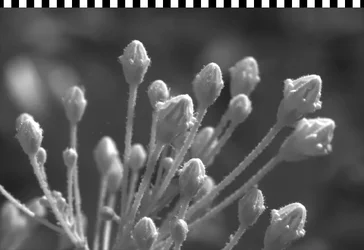
A RAW file including the calibration rows. They kind of look like sprocket Holes.
 

Attachments

  • $buds1BMP.webp
    $buds1BMP.webp
    71.1 KB · Views: 81
Last edited:

Create an account or login to comment

You must be a member in order to leave a comment

Create account

Create an account on our community. It's easy!

Log in

Already have an account? Log in here.

New Topics

Back
Top Bottom