What's new

Please Help!

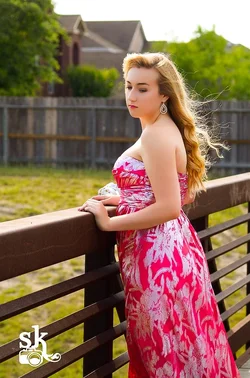
I think it needs some fill light on the left side of her face.
 
Not sure about the question - are you asking us what to do if the situation presented itself again, or what to do with the image that you have?
 
not sure if this is what you wanted, but here's a quick edit
$tpf help portrait 2.webp
 
i brought it into lightroom first, and tried playing with the shadows slider, but that didn't work very well...

so i went in with the brush tool, and brushed over every part of her that was in the shadows, with smart mask enables, and brought up the exposure on that part, then i did soe misc. adjustments until i thought it looked good

then i brought it into photoshop, and duplicated the image layer, and added a layer mask on the skin, then i added a slight surface blur adjustment on that layer, and then a uniform grayscale noise to smooth the skin and add texture


now im practicing some of the things im not as good with...
 
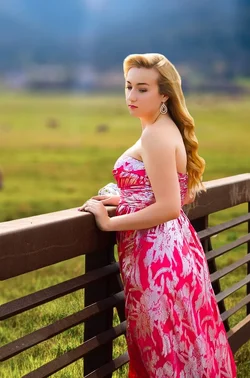
first thing i tried was smoothing the hair, which meant i needed to cut all of the excess blowing hair

then i tried replacing the background, and blurring it with the new field blur tool in CS6

$tpf help portrait 2 bg.webp
 
ShutterbugSarah said:
Woah. I need to get ahold of lightroom lol

Adobe camera raw which comes with photoshop has basically all the same editing capabilities as Lightroom.
 
I had a quick go at it...

girl1.jpg


girl2.jpg
 

Create an account or login to comment

You must be a member in order to leave a comment

Create account

Create an account on our community. It's easy!

Log in

Already have an account? Log in here.

Back
Top Bottom