What's new

Portrait Help

I used 2 speedlights with umbrellas.
Can you give us a diagram and/or a detailed description? The reason I ask is because the purpose of a protrait is to show the likeness of your subject. This translates to the face (mask) is paramount and be the first thing someone look at when viewing your image. Also, in traditional protraiture, there are three head positions..... full face (straight on with both ears showing equally), 2/3s (one ear showing and the nose not breaking the edge of the far cheek) and profile (exactly 1/2 of the mask). You have none of these going on yet. Okay, back to the point I wanted to make..... with the massive amount of white in your uniform, you will need to do some flagging, feathering and repositioning of your lights to create some depth.

On a personal note, I think a full body shot with the subject in an offensive/defensive stance (depends on your style) would be better suited for an instructor and his website. No offense, but a lame, just standing there pose would not evoke much of an emotional response for wannabe students. Just my 2¢.


EDIT:
A head shot on the website would be fine, but that's a different kettle of fish.
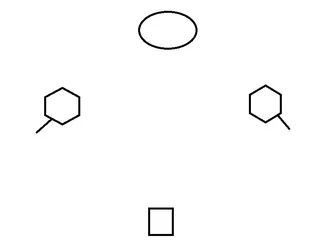
$Untitled.webp
Circle - Me
Hexagon - Umbrellla/speedlight
square - camera.

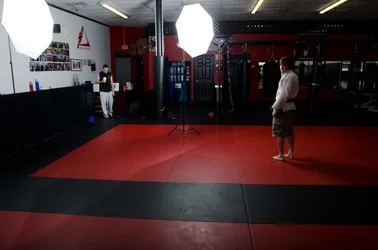
The layout of my apartment is very awkward and very small, the gym has 20 ft ceilings and plenty of space so I have much more room to position my gear and models.


There's no offensive or defensive stance in BJJ. In fact, there's no stance at all. It's a very laid back style, with a few exceptions.
As for the white uniform, I'll just have my instructors where a blue or black gi.
 
As for the white uniform, I'll just have my instructors where a blue or black gi.
That may very well work in your favor.


View attachment 9015
Circle - Me
Hexagon - Umbrellla/speedlight
square - camera.

Looking at your diagram I would think you would be getting a flatter light pattern. You must have dialed the camera right flash down a stop or two from the left because there is a nice lighting ratio from Main to Fill. You might want to try having the Fill light just off lens axis (up to 18") on the same side as the Main.

If you haven't seen this tool, you may want to give it a try. http://www.lightingdiagrams.com/
I keep a sketch pad handy while I'm shooting and note my setups and if I get happy, happy, joy, joy results I'll put a copy of the on-line diagram in the event folder and I also throw a copy in a Lighting Diagrams folder. My memory isn't always reliable, so having something to refer back to is quite handy. So as an example.....
The shot

The Diagram
 
Looking at your diagram I would think you would be getting a flatter light pattern. You must have dialed the camera right flash down a stop or two from the left because there is a nice lighting ratio from Main to Fill. You might want to try having the Fill light just off lens axis (up to 18") on the same side as the Main.

Bingo. Nail on the head here. That's exactly what I did. It's a little more than a stop. My apartment is extremely limiting on what I can do as far as lightstand placement. It's narrow with low ceilings. My options will be limited to gear in the school, not space so that's a good thing.

If you haven't seen this tool, you may want to give it a try. http://www.lightingdiagrams.com/
I keep a sketch pad handy while I'm shooting and note my setups and if I get happy, happy, joy, joy results I'll put a copy of the on-line diagram in the event folder and I also throw a copy in a Lighting Diagrams folder. My memory isn't always reliable, so having something to refer back to is quite handy. So as an example.....
The shot

The Diagram

First of all, that is a beautiful potrait. Second of all, that website is awesome. What an invaluable resource. 1000 thanks to you. Here's my set up.
Creator / Home - Online Lighting Diagram Creator - Tools for photographers
 
I'm about 4-5 ft off my wall, the umbrellas are about 4 ft in foward and 5 ft to the side and the camera is about 12 ft away.

85mm
f/4.2
1/250
ISO160
 
.... that website is awesome. What an invaluable resource. 1000 thanks to you. Here's my set up.....
Glad you found it useful.

I usually export the file to PNG (this leaves a clean canvas of your diagram without the extraneous), open it in CS5, add text and stuff, then save it to a JPEG.
 
.... that website is awesome. What an invaluable resource. 1000 thanks to you. Here's my set up.....
Glad you found it useful.

I usually export the file to PNG (this leaves a clean canvas of your diagram without the extraneous), open it in CS5, add text and stuff, then save it to a JPEG.

I'm going to show this to my professor. It's awesome!
 
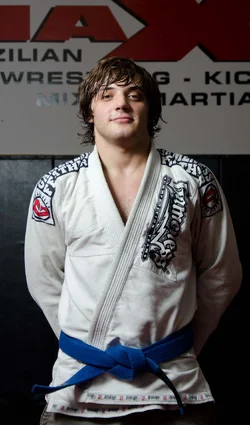
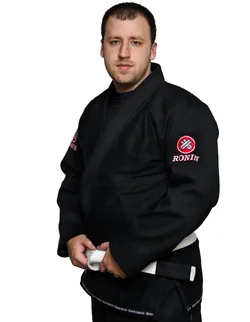
Oh, I'd like to get into posing if that's ok. Now, Brazilian Jiu Jitsu as a martial art is very unorthodox. With a few exceptions, it is a very laid back style and in terms of stances, there are none. All of the fighting takes place on the ground. The most common pose for a BJJ instructor is the hands on the belt pose below.
$blackroninmodelsqr.webp

I don't know if that would be more appropriate?
 
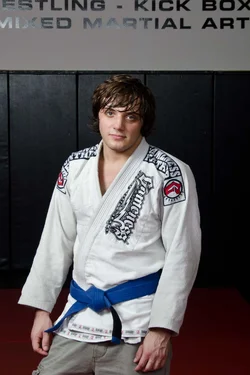
So how do I go about an on location shot, that will have a very busy background? I took some test shots today and the least busy I could come up with is this.

$gym19.webp $gym22.webp
There is literally stuff every, and where there isn't stuff, there is highly reflective wall pads. First shot, flash didn't fire looks like.
$gym23.webp
 
If looks like you are at the limit of your lens in terms of f stop, so you'll need to resort to 'managing' the backgrounds in PPing.

crop to minimize distractions
Darken the background selectively
Perhaps even relighten around him to create the effect of a small light on the background.
(this would be a good time to consider the ~$150 for a 50 1.8 to use - oops I see you have one. Use it at f4 or wider to minimize backgrounds)


gym22lllllllllll.jpg
 
If looks like you are at the limit of your lens in terms of f stop, so you'll need to resort to 'managing' the backgrounds in PPing.

crop to minimize distractions
Darken the background selectively
Perhaps even relighten around him to create the effect of a small light on the background.
(this would be a good time to consider the ~$150 for a 50 1.8 to use - oops I see you have one. Use it at f4 or wider to minimize backgrounds)


gym22lllllllllll.jpg

I used the 18-105 for testing purposes, and I lucked out in terms of the focal length. I really didn't know I was @ 50mm until I got home which is what I'll use next go around.
I was going to see if I could get away with 2.8, but do you think that might be too wide?
 
I was going to see if I could get away with 2.8, but do you think that might be too wide?

a 50 mm on a D700 is a very nice portrait length.
Assuming that what you mean by 'wide' is too much of a DOF, shooting at 2.8 or 3.2 will give you less than a meter of dof at the same distance from camera to subject.
You can download a DOF calculator at dofmaster.com to refer to while you actually work.
That narrower point of view may make you change your position a bit but the increased focal length and its shallower DOF will through the background nicely OOF.

.Lew
 

Create an account or login to comment

You must be a member in order to leave a comment

Create account

Create an account on our community. It's easy!

Log in

Already have an account? Log in here.

Back
Top Bottom