What's new

Printing Trouble

Welsh

TPF Noob!
Joined
Jun 20, 2011
Messages
3
Reaction score
0
Location
South Wales, UK
Can others edit my Photos
Photos OK to edit
Hi. I'm relatively new to the world of photography; I bought my first camera about 3 weeks ago and haven't been able to put it down since. I recently visited a local mountain to practice my "photography skills" or lack thereof and took a few photos of sunsets, scenery; the usual and sent them off to be printed; they came back this morning and I was quite disappointed with them. I know photos look different on screen, than they do on paper but these were quite blurred and dark and not as sharp as they once appeared; the sizes of the photos were the standard 4x6". I was wondering whether anyone could explain to me the re-sizing for print method, I thought I had it nailed but apparently not haha

Here's the link to the photos, so you can have an idea :)

Flickr: Welsh89's Photostream

Thanks :)
 
what is the pixel x pixel size you sent them?
 
first you need to make sure you use the right colorspace for the printer. When in doubt, use SRGB when you create the jpeg. Second, some labs different than other when it comes to print quality. Some labs use nicer printer than the other. Certain labs sharpen the images they receive, some dont. I use mpix and they tell me NOT to sharpen any photos I uploaded.
 
the sizes of the photos were the standard 4x6". I was wondering whether anyone could explain to me the re-sizing for print method, I thought I had it nailed but apparently not haha


Thanks :)
Check out these tutorials: http://www.cambridgeincolour.com/color-management-printing.htm

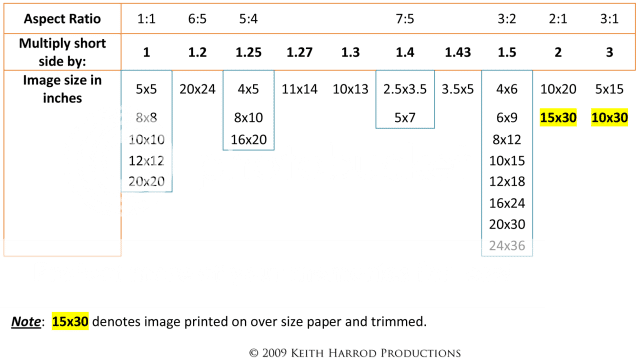
The aspect ratio of your image sensor is 3:2 which delivers images that have the long side 1.5 times the length of the short side, like a 4x6 (6x9, 8x12, 10x15, 12x18, 16x24, 20x30, 24x36).

An 8x10 has a 5:4 aspect ratio and the popular 5x7 has a 7:5 aspect ratio.

In other words each rectangular print 4x6, 8x10, 5x7 has a slightly different shape. If you want to make a 5:4, or 7:5 shaped print from a 3:2 image, you can't just resize the image, you have to crop (and discard) some portion of the 3:2 image away.

The next consideration for printing is how many pixels-per-inch (PPI) you assign to the image file. The PPI determines the print size.

A photo with pixel dimensions of 3263 px by 2331 px printed at 100 PPI will be a 32.6310.88 inches long. inch by 3.31 inch print. (3263 px divided by 100 PPI = 32.63 inches)

The same pixel dimensions printed at 200 PPI with constrain the print size to half the above size with the long side only 16.32 inches long, and conversely at 300 PPI the long side would be 10.88 inches (3263 px divided by 300 PPI = 18.876 inches).

As mentioned, good print labs will specify what file type(s) and color space they allow. Check out this link: Mpix.com - Help

AspectRatioChartv2.png
 
Last edited:
Is it just me or do the photos look soft to begin with?
 
Is it just me or do the photos look soft to begin with?

Not sure because i cant look at larger size. But the OP was only printing 4x6 so it should look as good as the screen.
 
The thumbnails look sharp, but opened they look soft to me. They seem to be saved at 4x6 (eyeballing) on flickr so that would definitely show.
 
Hi. Thanks for the replies :) I agree, some seem a bit soft but the sunsets imo look slightly over-sharpened but I'm new to this, so don't really have much of a clue lol I've been using gimp to edit and what not but for the life of me I can't seem to get my head around the ppi and width/height thing so it's more than likely my fault the photos came out shocking, as a result of that. Thanks for all your help :)
 

Create an account or login to comment

You must be a member in order to leave a comment

Create account

Create an account on our community. It's easy!

Log in

Already have an account? Log in here.

New Topics

Back
Top Bottom