What's new

Proper white balance techniques?

A little thing that is about the size of a small cheeseburger, pops on and off the end of your lens is cumbersome? With an expo disc it takes me under a minute to white balance. Also, you just point your camera at the light source that will be hitting your subject? Not sure how that's particularly difficult?

With a grey card you either have to do stuff in post, after having your subject hold the card, or you have to make the card take up the full frame, which I've always found to lead to slight inaccuracies, since you're not shooting from the same angle you normally would.

I can understand not wanting to pay the money for an expodisc, but saying its 'cumbersome' is just unfathomable to me. Pros love expodiscs precisely because of how fast and non-cumbersome they are.

I used grey cards forever, until I started using an expo disc every day for work. After using an expodisc consistently on a day to day basis, it was hard to go back to grey cards, so I finally just bit the bullet and paid the money for my own personal one.

If the Expodisc works for you that's fine...I'm not saying that it doesn't work. It's just that in my personal opinion I think it's more cumbersome to use than a card.

I look at the usability issue from the perspective of walking around, say, a large museum, where every room has different lighting. I want to set a custom white balance quickly without having to unzip a pocket on my bag (or sometimes I don't even have my bag.) I guess I could carry an Expodisc in a front pocket...which it would have to share with a phone or keys. But carrying a card in the back pocket is easier than in a bag, and more comfortable than a front pocket.

I use a gray card that's 4"x6" and only 3mm thick...it fits in my back pocket and I don't even feel it back there. As I have a Nikon, it literally takes me less than 10 seconds to set a custom white balance. I hold the WB button for two seconds to initiate the WB procedure, whip out the card from my back pocket, face it towards the light (or if there are two light sources, held to catch both,) and then frame the card and press the shutter. I don't even look through the camera...I just put the lens directly on the card, careful not to block the light. Then the card goes back in my pocket and I'm ready to shoot. It's fast, easy, indestructible, and works every time. The card was only 15 bucks and can be "refreshed" with sandpaper should it get dirty.

I'm sure the Expodisc works well...I simply don't see what advantage I get by spending 5 times as much, and always having to point in some other direction into the light source to set my white balance. And what do you do with two light sources? If you don't point the Expodisc directly at the source, the color from the area that you are pointing at may influence the white balance setting. I don't have that problem with a card. It's for these reasons that I never recommend the Expodisc. But like I said...it's just a personal evaluation...one person's opinion.

Hmm, I've just never found this method of WB'ing to be particularly accurate for me, often not even as accurate as just using auto WB. But maybe you're just better at it than me. I cant think of a single time my expo disc has ever been noticeably off. just my opinion.
 
Hmm, I've just never found this method of WB'ing to be particularly accurate for me, often not even as accurate as just using auto WB. But maybe you're just better at it than me. I cant think of a single time my expo disc has ever been noticeably off. just my opinion.

Good results from a card is difficult if the card doesn't have a good quality matte surface. I have a card called the Digital Grey Kard (DGK) by DGK Color Tools (as oppose to the Digital Gray Card [DGC] by RMI.) The DGK surface is about as neutral as the DGC surface. But the DGK is far more reflective, and specular reflections can throw off the reading. The DGC, on the other hand, can provide the same reflectance over a good range of angles with no specular reflections. It's a much better card.

In this respect there's an advantage to the Expodisc in that you're getting a product of known quality. If you just go out and get any ol' gray card, your results might not be as good as mine. However I do only recommend the RMI DGC, and a person looking for advice could just as easily buy an Expodisc knock-off from ebay, thinking it will work just as well (it won't) as someone buying a cheap gray card, also thinking it will work just as well.

I think the main point of my response is that quality does matter, and we should consider that in our recommendations and personal evaluations of products.
 
Ysarex said:
Welcome to TPF.

You haven't set your edit flag yet, I'm going to assume it's OK to show you a change, but let us know if you'd prefer "hands off" on your photos.

The photo of the young woman: it's tending flat and she has cyan highlights in her hair (see adjustment below). You're original post mentions struggling with WB. You got some good advice about setting a custom WB at the time the photo is taken. Given your statement that you'd prefer to avoid PP, then setting a custom WB is a necessary step -- auto WB does not work. The other option is to shoot raw and set the WB in post which you're saying you want to avoid. As this thread continued you also asked about exposure. Yes, Fred Parker is a waste of time. Considering the three photos you posted, I'd say your having some exposure problems due to high contrast ranges. Given the type of photos you're taking the only real efficient solution for that is flash. Flash also solves your WB problem. You need quality off camera flash hardware: it's either that or you will do the PP. Your camera has a feature you'll find under the Custom menu called HTP (highlight tone priority) which you might find helpful but it is a double edged sword.

Joe

Joe fantastic work on my photo really amazing I'd love to learn more from you. I see so much of what I'm trying to achieve in that edit you did I'll leave my work open to edit any time you want to throw your mix in a picture please do and if you want I'll send you links to the actual full image. I know a lot of people that would kill for your talent in post production I myself am even willing to pay for a lesson two thanks for the inspiration
 
MLeeK said:
That's all fine and well when you are shooting for personal reasons, but when you are selling to a client who is expecting perfect, then what is your take on it?

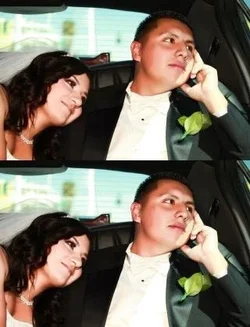
What do you think about these shots did it on spot no flash and corrected in DDR
There is a slight green blue on the first one.
The skin tones in the second two are too orange. Warm is good, but pure orange is harsh. You've toned it down on the faces somehow and that helps A LOT. The second of those two is better than the first.
They're passable, but if you are shooting a high end wedding it's not so great. I wouldn't put it out that orange. If you are finding oranges to be that heavy when you KNOW your white balance elsewhere is good switch to the HSL sliders in LR/ACR. You can have a major affect on the oranges by sliding the luminance slider for orange to the +. You then retain the warm tone, but the skin doesn't look orange.
 
I should probably adjust the exposure a bit on her face, but this was a 2 second edit just lifting the luminance and reducing the saturation of the oranges. Still has the warm look, but not heavy on the orange!
$Weddingcomp.webp
 
Ysarex said:
Welcome to TPF.

You haven't set your edit flag yet, I'm going to assume it's OK to show you a change, but let us know if you'd prefer "hands off" on your photos.

The photo of the young woman: it's tending flat and she has cyan highlights in her hair (see adjustment below). You're original post mentions struggling with WB. You got some good advice about setting a custom WB at the time the photo is taken. Given your statement that you'd prefer to avoid PP, then setting a custom WB is a necessary step -- auto WB does not work. The other option is to shoot raw and set the WB in post which you're saying you want to avoid. As this thread continued you also asked about exposure. Yes, Fred Parker is a waste of time. Considering the three photos you posted, I'd say your having some exposure problems due to high contrast ranges. Given the type of photos you're taking the only real efficient solution for that is flash. Flash also solves your WB problem. You need quality off camera flash hardware: it's either that or you will do the PP. Your camera has a feature you'll find under the Custom menu called HTP (highlight tone priority) which you might find helpful but it is a double edged sword.

Joe

Joe fantastic work on my photo really amazing I'd love to learn more from you. I see so much of what I'm trying to achieve in that edit you did I'll leave my work open to edit any time you want to throw your mix in a picture please do and if you want I'll send you links to the actual full image. I know a lot of people that would kill for your talent in post production I myself am even willing to pay for a lesson two thanks for the inspiration

Thanks for the flattery I'm happy to help. People do pay me; I'm a retired college prof. who still teaches photo and Photoshop part-time -- I've been at it long enough I should know a few things. You'll find some very capable people here at TPF who will give you useful info (no charge!). You're meeting some of them in this thread.

In your photo I removed the cyan/blue color shift -- you really see it in the highlights in her hair. Then I lightened the photo some and raised the contrast a little. I used a mask to suppress that effect on her face.

Joe
 
I wouldn't shy away from post production. These days it is really easy and cool. You can improve your photos 100% and no nasty chemicals! The clouds washed out? One slider, there're back. Shoot into the sun and foreground blacked, slide another slider it's back. Face underexposed move another slider. Sunset overexposed.... Well you get the idea. I spend a few seconds with each photo. You can apply Sam to all in a series... Way cool. JD
 

Create an account or login to comment

You must be a member in order to leave a comment

Create account

Create an account on our community. It's easy!

Log in

Already have an account? Log in here.

New Topics

Back
Top Bottom