What's new

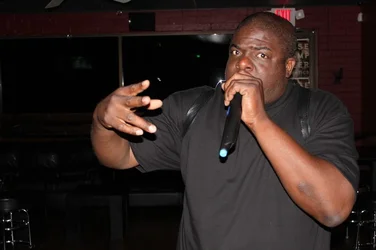
Rapper performing

QobraKhan

TPF Noob!
Joined
Dec 11, 2012
Messages
54
Reaction score
3
This is a picture I took with my Canon T3i that I just got this month...this is my first DSLR camera..and I am in the learning phase, any constructive criticism is appreciated. Btw I edited this pic some in Perfect PhotoSuite 7. Although I was happy with the raw picture how it came out originally.

Subject: Dome Craccer Loc
 

Attachments

  • $image-2340438056.webp
    $image-2340438056.webp
    67.6 KB · Views: 143
Next time set it to manual and set the shutter for a longer exposure and the background wont be so dark. Not to long though or stuff will start streaking, unless you want that.
 
Kinda hard to drag the shutter on a live performance, you're just asking for motion blur. Best he coulda done was not use flash and open aperture to get better exposure on background. Although, I'm guessing he didn't care about background, as it is a new camera and mostly just point and shot, and just wanted to catch the main dude rapping.
 
DiskoJoe said:
Next time set it to manual and set the shutter for a longer exposure and the background wont be so dark. Not to long though or stuff will start streaking, unless you want that.

+1
 
Kinda hard to drag the shutter on a live performance, you're just asking for motion blur. Best he coulda done was not use flash and open aperture to get better exposure on background. Although, I'm guessing he didn't care about background, as it is a new camera and mostly just point and shot, and just wanted to catch the main dude rapping.

??????

Thats like the thing now.
 
DiskoJoe said:
Next time set it to manual and set the shutter for a longer exposure and the background wont be so dark. Not to long though or stuff will start streaking, unless you want that.

+1

See, you get it.
 
Even better: drag the shutter, but set the flash to rear-curtain sync (This will make it fire right before the second curtain closes, aka, right at the end of the exposure).
You'll get more background, you'll get motion blur, but you'll also get a tack sharp subject..
If the subject is not sharp, check the onboard flash power and make sure it's at the fastest speed.
 
DiskoJoe said:
Next time set it to manual and set the shutter for a longer exposure and the background wont be so dark. Not to long though or stuff will start streaking, unless you want that.

I ONLY shoot in manual...I took lot of shots that night, and the best results came from using flash, I was not concerned with the background, only the subject, due to the fact that it was at a sports bar, and the background really wasn't interesting, (as you can see Santa clause in the upper left on a tv screen) ..my main concern was not to have blur, and all the acts that night, as most hip hop artists do...were bouncing around all over the place, I had to use the viewfinder in order to follow along, it was too much movement to rely on the LCD screen...

Thank you very much for the advice though I will try it that way next time to see if I get different results,

Note: through out the night some shots the background was bright and vivid, others only or mainly the subject was lit, I got mixed results depending on what angle, and what light was a factor (there was laser lights and a disco type ball etc.)

I will post more from that night in here soon, later today.

Thanks again. :)
 
Ps also keep in mind that I edited this pic in perfect Photosuite 7, and I believe I added darkness to the background through effect...if I am not mistaken...

My goal was for the subject to stand out from the background, and to add some griminess for that underground hip hop feel.
 
Pallycow said:
Kinda hard to drag the shutter on a live performance, you're just asking for motion blur. Best he coulda done was not use flash and open aperture to get better exposure on background. Although, I'm guessing he didn't care about background, as it is a new camera and mostly just point and shot, and just wanted to catch the main dude rapping.

Yes, I agree, motion blur was a big issue, and I took many fuzzy pictures while adjusting settings, to finally get the result I got here, and you are correct, the BG was not of my concern...in fact the young fellow with the lion on his shirt, is not also performing, he is part of the audience ..so he was not needed to be focused on. But you are dead on.

Thanks.
 
ManualMode said:
Even better: drag the shutter, but set the flash to rear-curtain sync (This will make it fire right before the second curtain closes, aka, right at the end of the exposure).
You'll get more background, you'll get motion blur, but you'll also get a tack sharp subject..
If the subject is not sharp, check the onboard flash power and make sure it's at the fastest speed.

This sounds interesting, although complex, as I am new at this, when you say rear curtain sync, (I just googled it by the way) and I understand the concept, how would I set that up?

Alright I went through my settings and see in flash settings under normal flash firing if I push info and click on shutter sync it says first and second curtain, is this what you are talking about? And could you explain maybe in layman s terms, what this is good for and what effect it is doing, this way I can understand better, of the why factor, for me, understanding why something is done and what it actually is doing, is a better way for ME to learn vs just following directions, it would be much appreciated..thank you ahead of time.

 
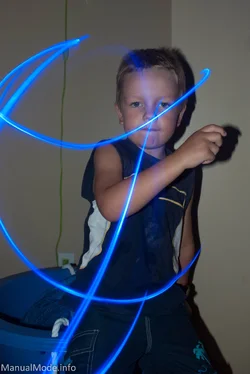
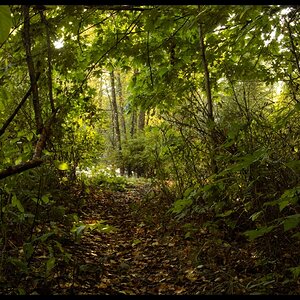
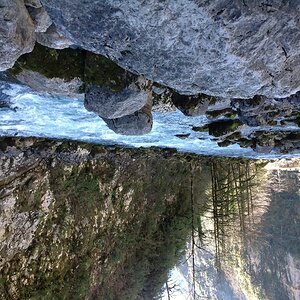
Here are a few pictures from the same night, unedited. I'm posting these, so y'all can see the difference in background etc.

Any CC welcome, and thanks to you all thus far.

Much appreciated and respect to yo all.
 

Attachments

  • $image-470897624.webp
    $image-470897624.webp
    71.6 KB · Views: 80
  • $image-2816823340.webp
    $image-2816823340.webp
    57.6 KB · Views: 94
  • $image-450440953.webp
    $image-450440953.webp
    56.1 KB · Views: 91
  • $image-1802287705.webp
    $image-1802287705.webp
    38.9 KB · Views: 89
ManualMode said:
Even better: drag the shutter, but set the flash to rear-curtain sync (This will make it fire right before the second curtain closes, aka, right at the end of the exposure).
You'll get more background, you'll get motion blur, but you'll also get a tack sharp subject..
If the subject is not sharp, check the onboard flash power and make sure it's at the fastest speed.

This sounds interesting, although complex, as I am new at this, when you say rear curtain sync, (I just googled it by the way) and I understand the concept, how would I set that up?

Alright I went through my settings and see in flash settings under normal flash firing if I push info and click on shutter sync it says first and second curtain, is this what you are talking about? And could you explain maybe in layman s terms, what this is good for and what effect it is doing, this way I can understand better, of the why factor, for me, understanding why something is done and what it actually is doing, is a better way for ME to learn vs just following directions, it would be much appreciated..thank you ahead of time.

Usually, you just hold your flash button and spin the dial until the indicator shows something like "rear".
Essentially what it does in is: instead of firing the flash at the beginning of a 2 second exposure and then letting the ambient light spill all over the image for the remainder of it..it opens the shutter for almost the 2 full seconds and at a split second before closing, it fires the flash. What this does is lets the ambient light spill all over the exposure *first* and then then in the final split second freezes a moving subject with a split second of flash.

It will probably make more sense once you try it for yourself.. have someone in a dark room spin something light around in their hands and shoot some pictures with rear-curtain snc
 

Create an account or login to comment

You must be a member in order to leave a comment

Create account

Create an account on our community. It's easy!

Log in

Already have an account? Log in here.

Back
Top Bottom