What's new

RAW in Lightroom 3

Diddy2theJJ

TPF Noob!
Joined
Oct 28, 2008
Messages
288
Reaction score
13
Location
North Dakota
Can others edit my Photos
Photos NOT OK to edit
I'm starting to shoot more and more RAW format now and I am doing my first edit in LR3 to RAW files. I created some presets for editing jpgs and they don't seem to work the same on mr raw files. I'm noticing that the temperature slider is different and maybe that's part of the reason why they don't look the same. I generally will warm the images up just a little bit in post when I'm importing my files into LR but the settings are really different. I'm just curious as to why LR handles them so differently.

Thanks,

- Diddy
 
I'm assuming it's because one is a unedited digital negative (RAW) and the other is a compressed in camera processed file. photoshop does the same thing. Not too sure of all the technical stuff but it is much easier IMO to fix WB and such with a RAW file.
 
That would be my guess as well.

You can't really adjust the white balance setting for a JPEG image. You can change/tweak the colors, but it's not the same as adjusting the WB on a RAW file.
 
OK cool, I will just have to recreate my settings for RAW then. It seems as though all the different areas, saturation, contrast etc have a different effect. I suppose because there's just so much more information in there.

Wow do they look nice in that format though! This is my first full frame sensor as well...so that combine with RAW is pretty nice :)
 
Hopefully, you are aware that Lightroom's Develope module uses the ProPhoto RGB color space, and it cannot be changed.
 
Keith, no I wasn't aware that it uses that. Is it better to edit RAW in Photoshop? I'm pretty new to the RAW scene so any advice is appreciated. I'll see what my friend Google has to say too :)
 
From Adobe" For rendered files such as TIFF, JPEG, and PSD files, Lightroom uses the image’s embedded color profile to display the image, histogram, and color values. If the image doesn’t have a profile, Lightroom assumes the sRGB profile, and the image may not look as expected on your monitor."

The develop Module only uses pro photo as the fixed Color space with RAW files
 
Keith, no I wasn't aware that it uses that. Is it better to edit RAW in Photoshop? I'm pretty new to the RAW scene so any advice is appreciated. I'll see what my friend Google has to say too :)
Really shouldn't make any difference at all. Both Lightroom and Photoshop use the same 'engine' to process RAW files....Adobe Camera Raw.

In terms of color space, a RAW files doesn't have a color space (a raw file technically isn't even an image (yet)). Lightroom uses a working space that is very similar to Prophoto RGB...you can't change that, nor would you want to. When you export from LR, you have to choose which color space you want to use going forward. If you're going to edit further in Photoshop, it would be best to use a large space (Prophoto or AdobeRGB) and only 'dumb it down' to sRGB before you upload to the web/lab etc.
 
The OP is probably worry more than they need too so I don't want to complicate matters worse

But ACR in PS is different than ACR in LR in THIS respect. You can choose the working space in the ACR panel in PS. and it does make a difference, You can test this by Turning on your highlight and shadow warnings and then choosing different color spaces and watch how different things show up depending on the gamut.

And as I showed from Adobe. Who are very tight lipped about LR's color managment going as far as saying it's none of your business how it works, just use it. Pro Photo RGB only applies to RAW files, All other files types, the develop module is Color space aware.

But getting back to my first line, Don't overthink it, you will be quite fine editing any image in Lightroom. But you may see a duifference between a RAW file in Pro and an Jpeg in sRGB because of the decreased Gamut
 
Keith, no I wasn't aware that it uses that. Is it better to edit RAW in Photoshop?
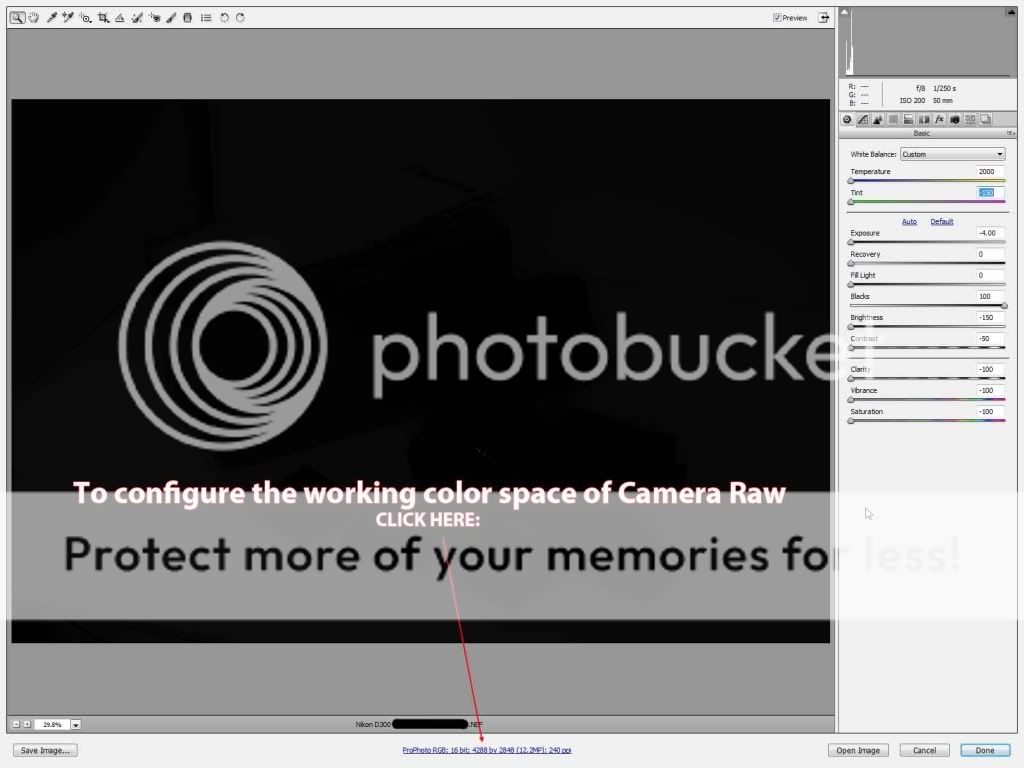
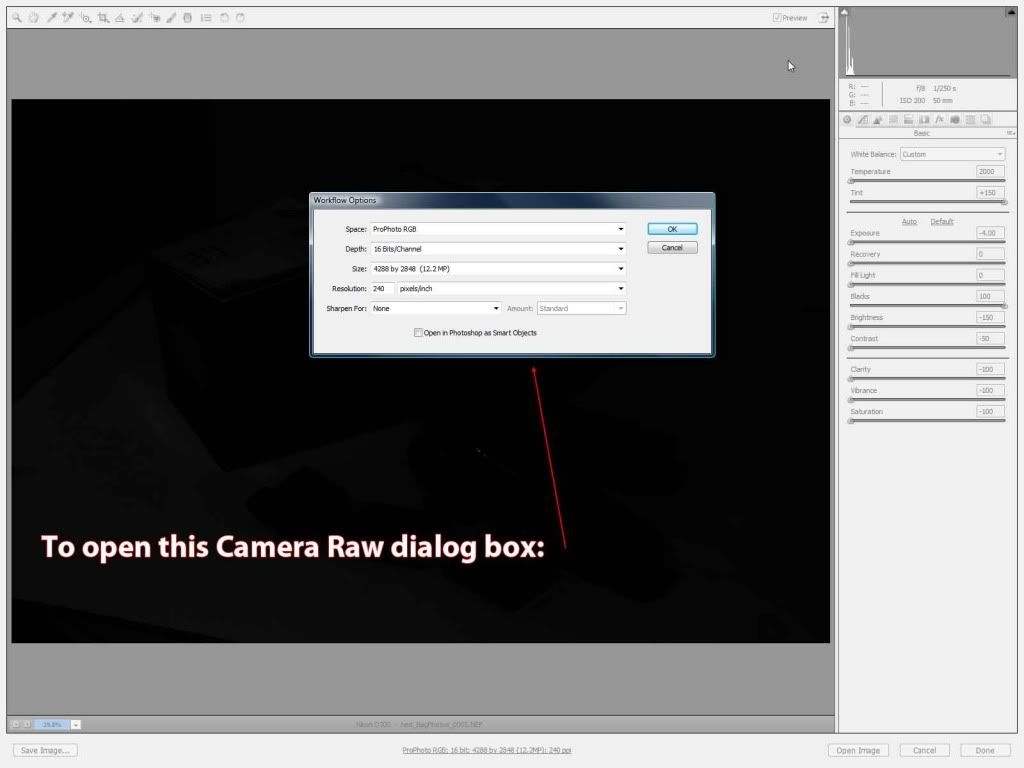
Like Mike says Lightroom's Develope module is the same edit rendering engine found in CS5's Camera Raw, but there are some differences. In Camera Raw you can change the working color space. In Lightroom you can't.

ClickHere.jpg


DIALOGbOX.jpg
 
Thanks a lot guys. Nice screen shots too Keith. I appreciate the input! And yes...I'm probably over thinking :)
 
I've read that it's less destructive to edit in Lightroom than in Photoshop using ACR. Unfortunately I can't link to where I read that as of yet.
 
GnipGnop said:
I've read that it's less destructive to edit in Lightroom than in Photoshop using ACR. Unfortunately I can't link to where I read that as of yet.

I doubt that. They are essentially the same thing. Lightroom develop module and camera raw have all the same tools and functionality. I don't see how Lightroom would be less destructive then ACR.

"I’ve also come to appreciate the flexibility of Lightroom’s non-destructive workflow. Lightroom never alters your original Raw or JPEG file. Instead, it writes a set of instructions about how you want the image to look, and applies those instructions only if and when you export the image out of Lightroom (This applies to Adobe Camera Raw also). This means that I can always go back and change any aspect of any image without having to start over."
http://www.michaelfrye.com/landscape-photography-blog/2011/03/03/lightroom-or-photoshop/
 
Actually, Lightroom 3 and Camera Raw CS5 do not have all the same tools and functionality. They both use ACR, but there are slight differences in tools and functions.

For instance - In Lightroom you can choose several different cropping guidelines beyong the ROT, like a Golden Spiral, diagonals, etc, that Camera Raw doesn't offer.

ACR (CameraRaw/Lightroom) is non-destructive (parametric) because it does not alter pixels. All the edits are in fact line commands added to the metadata that is in the .XMP file by the various conversion algorithms.

ACR can be set up to embed the .XMP file in the image metadata, or to make it a separate 'sidecar' file that has to be kept with the Raw file to preserve the edits.
 
KmH said:
Actually, Lightroom 3 and Camera Raw CS5 do not have all the same tools and functionality. They both use ACR, but there are slight differences in tools and functions.

For instance - In Lightroom you can choose several different cropping guidelines beyong the ROT, like a Golden Spiral, diagonals, etc, that Camera Raw doesn't offer.

ACR (CameraRaw/Lightroom) is non-destructive (parametric) because it does not alter pixels. All the edits are in fact line commands added to the metadata that is in the .XMP file by the various conversion algorithms.

ACR can be set up to embed the .XMP file in the image metadata, or to make it a separate 'sidecar' file that has to be kept with the Raw file to preserve the edits.

But they are still basically the same thing. Lightroom ha different grid/guidelines then ACR but they both crop the photo. ACR and Lightroom both have presets but you can see Lightrooms before you apply them. The adjustment brush in Lightroom has A and B brushes. The way the tools work are still all the same.
 

Create an account or login to comment

You must be a member in order to leave a comment

Create account

Create an account on our community. It's easy!

Log in

Already have an account? Log in here.

Back
Top Bottom