Ok should split this up into it's complete separate details because I know I am confusing everyone. Sorry >_<
Colour correction is done on 3 fronts. The most ideal of which is adjusting a monitors internal colour lookup table to get the appropriate shades. All those nice NEC, and HP screens on this forum we were talking about the last few days do this. However all is not lost for those who don't have a $1000+ screen.
The second one is a software lookup table in the video card driver. Now windows for the life of me I don't know why since Mac has done this since OS8, does NOT automatically adjust this lookup table, even though all the information for it is stored in the colour profile. When you startup most likely your colour correction software quickly loads the profile and updates the lookup table in the video card. What comes out of this is a correction curve for gradients. It makes sure that the grey stays the same shade of grey from black to white, and at the specific white balance you set.
Enter step 3. The ICC profile itself contains this gradient information as well as information about the chromaticity of the screen. This is something that can not be changed by playing with gamma curves, but is very important. A colour managed application will now load the ICC profile and identify where the red green and blue points lie. It will then transform the images it displays so the red green and blue gets sent as the right value to the screen.
So if you have a wide gamut screen with no colour management applications you can still adjust the tone and the white balance, which is what the lookup tables do, but the resulting images will still look mega saturated mostly to the red and green direction because windows does not adjust the colours, and the lookup tables are incapable of these kind of adjustments.
I hope this made sense, I don't think it did :er:
/EDIT: A picture says a 1000 words.
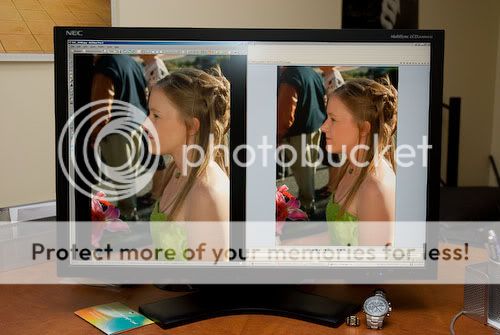
Below is my screen on the left side is an image opened in ACDSee Pro 2 with colour management enabled. On the right just some random image viewer. On the left is my screen AFTER calibration to 6500k with the calibrators curve loaded, on the right is my screen using the colour profile downloaded from NEC's website, but all the correction curves turned off, and no adjustment in white balance.
The images appear to be more unnaturally saturated on the right, regardless of what I do with the calibration, because the software needs to be aware of the red green and blue points.
Just a note my screen has an "sRGB compatibility" mode but it disables the internal lookup table and locks the white balance. Also when it's set the deltaE calibrations errors go through the roof, the contrast ratio goes down to about 250:1 and the brightness reduces too. There's no non destructive way of simulating a different colour space directly on the output device other than software conversion.



 ) but from what I've read about monitors that can interface with the calibrator packages that can do such things, it's mostly a useful (time saving) feature but 10% or so of the users (less?) get wrong results. I think it's kewl if it's there but I wouldn't let the presence or absence of that feature sway my decision.





![[No title]](/data/xfmg/thumbnail/32/32926-ec27ecead8c80d803404500d8f888dbf.jpg?1734162683)





![[No title]](/data/xfmg/thumbnail/34/34053-89f2960a2f30add00b9b4379abd6dd12.jpg?1734164460)
![[No title]](/data/xfmg/thumbnail/34/34052-c6933243940b9ae3474b0a2abaa08312.jpg?1734164460)