What's new

Roses

billy.the.kid43

TPF Noob!
Joined
Mar 22, 2011
Messages
12
Reaction score
0
Location
Flagstaff, AZ
Can others edit my Photos
Photos OK to edit
Tried this in the Nature forum but maybe it's just not good enough to be commented on. I thought I did a good job but maybe you guys can tell me different.

C&C is welcome. I really don't mind the critique.
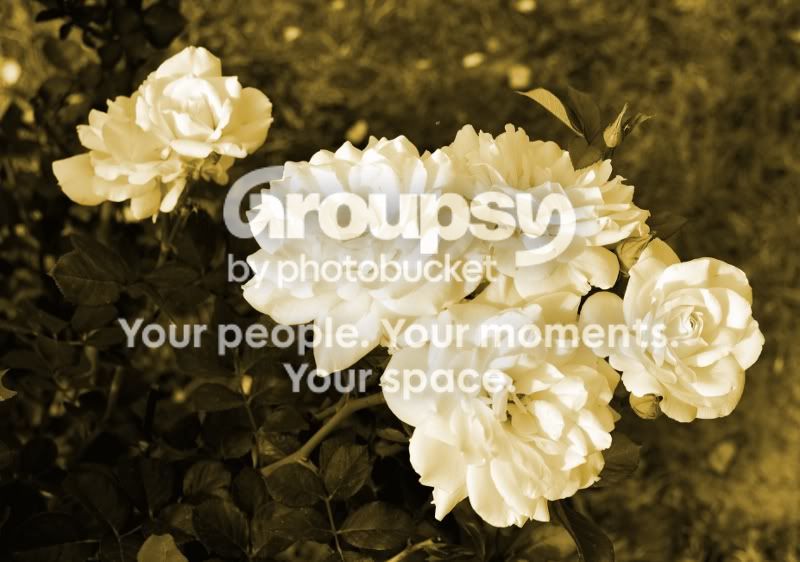
Flowers2_Sepia_sm.jpg
 
I feel if there was more green in the photo from the leaves it would make the white flower more sharp but I am not an photographer far from it Im just saying what I see with my eyes other wise the flowers to me looks good
 
It's just another top down flower shot with processing that makes the image muddy.
 
Hey Bitter, I'm glad you chimed in because I like your work. I am trying to get better. Could you please explain your comment though. The only way for me to take this picture was to get a top-down shot. Anything from the sides or other angle would've gotten a bunch of busy background to it (taken in a residential neighborhood). Also, what does muddy mean? Is it over processed, under processed? I do have this in B&W and color versions but I was leaning more towards the sepia. Was this wrong?

Thanks for any input.
 
The rose is white correct? Not yellow...

I think the background is pretty busy as is. The problem is shots like this are pretty interchangeable.
 
Well, I see you converted to sepia but my impression was that it was over exposed & out-of-focus white roses & that the green was desaturated in post processing.
 

Create an account or login to comment

You must be a member in order to leave a comment

Create account

Create an account on our community. It's easy!

Log in

Already have an account? Log in here.

New Topics

Back
Top Bottom