Nice shots - shame the plant got in the way - but that is half of a wildlife shot most of the time You got the exposure really well, keeping the blacks round the eye from being too dark and smothering the detail there and without swinging the other way and having overexposed areas
Out of interest have you used a levels edit on these - only it looks like there is a haze on the shots that a levels (auto works really well) can remove most times.
After that I would say sharpness looks a little soft - but for web size if you resize the shot in stages (don't know how big the original is, but 2-3 stages should be enough) and sharpen at each stage (I use unsharpen mask set to around 70% but it varies between shots) you can restor sharpness lost due to resizing
^^^ Yes, I did 'auto levels' on both shots, as well as shadow/highlights. I then did a contrast adjustment after tranceplant suggested it. I'll have to try that sharpening in stages that you suggested, as I think the photos do lose sharpness in the resizing.
hmm I still did not like the haze in this, so I ran my own edit over the top of yours - taking the first versions of the shots - a little tricky, but I think for you working from the original it will be easier. The auto levels has not been enough this time, so I used maual - that is to say the 3 little pippets on the levels menu. I used the first (black) and selected an area of the shot which was black - and then the end one which is white and selected an area of the shot that was white.
That did a lot to removing the haze, however it was too intense - now on my levels edit under the histgram there is a bar with 2 sliders - using the far right hand slider I moved it to the left to lower the intensity a bit.
I then used several edits (saturation, brightness, contrast and a colour curves to get the shot to look right - though if you go back to edit the original you will probably need different settings to me)
Ahh, quite a difference! I see what you mean about the haze. Thanks! (My photoshop knowledge is very basic, so I don't do a lot of adjustments to my pics)



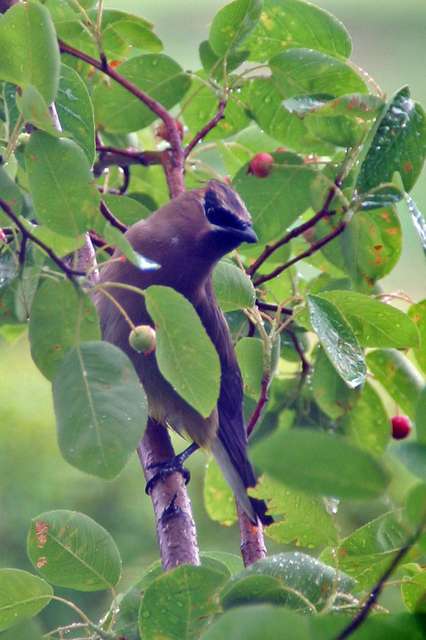
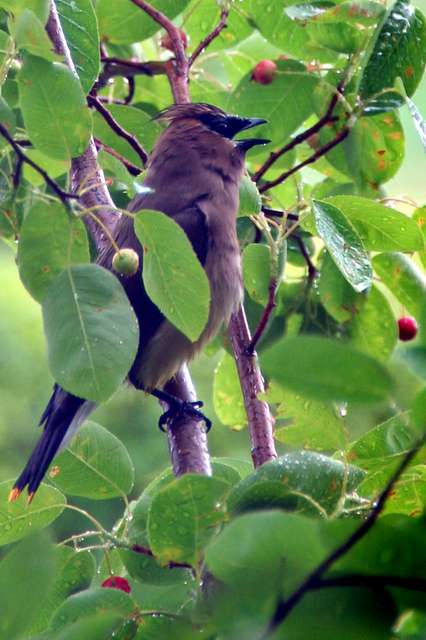


 You got the exposure really well, keeping the blacks round the eye from being too dark and smothering the detail there and without swinging the other way and having overexposed areas