What's new

Some old buildings for some C&C?

John27

No longer a newbie, moving up!
Joined
Sep 1, 2010
Messages
300
Reaction score
49
Location
Missouri
Can others edit my Photos
Photos OK to edit
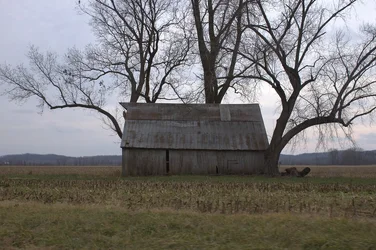
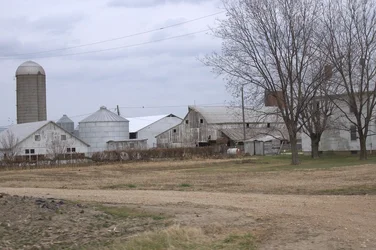
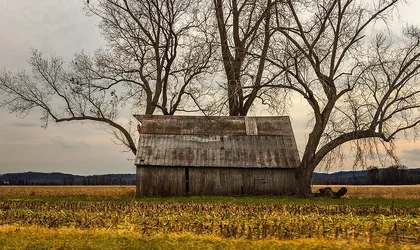
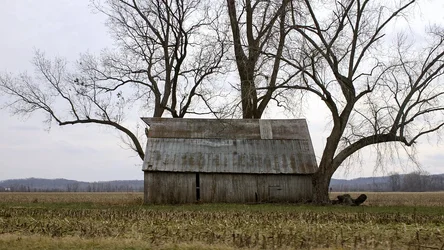
Hey all! So my wife snapped a couple pics yesterday and wanted some basic C&C on them. Just curious as to what everyone thought, and always, what could have made them better.
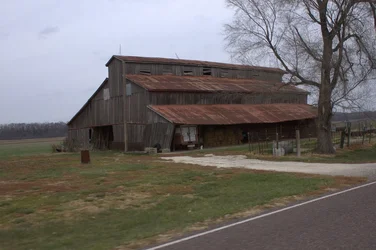
$AshleyHampton-9530-XL.webp


(My personal favorite:)
$AshleyHampton-9516-XL.webp


$AshleyHampton-9533-XL.webp

Oh, and by the way, these were all taken on the back of a motorcycle traveling 45-60mph while wearing a full face helmet and gloves. She has her own motorcycle but rides on the back of mine because she can take pictures! So obviously these are not 'ideal conditions' or anything like that, but I'm pretty impressed with what she comes up with snapping away on the back of a moving vehicle!

Not sure if the EXIF will transfer over (been having an issue with that in lightroom), but these are straight-out-of-camera, uncropped or otherwise. f/8, 1/320 sec, ISO400

-John
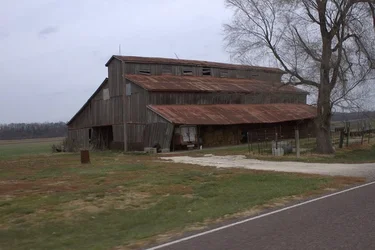
 

Attachments

  • $AshleyHampton-9530-M.webp
    $AshleyHampton-9530-M.webp
    54.3 KB · Views: 158
They're SOOC and to make them better you need to edit them. For one it's hard to hold a camera level when driving by at 45mph on the back of a bike.

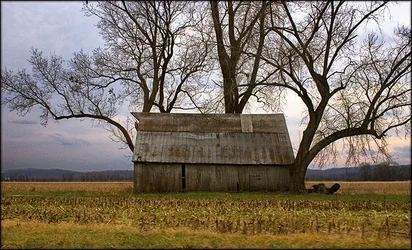
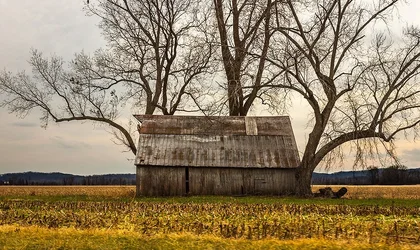
Here's your favorite with the tone response and color adjusted:

$bucolic.webp

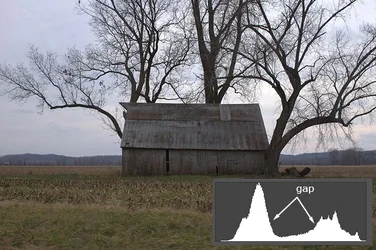
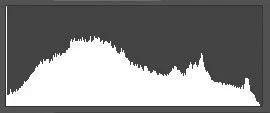
Here's the original with an inset histogram -- the histogram tells you what's needed in terms of tone response.

$drive_by.webp

Notice the histogram has two distinctly separate peaks that are separated by a substantial gap. That gap is the difference between earth and sky and the gap is too big. It indicates a classic lighting problem that the camera software can't process. When you shoot into an overcast sky that sky is your light source and your subject is then effectively backlit. If your camera exposure doesn't blow out the sky then your camera software will most certainly give you a flat and dark rendition of the foreground which you'll have to jump hoops to correct in post processing. So just don't do it in the first place -- see the light.

But since you did it, you've got to close that gap. If you take a photo like this then you commit to the post processing which you should avoid doing with a SOOC JPEG which means you should have a raw capture to work from. I did the best I could with your JPEG. Here's the histogram from my edited version of your photo:

$histogram.webp

Joe
 
Hey Joe thanks!

Can you give me a little more info on how you did that tone edit? Perhaps I can replicate the results in the RAW file?
 
Do you have the raw file? That changes everything. I'm out now for the afternoon -- back later this afternoon and I'll check back then.

Joe
 
Do you have the raw file? That changes everything. I'm out now for the afternoon -- back later this afternoon and I'll check back then.

Joe

Yes, we always shoot RAW. I suppose 'straight out of camera' may have been inaccurate, as I did convert it to JPEG and resize it in order to make it fit the requirements for the forum!

I really appreciate the help, and would love to learn more about what your doing! I'll upload the raw file in a moment here.
 
Oh, and by the way, these were all taken on the back of a motorcycle traveling 45-60mph while wearing a full face helmet and gloves. She has her own motorcycle but rides on the back of mine because she can take pictures! So obviously these are not 'ideal conditions' or anything like that, but I'm pretty impressed with what she comes up with snapping away on the back of a moving vehicle!

The images would greatly improve if you pull over set up a tripod take time to think about the shot compose and properly meter the exposure.
 
Oh, and by the way, these were all taken on the back of a motorcycle traveling 45-60mph while wearing a full face helmet and gloves. She has her own motorcycle but rides on the back of mine because she can take pictures! So obviously these are not 'ideal conditions' or anything like that, but I'm pretty impressed with what she comes up with snapping away on the back of a moving vehicle!

The images would greatly improve if you pull over set up a tripod take time to think about the shot compose and properly meter the exposure.

Well no doubt! And we do a lot of that too.
 
Alright, here is a link to the original RAW file;

https://www.onlinefilefolder.com/2siWv0K3dxlNcl

Again, these aren't going up in a gallery in new york, just snapshots. But when I see a shot and think it looks good, I post it here, so you guys can tell me why it's NOT good, and that's how I learn! I also appreciate the info on bringing the most out of these images in post processing.

We had the tripod on the bike but were enjoying the weather and the ride too much to pull off. It definitely is an absolutely fun blending of the two hobbies though. Riding our motorcycle to unique rural destinations, pulling off the side of the road and taking pictures! I love these big farms out here, you can just see for miles with some of them!
 
OK, with access to the raw file and the resulting 16 bit RGB conversion a much better processing job is possible. Here's my take on it then:

$bucolic_mo.webp

It's still a bunch of hoops to jump because of the lighting and I can't stress this enough: Don't take photos like this in the first place -- get the light right. If you are going to do this then you need to both 1. have the skills to do the processing and 2. make the time commitment -- this took me 30 minutes -- that's too much time. There is no automated software solution that will make a photo like this possible.

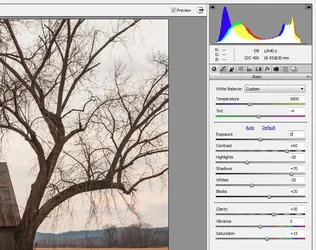
First in ACR/LR the photo has to be converted and given the difficult lighting the conversion has to be done with the additional Photoshop processing in mind. You can't get this one completely done in the raw converter. Here's my ACR/LR conversion values:

$acr_adjust.webp

I made sure I had full tonal info to work with. I did the white balance in ACR and I converted to a 16 bit RGB file in the Pro-photo color space.

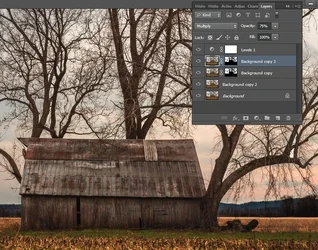
Then in Photoshop I got the hard work done. Bottom line is the sky and foreground have to be treated separately because of the backlight. Both need a contrast boost but the sky needs to be darker and the foreground needs to not get much darker as the contrast increases. This then required layer masks to apply separate adjustments sky/foreground. Here's my final processing then in Photoshop:

$layers.webp

From the bottom up the first duplicate layer is blended with the background using a partial opacity Soft Light blend which raises contrast. The next dupe layer has a mask in place which is effectively applying a full opacity blend in Multiply mode to darken the sky. The next layer up is a dupe of the third for even more sky darkening (note mask again) -- this one is partial opacity. Finally a Levels adjust layer on top to finish it off.

Joe

P.S. For a fellow Missourian who asked, "show me."
 

Attachments

  • $bucolic_mo.webp
    $bucolic_mo.webp
    321.9 KB · Views: 140
Wow, that's incredibly informative and I really appreciate your time and skills.

I'm always looking to learn more. When ever I see a shot that I or she takes and think "Hey that's pretty good", I like to post it on here to find the flaws. We don't learn from success, we learn from mistakes. I hope to hone my skills and 'increase' my standards through stuff like this.

So your suggestion, then, is to wait until sunset for a shot like this in the future? Not to shoot middle of the day, overcast landscape shots? I assume there is no practical way to properly expose a large subject like this in bright daylight? (Short of some 50,000 watt strobes or something and metering for the sky? LOL)
 
This thread is the $hite! Applause for Ysarex. :thumbup:
 
I did an edit as well, but have to admit I didn't spend more than 7 or 8 minutes on the edit. My biggest change was going to a pano type 16:9 crop, resetting the black and white points and doing a bit of curves and levels adjustments.

$8248173685_8c7d984d24_o.webp
 

Create an account or login to comment

You must be a member in order to leave a comment

Create account

Create an account on our community. It's easy!

Log in

Already have an account? Log in here.

Back
Top Bottom