What's new

Still Practicing...Giving inside lighting a try CC appreciated!

Tracybug

TPF Noob!
Joined
Dec 20, 2011
Messages
53
Reaction score
10
Location
United States
Can others edit my Photos
Photos OK to edit
Hi Everyone,

I've had my camera just about a month now and I'm starting to feel like I'm understanding things a bit better. I was having a terrible time with inside lighting, but really was feeling like I might be getting somewhere!
I know these are still far from perfect. In the first one I don't feel like my composition is quite right and in the second one I slightly cut off the top of her head, but for some reason I still like the feel of the picture.
I would love your input on what I'm doing wrong and what might help to make these better. My goal is to take photos that are portraits not snap shots. I realize I'm not quite there but feel like I'm moving in the right direction.

Thanks,
Tracy

(1)
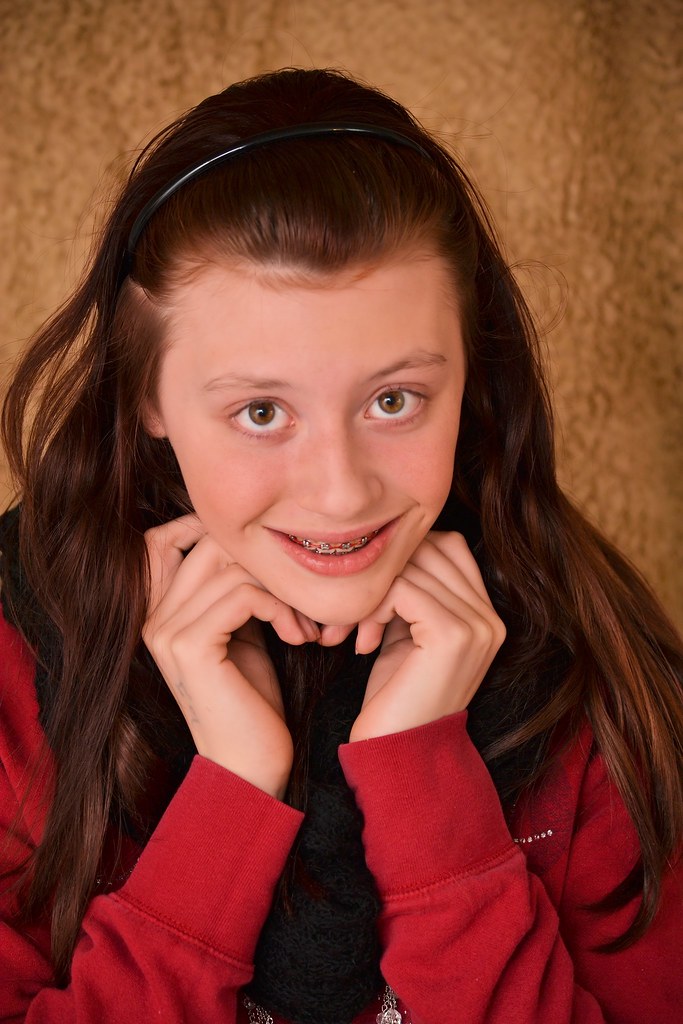
DSC_0581 (2) by joecrisjon, on Flickr

(2)
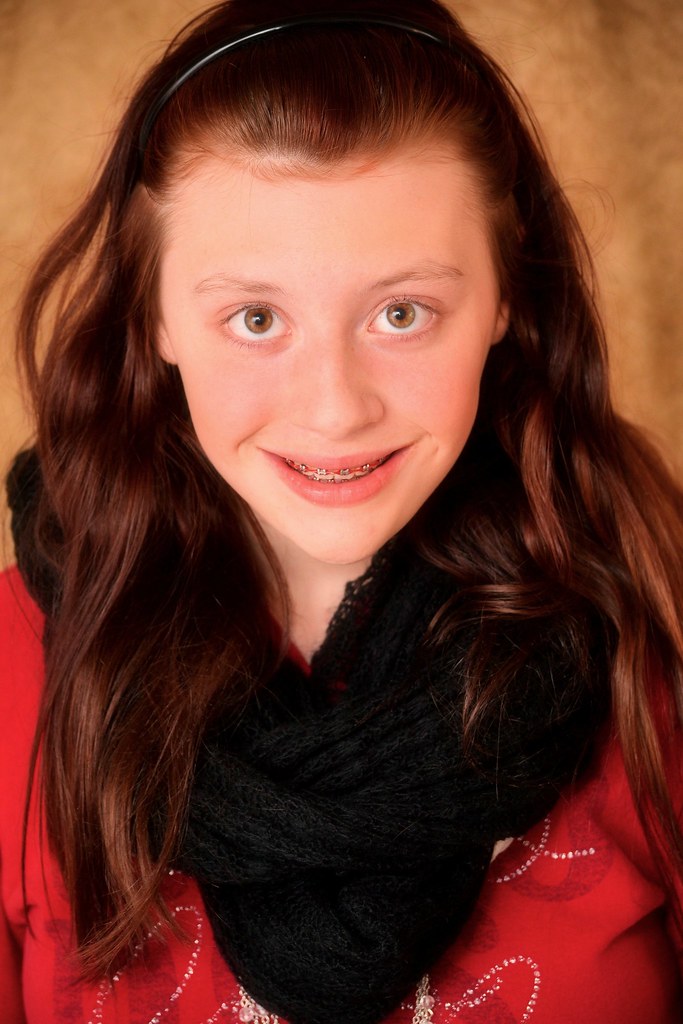
chrissyedit3 by joecrisjon, on Flickr
 
Nice soft even light...great job. Glad your trying to understand your camera settings and lighting first..without worrying too much on posing and angles. That's a very good way to start...then once you start understanding more you can relax on lighting and focus more on your composition and posing. Keep it up Tracy!!
 
better than previous posts! sharp... #1 is slightly better than #2... #2 is just a touch too bright on my calibrated monitor. You need to get down level with her.. don't shoot down her.. get level with her, and shoot even. Shooting from higher than the subject "demotes" the subject...
 
Nice soft even light...great job. Glad your trying to understand your camera settings and lighting first..without worrying too much on posing and angles. That's a very good way to start...then once you start understanding more you can relax on lighting and focus more on your composition and posing. Keep it up Tracy!!

Thanks....There is way more to learn then I had even came close to imagining!!! These are obviously just practice shots and if I could get her to take that scarf off that she is obsessed with it might help too!!!! Teenagers!
 
better than previous posts! sharp... #1 is slightly better than #2... #2 is just a touch too bright on my calibrated monitor. You need to get down level with her.. don't shoot down her.. get level with her, and shoot even. Shooting from higher than the subject "demotes" the subject...
She is just about an inch shorter then me....I guess I need to try crouching down just a tiny bit to get more even with her....I'm afraid in a few months I'm going to be looking down on her rather!!!!
How do I "Calibrate" my monitor to make sure I'm getting the most accurate colors?
 
better than previous posts! sharp... #1 is slightly better than #2... #2 is just a touch too bright on my calibrated monitor. You need to get down level with her.. don't shoot down her.. get level with her, and shoot even. Shooting from higher than the subject "demotes" the subject...
She is just about an inch shorter then me....I guess I need to try crouching down just a tiny bit to get more even with her....I'm afraid in a few months I'm going to be looking down on her rather!!!!
How do I "Calibrate" my monitor to make sure I'm getting the most accurate colors?

I would have thought she was shorter.. see how she is looking up???

You would need a monitor that can be calibrated (most are.. although some are better than others!) and a calibration tool that measures various things on your monitor. Google monitor calibration... and search on monitor calibration at Amazon to start with...

Here is one link... Display Calibration - DisplayCalibration.com - Calibrate your computer display or monitor online for optimal viewing. Brightness, contrast, color depth, resolution and freeware software downloads.
 
better than previous posts! sharp... #1 is slightly better than #2... #2 is just a touch too bright on my calibrated monitor. You need to get down level with her.. don't shoot down her.. get level with her, and shoot even. Shooting from higher than the subject "demotes" the subject...
She is just about an inch shorter then me....I guess I need to try crouching down just a tiny bit to get more even with her....I'm afraid in a few months I'm going to be looking down on her rather!!!!
How do I "Calibrate" my monitor to make sure I'm getting the most accurate colors?

I would have thought she was shorter.. see how she is looking up???

You would need a monitor that can be calibrated (most are.. although some are better than others!) and a calibration tool that measures various things on your monitor. Google monitor calibration... and search on monitor calibration at Amazon to start with...

Here is one link... Display Calibration - DisplayCalibration.com - Calibrate your computer display or monitor online for optimal viewing. Brightness, contrast, color depth, resolution and freeware software downloads.


Thanks for the info on Calibration....I'll look into it!
You know until you just mentioned I did not notice that she was looking up....I'll have to talk with her make make sure she is looking straight ahead....It must be she is just use to look up at her Mommy!!! :)
 
She may be self-conscious about the braces too... many kids are when they have them. She may be trying to minimize that.

Have her lift that chin up a bit! :)
 
They both look to have a very strong magenta color cast. This may be a result of your monitor, or lack of experience, or a combination of both. Sometimes it can help to find some other known good photos (portraits) on flickr and compare yours with them side-by-side to see if you notice any obvious issues. It's the poor man's calibrator. :)


Or, you can take a test shot of a white/gray card under the same lighting conditions and use the white balance dropper tool in your PP program.
 
White balance seems a bit warm. This is typical for indoor shoot. maybe a little extra contrast to give the pics some more depth. You might pan back a bit too to frame her face out better.
 
What indoor lighting are you using ?
 
Compare WB to this one.... note that I'm not currently on a calibrated monitor, but this is much closer to accurate. I used the white of the eye as reference.

6638337483_540f2eb266_z.jpg
 
Compare WB to this one.... note that I'm not currently on a calibrated monitor, but this is much closer to accurate. I used the white of the eye as reference.

6638337483_540f2eb266_z.jpg

On my monitor it makes her auburn hair look dark brown?
 
Good catch, how about this one?

6638337483_540f2eb266_b.jpg
 

Create an account or login to comment

You must be a member in order to leave a comment

Create account

Create an account on our community. It's easy!

Log in

Already have an account? Log in here.

New Topics

Back
Top Bottom