What's new

Tablet?

KitBassGirl

TPF Noob!
Joined
Oct 18, 2011
Messages
8
Reaction score
0
Location
OR
Can others edit my Photos
Photos OK to edit
I've been thinking of getting a tablet to use with editing my photos and I was wondering if anyone has any recommendations?
 
You mean a drawing/graphics tablet? If so, The wacom tablets are all nice - I have the bamboo pen and touch. The Intuos by wacom is a little bit more price wise but I've heard great things about it.
 
Intuos 4 Medium, is what I use and like it. Make sure you look around on Amazon, search for bundles etc. and if thinking of buying software Wacom has some discount codes on that as well when you sign up for one of their programs.
-
Shoot well, Joe
 
Yeah I've been looking at the Wacom tablets for a while, could you tell me a lil more about the Intuos?
 
Last edited:
Tablets are great for photo editing and Wacom makes many great models.

Ideally, bigger is better but I use a small one and it does the job.
 
The Intuos is nice. I had an Intuos 4 Medium and it worked very well, but I upgraded to a Cintique. Editing right on the monitor is sweet.

A nice feature of the Intuos 4 Medium was being able to define how much of the work area was active. I had mine adjusted so the pad of my hand was always on the tablet.

The quick selection buttons were also very handy as was being able to adjust the pen pressure levels.

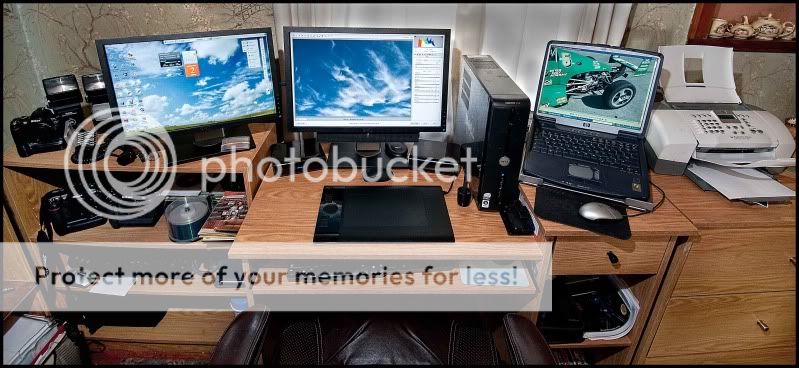
Here is a photo of my editing workstation and the Intuos 4 Medium:
WrkStatn1-2-10_0028.jpg
 
Last edited:
O.O that is a very very nice workstation.... I envy you!
 
For the most part the bamboo series works very well, there is a larger version that is a couple hundred. The bamboo series has 1024 levels of sensitivity which is good enough. If you are running multiple monitors the bamboo are a bit of a pain as they don't have monitor switching built in. There is a third party app that uses a hack to get around the issue but might not always work and will not work at all on a MAC.

Intuos are great and the professional level tablet, don't bother with the small if you are going to spend the money on one as the medium is about $400 last I checked. I'm not sure that larger is really needs for editing photos, I use a large for painting as you need to get your whole arm into it. For editing photos I'm just using the medium or the bamboo on my laptop.

If you really have the money to spend the Cintique is incredible but you are looking at a grand for the small and two grand for the large.

What ever you do don't buy any other brand. None are as good as the Wacom.

 
I use a cheap, small (A5-ish size) Bamboo. I prefer it to a mouse for general PC use. But for doging and burning it is a bit small. I run out of tablet and that messes up a layer. I can zoom-out but that makes detail work difficult.
 
Cheap is good dots :) cheap I can do. lol
 
I use a cheap, small (A5-ish size) Bamboo. I prefer it to a mouse for general PC use. But for doging and burning it is a bit small. I run out of tablet and that messes up a layer. I can zoom-out but that makes detail work difficult.

You should not be running out of tablet as the pen should be used mapped to the monitor so that the edges of the tablet are the edges of the screen. If you have it in mouse mode you really are not using it to the best advantages.
 
The edges of my tablet do match the edges of the monitor. The tablet allows you to initiate movement of the cursor from any point on its surface. The stylus's initial position doesn't have to precisely correspond with the actual X,Y position of the cursor, on the monitor screen.

Try it..place the cursor dead-centre on the screen. Now lift and place the stylus in the middle of the top-right quandrant of the tablet and try to reach the top-right corner of the screen. You'll run-out of tablet (half-way)..for obvious reasons.


..or is your tablet configured to jump to a precise, corresponding position when the stylus contacts the tablet? How would that work when zoomed-in (?)

I've had several tablets. Always used them plug-and-play.
 
Last edited:
I am using the Intuos4 L (the ExpressKeys and a Touch Ring that can be accommodated for left- and right-handed people by turning the tablet by 180 ) If you never used a tablet before you will need to get used to it, it will take a while but when you got the hang of it you don't want to use the normal mouse any more. More control and precision when you do post production in PS I work in layers and masking and use the pen to for example sharpen just a small part or burn it, tracing is a piece of cake with the wacom pen and the pen tool in PS same for masking with a brush. I like to hand write and/or add a signature cos its like writing on paper though you have to practise your hand eye coordination. The wacom mouse is okay but has its moments a common issue is the unwanted double click when you only click once.

Overall I cant do without it any more and can highly recommend the Intuos4.

Ps. The pen nibs are going fast so you order a tablet get a some extra.
 
Last edited:

Create an account or login to comment

You must be a member in order to leave a comment

Create account

Create an account on our community. It's easy!

Log in

Already have an account? Log in here.

Back
Top Bottom