What's new

Taking long exposure night shots

phiya

TPF Noob!
Joined
Sep 23, 2010
Messages
344
Reaction score
2
Location
Apple Valley, Ca
Can others edit my Photos
Photos OK to edit
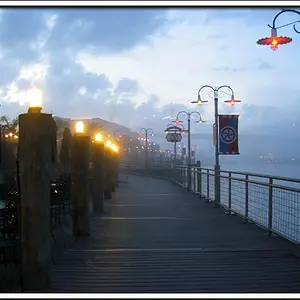
I was out trying to take some pictures of a famous lighthouse tonight which was a very dark night. I tried using F/1.8 with a variety of shutter and ISO settings, with and without flash but they just weren't turning out how I'd liked. The short burst of light from the lighthouse spinning is almost always way blown out, and the color is off... also, i just thought I'd pick up more ambient light than I was. Any tips?

Here is an example. Oh yeah, and I was getting that strange lens flare with my prime every shot...

EDIT: Also, I'm out of town, so this pic only has a quick picasa edit, I don't have PS or LR on my laptop.

DSC_0802-1 by Ricky Jay, on Flickr
 
Last edited:
The lens flare is caused by the angle of your lens in respect to the lighthouse beacon. trying to overcome that bright of a light will be really tough

I would suggest and HDR attempt on this. multiple exposures when the light is swung away from you and closed before the light gets to you.
 
I can reduce the light based on timing it perfectly, but is there any way to increase my ambient light besides ISO? Maybe a specific white balance setting would help the colors?
 
I can reduce the light based on timing it perfectly, but is there any way to increase my ambient light besides ISO? Maybe a specific white balance setting would help the colors?

download paint.net or Gimp2 both are free and have much better image refining capabilities than picasa.

you either need to keep the shutter open longer or increase the ISO. another thought is to block the light of the lighthouse as it passes you and then remove the block in between flashes. kinda negative light painting
 
I can't increase exposure time... unless I can do it with bulb, is there a way to take one exposure with multiple bulb actuations?

I could probably just block the light with my hand or a piece of cardboard when the light comes around, since it's already so dark, correct?

Also, I have PS CS5 and LR at home, this was just a quick edit on my laptop while on the road.
 
I can't increase exposure time... unless I can do it with bulb, is there a way to take one exposure with multiple bulb actuations?

I could probably just block the light with my hand or a piece of cardboard when the light comes around, since it's already so dark, correct?

Also, I have PS CS5 and LR at home, this was just a quick edit on my laptop while on the road.

use the bulb function and manual mode. block the light and step it down to f16 or so block the light and exposure of 30 seconds or so to start with also shoot this at full moon would help
 
Neutral density filter and a polarizer might help. Your still going to have to use "bulb" mode. Also don't be afraid of really long exposures. Reduce the aperture to f/22 and use a stop watch. Trial and error will help.
 
I can't increase exposure time... unless I can do it with bulb, is there a way to take one exposure with multiple bulb actuations?
If there is, it will be described in your D80 users manual.
 

Create an account or login to comment

You must be a member in order to leave a comment

Create account

Create an account on our community. It's easy!

Log in

Already have an account? Log in here.

Back
Top Bottom