amolitor
TPF Noob!
- Joined
- May 18, 2012
- Messages
- 6,320
- Reaction score
- 2,131
- Location
- Virginia
- Can others edit my Photos
- Photos OK to edit
- Banned
- #1
Derrel mentioned something in another thread a while back, and I thought I'd take some time to pull together a little more detail on it.
There are lots of "manual" hot-shoe flashes out there that have built in meters. Basically the flash can pretend it's "like" a camera, and fire itself off until the meter in the flash sees "enough" light for whatever setting you have it set for. You get 2 or 3 power levels, that correspond to aperture/ISO combinations in the camera. So you might set your camera for ISO 100, f5.6, and then select a corresponding power level on the flash unit.
When the flash fires, it starts measuring light until it "sees" enough light for ISO 100 f/5.6, and then it shuts itself off. This is nice because it doesn't really care about modifiers, it's just plain measuring actual light seen. I shot this still life with my Vivitar 285HV, which costs about $85, with three different head positions:
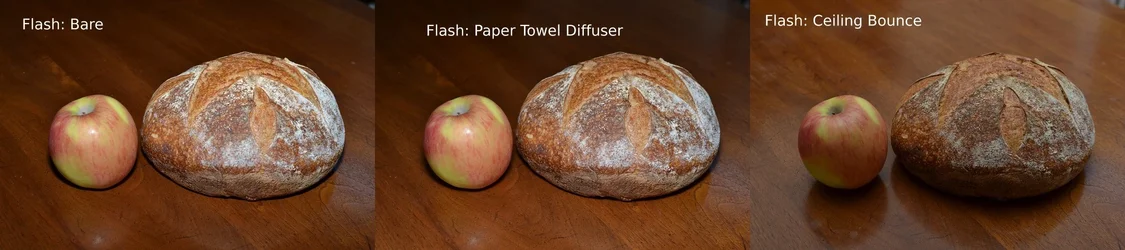
As you can see, you get pretty much the same exposure each way. The shutter speed was 1/200 to "kill" almost all the ambient light.
Ok, so how do you balance the flash and ambient? Everyone knows that with camera-mounted flash, you really just want to be filling in, not lighting the whole thing up. I think of these situations as really two exposures. One is from the flash, one is from the ambient light. Both exposures are underexposed, but when you put them together, you get proper exposure. Here's how you can do that:
- Meter for the ambient light. Now subtract one stop of exposure from that (cut the ISO in half, stop down, double the shutter speed, I don't care).
- Now set the flash up for the ISO and for an aperture that is one stop down from your current setting.
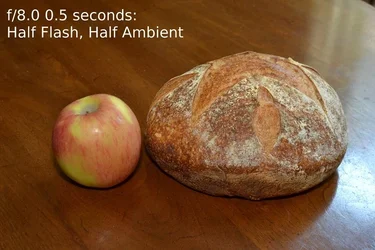
The astute observer will see that I have balanced flash and ambient light even-steven. They're both set up for half of the "correct" exposure, and will add up to the right thing. The scene meters at f/8.0 and 1 second. It looks like this:
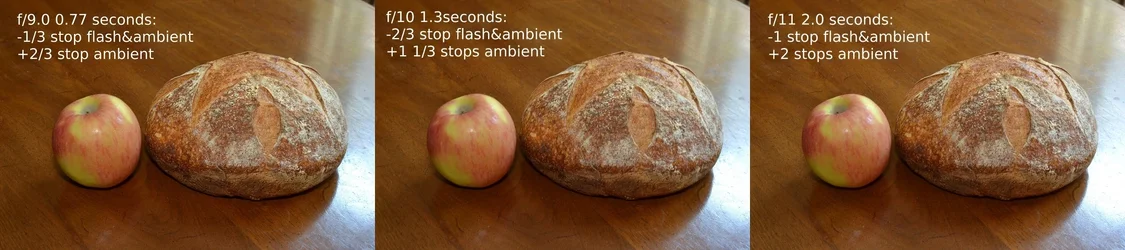
Now you can tweak it around some. You can add or subtract exposure from both the flash and the ambient light by adjusting the aperture or the ISO. You can adjust the ambient light only exposure by adjusting the shutter speed. So, you take 1/3 of a stop off both flash and ambient with one click of the aperture dial. Now you should add some exposure back with the shutter, say 2/3 stop. You can add 2/3 of a stop to both flash and ambient exposures with two clicks of the aperture, but then you better take some away, maybe a stop or 1 1/3 stops, with the shutter to keep things balanced.
If you go too far, you start getting overexposed for reasons I won't get in to. You can go something like 1 stop up or down with the aperture/ISO and a corresponding 2 stops and up and down with the shutter.
Just remember: ISO/aperture takes or adds exposure to BOTH of the flash/ambient exposures. Shutter speed adds or subtracts only from the ambient. Also, watch your sync speed.
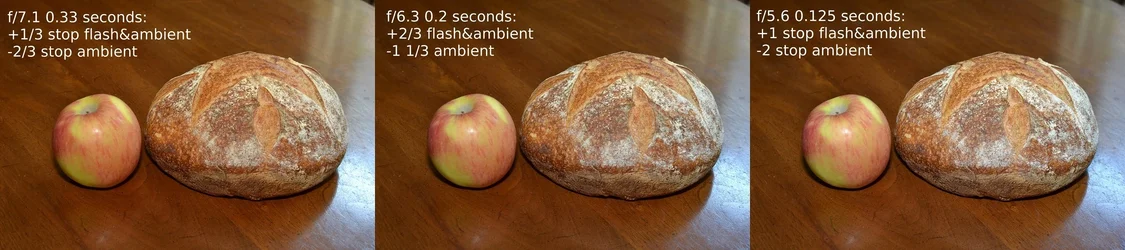
If you think it through you can play some games with aperture priority mode (which will meter "correctly" for a given aperture) with some exposure compensation, and then just fire away. In Av with -2/3 exposure compensation, the camera will expose 2/3 of a stop on the dark side. If your flash is set up to exposure correctly for 1/3 or 1/2 a stop more open than you're using, it'll push out a decent amount of fill for you. Fire and forget. It's not TTL, but it's a pretty darn good substitute.
There are lots of "manual" hot-shoe flashes out there that have built in meters. Basically the flash can pretend it's "like" a camera, and fire itself off until the meter in the flash sees "enough" light for whatever setting you have it set for. You get 2 or 3 power levels, that correspond to aperture/ISO combinations in the camera. So you might set your camera for ISO 100, f5.6, and then select a corresponding power level on the flash unit.
When the flash fires, it starts measuring light until it "sees" enough light for ISO 100 f/5.6, and then it shuts itself off. This is nice because it doesn't really care about modifiers, it's just plain measuring actual light seen. I shot this still life with my Vivitar 285HV, which costs about $85, with three different head positions:
As you can see, you get pretty much the same exposure each way. The shutter speed was 1/200 to "kill" almost all the ambient light.
Ok, so how do you balance the flash and ambient? Everyone knows that with camera-mounted flash, you really just want to be filling in, not lighting the whole thing up. I think of these situations as really two exposures. One is from the flash, one is from the ambient light. Both exposures are underexposed, but when you put them together, you get proper exposure. Here's how you can do that:
- Meter for the ambient light. Now subtract one stop of exposure from that (cut the ISO in half, stop down, double the shutter speed, I don't care).
- Now set the flash up for the ISO and for an aperture that is one stop down from your current setting.
The astute observer will see that I have balanced flash and ambient light even-steven. They're both set up for half of the "correct" exposure, and will add up to the right thing. The scene meters at f/8.0 and 1 second. It looks like this:
Now you can tweak it around some. You can add or subtract exposure from both the flash and the ambient light by adjusting the aperture or the ISO. You can adjust the ambient light only exposure by adjusting the shutter speed. So, you take 1/3 of a stop off both flash and ambient with one click of the aperture dial. Now you should add some exposure back with the shutter, say 2/3 stop. You can add 2/3 of a stop to both flash and ambient exposures with two clicks of the aperture, but then you better take some away, maybe a stop or 1 1/3 stops, with the shutter to keep things balanced.
If you go too far, you start getting overexposed for reasons I won't get in to. You can go something like 1 stop up or down with the aperture/ISO and a corresponding 2 stops and up and down with the shutter.
Just remember: ISO/aperture takes or adds exposure to BOTH of the flash/ambient exposures. Shutter speed adds or subtracts only from the ambient. Also, watch your sync speed.
If you think it through you can play some games with aperture priority mode (which will meter "correctly" for a given aperture) with some exposure compensation, and then just fire away. In Av with -2/3 exposure compensation, the camera will expose 2/3 of a stop on the dark side. If your flash is set up to exposure correctly for 1/3 or 1/2 a stop more open than you're using, it'll push out a decent amount of fill for you. Fire and forget. It's not TTL, but it's a pretty darn good substitute.
Last edited:


![[No title]](/data/xfmg/thumbnail/37/37610-09a3b763265223288ccc8f30a63a666b.jpg?1734170736)