What's new

Trying to work in CS5....a photo of a horse for CC please

Joined
Aug 7, 2011
Messages
740
Reaction score
84
Location
South Range, WI
Can others edit my Photos
Photos OK to edit
Hey guys

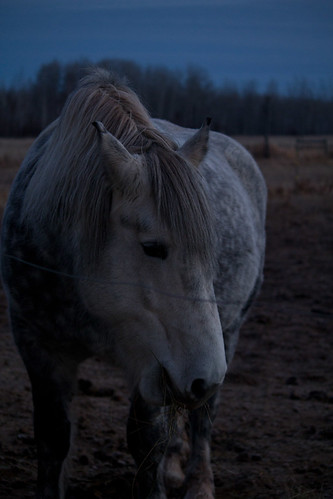
So I did my basic edits and bw conversion in lightroom. I really like the contrast and grainy texture to this picture. I had taken it at 7am when the sun was just rising and didn't want to use flash. Do you think I should have?

I then went into CS5 to work on my cloning skills. I cloned the fence line out using the clone tool obviously lol and used the first preset so it wasn't really hard. I had noticed that you could still see where I cloned so I went and used the healing brush where I cloned. Was this the correct action??

I'm just learning cs5 and just wanted your guys input on:

1) the BW conversion
2) the cloning I did.

and well all the other good stuff like composition etc etc.... For better compositon maybe have zoomed out some. I find im struggling in the composition area now. I think I'm over thinking it. I do think she is too far to the left but if I had gone with a tighter crop she would have been too centered.

Thanks for looking, its always greatly appreciated.

1) The before in BW
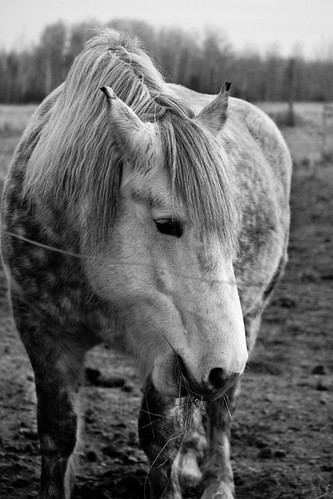
IMG_8298 by Rebecca Andresen Photography, on Flickr
1/200, f4, iso800

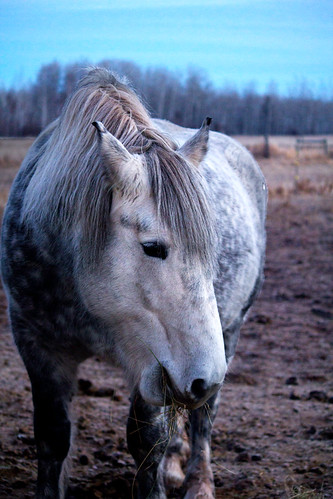
2) After cloning and healing
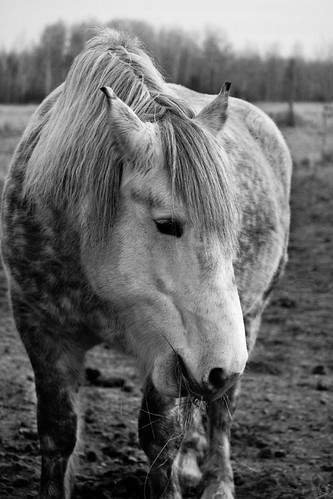
Percheron by Rebecca Andresen Photography, on Flickr

The one spot that I feel you can tell I cloned is on the left side of the frame her right side of the belly. But to someone who doesn't know photos I really don't think they could tell.
 
Thanks schwetty!! I gotta say besides taking photos of my kid lol it is my FAV thing to do. There aren't many show photographers out here I wanna get into doing that BUT my gov't job would probably never give me the time off for the shows. There was a KILLER sunrise the day b4 and it was bitter cold so I didn't take the camera so I took it the next day hoping to get that o hell no! It was just blue skies lol. My profile pic actually won a contest (granted not judged by other photographers lol) and got cover of the calender for the horse rescue in which I adopted my guy from :)
 
Hey guys

So I did my basic edits and bw conversion in lightroom. I really like the contrast and grainy texture to this picture. I had taken it at 7am when the sun was just rising and didn't want to use flash. Do you think I should have?

.
Yes, I think you should have used flash.

The point many seem to not get about using flash is it allows you a lot more exposure control. You can control the ambient light exposure separately from the strobed light (flash) exposure.

By using flash for this shot you could have made the ambient light in the background darker so the horse 'pops' better.
As it is the light values in the forground are about the same as they are in the background.

Post the color version of the photo.

I wonder? Since Lighroom 3 and CS5's Camera Raw use the same edit rendering engine - ACR 6, why Lightroom?

One can still see camera right where you cloned, or used the spot healing brush, to eliminate the fence wire going across the frame
 
To me the crop on the left side is a bit too tight. You dont have to scared of trying a subject matter in the center.
Composition rules are guidelines not laws. If a certain placement isnt working see if breaking the rules are better. I dolike the photo though.
 
Hey guys

So I did my basic edits and bw conversion in lightroom. I really like the contrast and grainy texture to this picture. I had taken it at 7am when the sun was just rising and didn't want to use flash. Do you think I should have?

.
Yes, I think you should have used flash.

The point many seem to not get about using flash is it allows you a lot more exposure control. You can control the ambient light exposure separately from the strobed light (flash) exposure.

By using flash for this shot you could have made the ambient light in the background darker so the horse 'pops' better.
As it is the light values in the forground are about the same as they are in the background.

Post the color version of the photo.

I wonder? Since Lighroom 3 and CS5's Camera Raw use the same edit rendering engine - ACR 6, why Lightroom?

One can still see camera right where you cloned, or used the spot healing brush, to eliminate the fence wire going across the frame

I was hopeing you would grace me with your knowledge. After I had gotten home I realized for the heck of it I should have taken it with flash also. It wouldn't have hurt.

Heres the original (very very badly exposed)

IMG_8298-2 by Rebecca Andresen Photography, on Flickr

The reason for lightroom is only b/c I've been using it longer and feel more comfortable in it. Yea I tried the clone, I just have to continue to practice. Practice makes perfect, or at least better :) I also see what your talking about in the spot on the right side :(
 
I don't know the answer to this because I am not a Horse person, but how would the horse have reacted to flash? Would it have scared him?
 
No I haven't. I pretty much brand new to cs5 and kinda find it overwhelming still lol. Thanks!!!
 
I don't know the answer to this because I am not a Horse person, but how would the horse have reacted to flash? Would it have scared him?

My first answer is (i really don't care if it would have spooked rofl!).... Nah probably not this horse is a special horse she works with special needs adults and children. Pretty much they train the heck out of them to make them BOMB PROOF! Even if she did spook it wouldn't have hurt her so in that aspect I dont really care if it did she woulda jumped then continued onto her breakfast :)
 
Your original explains why the edit has so much image noise in it.

The Content Aware feature for the Spot healing brush is pretty sweet.

You can use the Patch tool to disguise some of the cloning artifacts and you can open the Clone Source window and manipulate the source you used to clone with.

CloneSouceDialogBox.png
 

I did this edit entirely in CS5. i did not use ACR or any other plug-ins.
I selected the horse and a majority of the foreground (Background layer). I used 'Refine Edge' in the tool options bar to add a 3 px feather to the selection. I then named and saved the selection so I could use it again later.
I then made a copy of the Background layer (Ctrl-J, or drag it down to the 'New Layer' icon at the bottom of the Layers work pallet) while the selection was still active (Layer 1). That only copies what is inside the selection.
I then changed the blending mode of Layer 1 to 'Screen'. That makes what I had selected much brighter. But, not bright enough.
So I retrieved the selection I had saved (Select > Load Selection and in the dialog box the saved selection is in the 'Channel" drop down box.) and copied Layer 1, so there is now a Layer 2 and it also copies the blending mode so the horse and foreground got brighter still.
I then made a new layer (Layer > New > Layer and in the dialog box went to the blending 'Mode' box and opened the drop down menu. I selected 'Soft light' as the blending mode and when I did a check box appears under the Mode box that says 'Fill with Soft-Light-neutral color (50% gray).' The 50% gray fill is used so you can see in the layer where you have worked.
The next step is to grab the Dodge tool and adjust the tool settings and brush size to lighten the horses face some.

I then used the Spot healing brush to clone out the wire and I used the Patch tool to hide the line between the dark background and the now much lighter foreground.

Using Lightroom for basic edits is fine. I almost always start editing with ACR too. But ACR and Lightroom are Neanderthal compared to what CS5 can do.
Like ACR (Camera Raw/Lightroom) CS5 can do edits non-desructively by using layers and Adjustment layers.
65442Edit.jpg
 
Last edited:
Hey Keith!

I can not THANK YOU enough for taking the time and giving me such a detailed response and how to, to how you did that photo. I learned a lot! and tried to reproudce what you did. Here it is :) The one part I had an issue with was the patch tool. I couldn't figure out exactly what it did. Should I have selected the whole horse? Then what? So that part I did not complete but I did do everything else. I learned a lot in this lesson you just gave me and am truely thankful for all your help and knowledge :)

Here is my edited version with your guidelines :)


percheron2 by Rebecca Andresen Photography, on Flickr

How do you think I did?
 
Now that I sit here and compare.... Yours is still way better. I lightened my sky way too much and didn't dodge the horse enough
 

Create an account or login to comment

You must be a member in order to leave a comment

Create account

Create an account on our community. It's easy!

Log in

Already have an account? Log in here.

New Topics

Back
Top Bottom