What's new

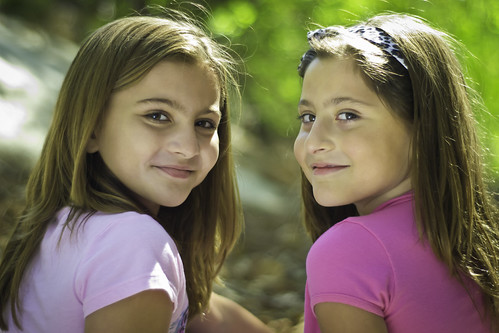
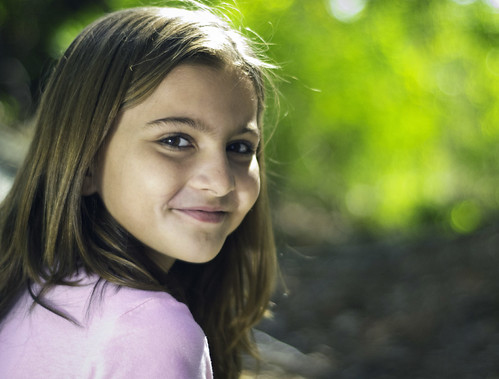
two portraits for critique please

They look nice. The light on the face looks a bit harsher in the first, and softer in the second image.

I would question why you used ISO 1600 in such bright light.

The light on their faces looks nice. Did you use flash, or reflectors?
 
white balance is off. they look a little green to me.
 
i used a reflector it was my first time
 
Not bad for first time. Was it a silver reflector? I see a hint of blue cast, rather than green, but I am on my craptop.


I don't really shoot people, so keep that in mind with my comments. :D
 
I think this is a good first effort. I don't know too much about portraits but I think they look decent. I would like to see the eyes a little brighter....just a tad especially on the left girl and in the first image. As for the ISO as said above not sure what is up with the 1600. You should drop that down to 200. Not the best at the with the conversion yet of ISO to shutter speed but I think that would keep you in the 1/125-200 range and would clean up the image.
 
honestly i dont remember shooting at such a high iso this is the data lightroom gave me im almost sure i was shooting at 200 but i guess not and yes it was a silver reflector
 
They do look green. Otherwise good shots. I would do a tighter crop on #1, taking her shoulders out.
#2 I'd center the two faces a little more. Try to clean up the hair a little bit too, it's kinda distracting.
 
Yes, too much green in the fleshtones...that is quite often an issue when photographing under or near large expanses of trees...using an orange-hued filter over fill-flash, or over the lens when photographing can help eliminate that problem. You missed the focus in the first shot, which is evident on FLickr when looking at the image larger than a business card...

In post processing, I'd say open the files, go to selective color, pull down to the yellows, which will tend to be the caucasian skin tones, and then ADD some magenta, to cancel the greenish pollution in the yellows....also, while there, stop by the REDS, and shift a couple of sliders a few points one way or another...maybe visit our friend Cyan, maybe give a tiny wazzup! to magenta for a second.....should be good to head home after that...

 
Yes, too much green in the fleshtones...that is quite often an issue when photographing under or near large expanses of trees...using an orange-hued filter over fill-flash, or over the lens when photographing can help eliminate that problem. You missed the focus in the first shot, which is evident on FLickr when looking at the image larger than a business card...

In post processing, I'd say open the files, go to selective color, pull down to the yellows, which will tend to be the caucasian skin tones, and then ADD some magenta, to cancel the greenish pollution in the yellows....also, while there, stop by the REDS, and shift a couple of sliders a few points one way or another...maybe visit our friend Cyan, maybe give a tiny wazzup! to magenta for a second.....should be good to head home after that...

Nice CC Derrel! I enjoyed that one, Wazzup!
 
im still a little confused on white balance, i am learning mind you ive been shooting less than a month and less than 1000 photos.....
 

Create an account or login to comment

You must be a member in order to leave a comment

Create account

Create an account on our community. It's easy!

Log in

Already have an account? Log in here.

Back
Top Bottom