What's new

Using different white balance to offset clipping...

Bend The Light

No longer a newbie, moving up!
Joined
Jun 8, 2010
Messages
2,591
Reaction score
375
Location
Barnsley, Oop-Nooerth, UK
Can others edit my Photos
Photos OK to edit
Hi,

I was just perusing the forum, when I came across this in another thread. Didn't want to hijack that thread, so started a new one.

Tyler_h said

"If you find you are clipping your highlights but only for the red channel, then select a WB with the coolest offset to counter this. This would just be to try and capture as much information as possible to use in post".

Does this mean, for example, when I took a picture of a red tulip, I could have set the WB to one of the "cooler" settings, then readjusted in Photoshop? I did take a photo or 5 of a red tulip, and the reds were definitely "off" which I realise now was because that one channel was clipping (I used to just look at the brightness histogram, rather than RGB).

Is this a good way to go about this, then?

Cheers
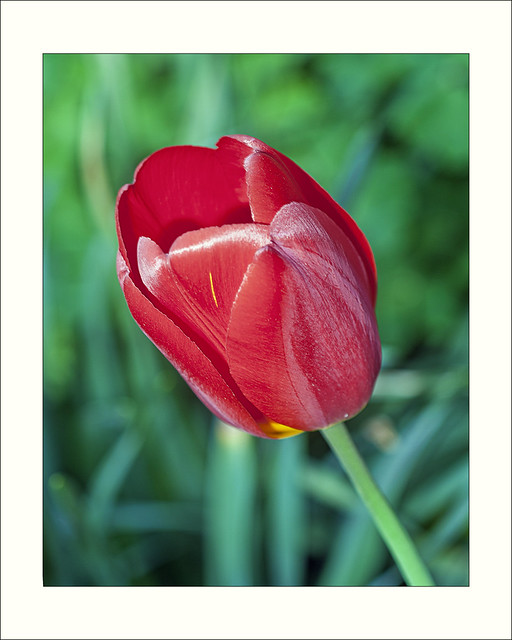
 
It should be most useful when you are clipping due to saturation instead of just brightness. How much mileage you will get out of it I'm not sure and it will vary from one situation to another of course. If you are going to be decreasing the saturation in post you should be able to get a bit more detail instead of just a pure red block or something. If you are going to bump the saturation you probably need to look at other settings as I think the problem will just be reintroduced in post if that is the case.

If someone has the time to do a proper bit of an experiment with this it would good to see how the results come out.
 
Thanks tyler. I will have a go when I get a bit of time...the scenario I was considering was with this flower:


red tulip 2 by http://bendthelight.me.uk, on Flickr

It was completely blocked up, and I think that was just the reds. I recovered some, and desaturated some, but the end result is a tulip that is not really that red, compared to how it was in real life. Have to wait till spring again to try this particular type of flower. :)
 
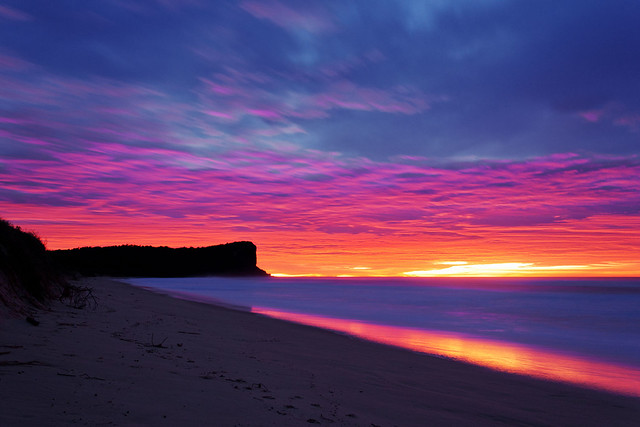
I had a similar problem with the sky a short while ago. It's most distinct in this shot:


2011_07_13_7410 by tyler_s_hamilton, on Flickr

The majority of the sky up to the height of the cliff was clipped. Recovery was set to the max to bring that back. That section looks quite flat in the original if not so much as the patch on your flower due to the variation in colour for me.
 
I would think a more direct and effective solution would be to just shoot a RAW capture and go from there.

Joe
 
I would think a more direct and effective solution would be to just shoot a RAW capture and go from there.

Joe

I do shoot RAW. But in some cases you can only recover so much. I would obviously be trying to shoot everything as best I could in the first instance, and only play around with it if necessary.

Cheers
 
The WB setting on your camera only applies to camera processed JPEGs. If you shoot RAW it's meaningless.

Joe
 
The WB setting on your camera only applies to camera processed JPEGs. If you shoot RAW it's meaningless.

Joe

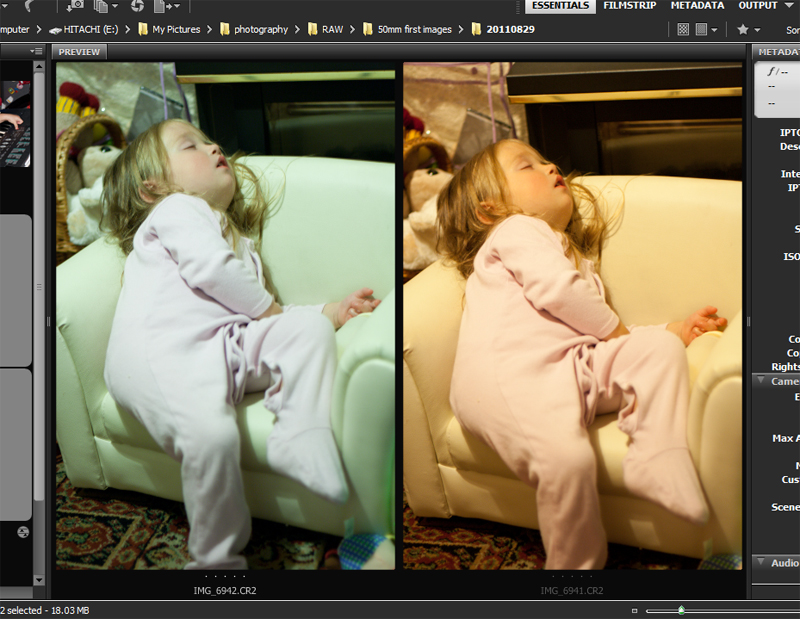
But I have two images I took last night...one with auto WB, one with a custon set WB. totally different RAW files...


Untitled-1 by http://bendthelight.me.uk, on Flickr

It must alter the RAW file in some way...they open in ACR differently...
 
When you open a RAW file in a RAW converter the software must begin the process of RAW to RGB conversion just to show you the image. When it does that it will note what camera settings you used and begin to process the file based on those settings. Had you shot an in-camera JPEG those settings would be "burned into" the RGB file and not easily altered. In the process of converting a RAW file you have the choice at the time of conversion to ignore any camera settings like WB.

Joe
 
The WB setting on your camera only applies to camera processed JPEGs. If you shoot RAW it's meaningless.

Joe

I shoot RAW and set my white balance on the camera. When I import into light room I choose "As Shot".
Why? The "Daylight" white balance setting in camera yields different results from the "Daylight" white balance setting in Lightroom.
Lightroom's WB profiles are slightly different from my Nikon.
 
The WB setting on your camera only applies to camera processed JPEGs. If you shoot RAW it's meaningless.

Joe

I shoot RAW and set my white balance on the camera. When I import into light room I choose "As Shot".
Why? The "Daylight" white balance setting in camera yields different results from the "Daylight" white balance setting in Lightroom.
Lightroom's WB profiles are slightly different from my Nikon.


Absolutely -- no two RAW converters are the same. Your nikon and ACR are different and if you try a third option it may likely be different yet again. I keep four RAW converters on my main system for regular use. I start with ACR (Photoshop/LR) by default but often jump to a different converter when ACR is misbehaving or doesn't have a feature I want. As for WB I haven't met any software in or out of the camera that's worth using with a preset.

The point here is that the camera WB setting is no more than one option out of many when converting a RAW file. The WB is not fixed in the camera.

Joe
 
I have this issue with red lights at shows all the time.

I honestly still haven't figured out how to counter this other than washing the color out a bit with a touch of flash at the venues that call for it.
 
I have this issue with red lights at shows all the time.

I honestly still haven't figured out how to counter this other than washing the color out a bit with a touch of flash at the venues that call for it.

I have started doing the photos for my daughter's drama group. Guess what colour light the lighting guy uses 7 times out of 10? Yep...red! Makes photos all mushy and hard to acquire focus. I may have to look at a decent flash for certain times if I do many more of these.
 
To the best of my knowledge, adjusting the white balance in camera to avoid a single channel clipping won't actually work. (presuming you're shooting raw) If you adjust the white balance to be too cool, so that you have more room on your red channel for instance. You lose whatever room you've saved when you try to get that red channel back in post. I try to go for as-close-as-possible wb in camera (usually using auto, not always cause it can be tricked), that way the channel information that I get is close to what I'll end up with in post. The solution to a blown channel is always to decrease exposure until it doesn't blow.

I do run into the same problem with sunsets as was mentioned, and I think that the scene just has too much dynamic range. I always end up clipping both sides of the histogram with scenes like that, so I usually bracket exposures, and then layer them later.
 

Create an account or login to comment

You must be a member in order to leave a comment

Create account

Create an account on our community. It's easy!

Log in

Already have an account? Log in here.

New Topics

Back
Top Bottom