What's new

Veil Dancers

Granddad

Been spending a lot of time on here!
Joined
Jun 22, 2011
Messages
2,269
Reaction score
1,338
Location
Lincoln, England
Can others edit my Photos
Photos OK to edit
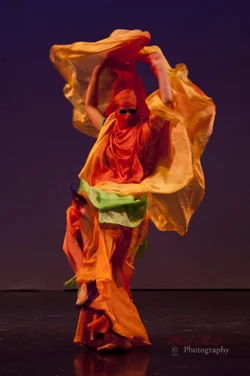
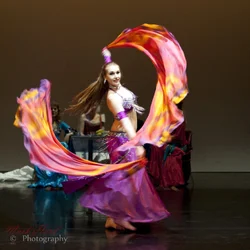
A couple of images of veil dancers shot last weekend at a show in Leeds. No flash permitted so using available lighting. Nikon D700, 1st using my new 50mm f1.4 and the second using my old 80 - 200mm f2.8
C&C are always welcome.

#1 is softer than I'd like but given the motion and the lighting I'm not too ashamed of it.
$ODII-5533b.webp

$ODII-6079.webp
 
Both of these are very soft because you didn't trust your camera.
Shoot at an iso that's high enough to get the result you want and deal with the noise later.
These were shot at iso 800 and thus too slow a shutter speed.
 
True, Lew, I went to 1250 later in the show. I know that's still low and I should be going higher but despite my years shooting in low light I've never figured out how to deal with the noise in an effective and efficient manner. Part of the problem is that I like to have a couple of hundred photos of a show like this one and to have to deal with noise in post on so many isn't practical. I suppose I should be looking at it from the perspective that I have a choice of soft or noise and soft isn't fixable. Right? :scratch: Any tips or pointers to tutorials would be welcome.
 
Granddad,

You comment provoked two responses, one of which was out of the track but, since we are in the same age group and I don't think you will take offense, I feel comfortable making both.

First, in regards noise control on many images, Noiseware, the software I use, is a PS plugin and has a batch action that is downloadable. So you can set it going, go have coffee and come back while the computer does the work. I don't use that capability primarily because my pictures are not similar and with different settings and so I must tweak the individual shots myself.

Second, and you can stop reading here if you like, is in regards to the 'couple of hundred photos'.

I have a good friend who is a marvelous and meticulous flower photographer.

His only fault, imo, is that he takes many, many pictures of the same flower with minute variations and shows them all. Thus the not-so-good ones dilute the impact of the excellent ones. My comment to him is always that I get picture fatigue looking at his galleries; why doesn't he pick the best one or two shots from each group and show those?
Why tire out and confuse the viewer by presenting too much to see?

The same to you.

Lew
 
The first image is not blurry enough to work for movement....I like the second shot but it needs to have the mid range opened slightly to clean out the muddiness Open the levels in shop and lighten it up some ...the image will look better.
 
Granddad,

You comment provoked two responses, one of which was out of the track but, since we are in the same age group and I don't think you will take offense, I feel comfortable making both.

First, in regards noise control on many images, Noiseware, the software I use, is a PS plugin and has a batch action that is downloadable. So you can set it going, go have coffee and come back while the computer does the work. I don't use that capability primarily because my pictures are not similar and with different settings and so I must tweak the individual shots myself.

Second, and you can stop reading here if you like, is in regards to the 'couple of hundred photos'.

I have a good friend who is a marvelous and meticulous flower photographer.

His only fault, imo, is that he takes many, many pictures of the same flower with minute variations and shows them all. Thus the not-so-good ones dilute the impact of the excellent ones. My comment to him is always that I get picture fatigue looking at his galleries; why doesn't he pick the best one or two shots from each group and show those?
Why tire out and confuse the viewer by presenting too much to see?

The same to you.

Lew

Lew, no offense meant and none taken. I'm new enough to this game that advice from experienced photographers is always appreciated. Noiseware sounds like something I could definitely use, I'll look it up.

As for the couple of hundred, my dance show photos have always been on the documentary (reportage?) theme, the performers love to see themselves in photos and they are the audience I've been aiming at - I know a very high proportion of them (my wife is a dancer) and they would probably string me up if I missed anyone out. I sell a CD of photos to them at an affordable price. The minor players use them to show aunty Maud what they've been doing and the principles sometimes use them in their publicity and on their websites. Yes, it's a lot of work and I love every minute. Doing this over three or four years has got me well known and this has become the market that comes to me for dancer portraits.

Having said all that, you've given me a couple of things to to think about and challenge myself with. Firstly to aim for sharper stage photos by taking the time to experiment with higher ISO - learning to trust my camera (that was why I invested in the D700 to start with). Secondly, it would do me good to shoot a show where I'm not trying to please performers who are my friends and to shoot it for myself. Old habits die hard but this old dog can learn new tricks. ;) ... come to think of it, I'm at another show on the 16th and can put these suggestions into operation. I haven't been asked to shoot it so I can do it my way.


Mully... said:
The first image is not blurry enough to work for movement....I like the second shot but it needs to have the mid range opened slightly to clean out the muddiness Open the levels in shop and lighten it up some ...the image will look better.

Yeah, in #1 the blur's in the wrong places and isn't conveying movement well, I picked these to illustrate a point on another thread about the movement/flow of material but I should have picked a better one than #1 - but If I'd done that Lew wouldn't have challenged my use of ISO, so I win after all! #2 has just been through a first pass in Lightroom so I'll put it into PS and address those issues.

Thanks Guys! :)
​
 
Noiseware has a free Community edition. I'd suggest downloading it and give it a whirl. I've used several noise reduction programs over the years, and found, for me, it's the best. As with any of them, some sharpening is required after applying it, but I find much less loss of detail with Noiseware. The free version does what I want, so I've never felt the need to upgrade to the full version, and you may not either. As they say, it's free, so what have you got to lose? C'mon, learn a new trick.

NoiseWare Community Edition - Download
 
Noiseware has a free Community edition. I'd suggest downloading it and give it a whirl. I've used several noise reduction programs over the years, and found, for me, it's the best. As with any of them, some sharpening is required after applying it, but I find much less loss of detail with Noiseware. The free version does what I want, so I've never felt the need to upgrade to the full version, and you may not either. As they say, it's free, so what have you got to lose? C'mon, learn a new trick.

NoiseWare Community Edition - Download

Done. I'll give it a shot. :thumbup: :D
 
Awesome shots, I really like the first one, the colours and circular sense of motion. What kind of show was that? Competition?

I would also definitly recommend Noiseware for noise reduction, I use it a fair amount as well and its def the best (by a long margin) that I've come across. To give you an idea, this is a pretty extreme example:

$1.webp$2.webp

This was taken with a canon 400d at ISO3000, and the camera normally has a factory limit of 1600, (which already is well on the way to staticville). Granted, you would never use this amount on anything other than snapshots you just didnt want to miss and your camera sucks at low light, (like sons first birthday and both my cameras lol), but its a good technical example of what noiseware can do. I'd say you can basically go one stop above your normal "comfortable limit" ISO and recover it acceptably, 2 stops if you absolutly had to. On the 400d my limit is usually ISO400 and I can just about stay decent at 800 with noiseware. (Again, that pic was 3000). Ive left them fairly big so you can zoom in, the sharpness isnt so much a big deal as the 'peeling paint' effect.
 
@ Thayli = OK, I'm impressed. :D
I'll try it out with the free version and it it works as well as I'm told I'll have to buy the full version for the batch processing feature (not available on the freebie).
 

Create an account or login to comment

You must be a member in order to leave a comment

Create account

Create an account on our community. It's easy!

Log in

Already have an account? Log in here.

New Topics

Back
Top Bottom