What's new

What can you do with this picture?

uzland

TPF Noob!
Joined
Nov 16, 2012
Messages
20
Reaction score
0
Location
Virginia
Can others edit my Photos
Photos OK to edit
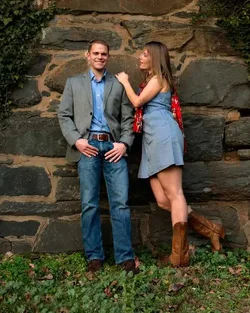
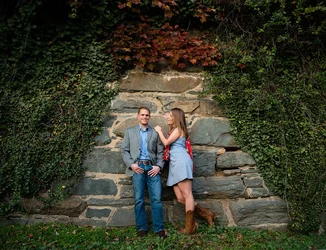
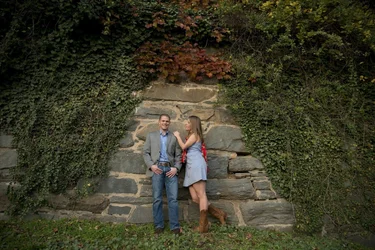
No matter how hard I tried to work on this image, I couldn't make it good looking and appealing. What can you do with it?

Here is the RAW file of it - DSC_4788.NEF
$DSC_4788.webp
 
Why so? I can upload it somewhere else. Any ideas?
 
Sorry, I'm not downloading ANYTHING from Mediafire!

Why?
A more appealing composition might have helped to begin with. I'm updating now. I'll play with it in a minute!
 
personally, I don't care for subjects dead center, nor really far away...to me...they get lost and are not the subject any longer, but could just be a me thing. I'm sure you were trying to play on the scene and structure of the background....

maybe even could have separated them from the background a bit....put some distance between them.

as far as post....it's all a matter of personal taste I think. a good crop and other tid bits maybe. I'll play with it after I eat and see if I can get creative....
 
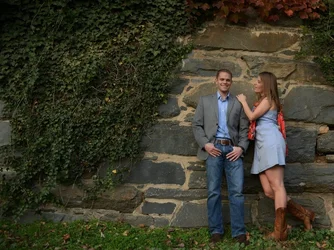
lol, well ps wont open your nef, not sure why as I have all the updates for extensions. but anyway, I like travelers crop.
 
lol, well ps wont open your nef, not sure why as I have all the updates for extensions. but anyway, I like travelers crop.

Apparently you don't have all the updates since it opened in Adobe Camera RAW for me with no problems.
 
lol, well ps wont open your nef, not sure why as I have all the updates for extensions. but anyway, I like travelers crop.

Apparently you don't have all the updates since it opened in Adobe Camera RAW for me with no problems.

I dunno, when it didn't open I went to adobe site and downloaded the latest update, from may 2012 i think, I'll check again.
 
crazy, it opens up my .cr2 files fine, just not the nef. i don't have any other nefs on here to test.
 
Well, you have missed focus on this one. Focus is behind the couple.
The distortion needed fixed first and foremost
This is just a basic edit. Little too contrasty.
8191504827_1b0902ff74_c.jpg


A bit better edit $DSC_4788 as Smart Object-2.webp
 
crazy, it opens up my .cr2 files fine, just not the nef. i don't have any other nefs on here to test.

Did you also boost the clarity and sharpness?
 
Did you also boost the clarity and sharpness?

Don't touch the clarity slider! LOL! You don't need it and it will muddy up your skin tones.
Yes, you have to sharpen a raw image.
For processing raw there are some excellent books on the market. To say "it's complicated" would be an understatement
 
Did you also boost the clarity and sharpness?

Don't touch the clarity slider! LOL! You don't need it and it will muddy up your skin tones.
Yes, you have to sharpen a raw image.
For processing raw there are some excellent books on the market. To say "it's complicated" would be an understatement

I don't use clarity on people, only on objects. I do sharpen at around 50-60 as the last step after all the edits have been done. My concern was more with colors. They are not vivid. Not lively. Very dull colors.
 
Putting the subject dead center rarely works for composition. Try something like this.
 

Attachments

  • $ImageUploadedByTapatalk HD1353123562.058169.webp
    $ImageUploadedByTapatalk HD1353123562.058169.webp
    227.8 KB · Views: 141

Create an account or login to comment

You must be a member in order to leave a comment

Create account

Create an account on our community. It's easy!

Log in

Already have an account? Log in here.

Back
Top Bottom