What's new

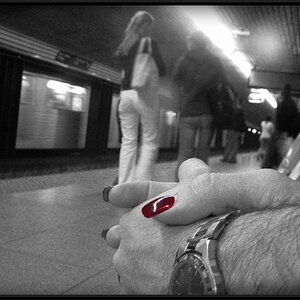
Why aren't these shots in focus?

I was in Aperture Priority mode. Someone told me to try to understand aperture mode first so I am (badly). My ISO is not on Auto. Camera is the Rebel T4i (I know something you all here would never buy) It was all I could afford and it is more than I can handle.
What I don't understand is this - should I have shut down the aperture to force the camera to increase the shutter speed??

thanks

There is nothing wrong with that camera and many folks here use older models. That is a perfectly capable entry level camera. Read the stuff they posted here and read the manual and practice. Master it and you will do well with it.

When I started out I went through at least 20-30K shots before the lightbulb clicked and I started getting it right. Basic exposure triangle and mastering your cameras functions are step 1. Then a whole new world will open to you.
 
Pallycow said:
There is nothing wrong with that camera and many folks here use older models. That is a perfectly capable entry level camera. Read the stuff they posted here and read the manual and practice. Master it and you will do well with it.

When I started out I went through at least 20-30K shots before the lightbulb clicked and I started getting it right. Basic exposure triangle and mastering your cameras functions are step 1. Then a whole new world will open to you.

Thanks. It's just frustrating to be in a once in a lifetime situation and blow the shots.
S the T4i is a decent camera? I'm not sure anymore.
The pictures look much better on the little screen then they do when I add them to iPhoto !
 
Well yea, kinda. but for example, had you increased your iso to 3200, all of the shots would probably be crisp. So its not trivial.
 
Well yea, kinda. but for example, had you increased your iso to 3200, all of the shots would probably be crisp. So its not trivial.

Can you really shoot at ISO 3200 and not just have noise?
Should I adjust the ISO until I get the right shutter speed?
Can the T4i really take clear crisp pictures?
And my biggest frustration is my iPhone 4S takes great pictures everytime no fuss no muss
 
Don't be disappointed. You'll get this right. Were you in aperture priority mode? If so, and you're ISO is NOT auto, the camera is going to do what it has to to get the exposure level correct. in this case, all it could do was decrease the shutter speed. You could mitigate that by upping the ISO, or perhaps by allowing some degree of auto ISO, but different cameras will deal with that setting slightly differently. As a rule, try to keep your shutter speed at or faster than 1/focal length. Make sense?


Camera Maker: Canon
Camera Model: Canon EOS REBEL T4i
Lens: Canon EF 35-105mm f/3.5-4.5
Image Date: 2012-11-24 15:20:12 (no TZ)
Focal Length: 105mm
Aperture: f/5.6
Exposure Time: 0.077 s (1/13)
ISO equiv: 200
Exposure Bias: none
Metering Mode: Matrix
Exposure: aperture priority (semi-auto)
White Balance: Auto
Flash Fired: No (enforced)
Orientation: Normal
Color Space: sRGB
GPS Coordinate: undefined, undefined
Software: iPhoto 9.4.2
 
Your iPhone is fully automatic, you can't adjust anything one it except flash or no flash. Put your ISO to auto, try program auto mode "P"take notice to what the settings are in the viewfinder. That should help give you an idea of what settings are needed for a certain level of exposure in certain lighting.
 
Don't be disappointed. You'll get this right. Were you in aperture priority mode? If so, and you're ISO is NOT auto, the camera is going to do what it has to to get the exposure level correct. in this case, all it could do was decrease the shutter speed. You could mitigate that by upping the ISO, or perhaps by allowing some degree of auto ISO, but different cameras will deal with that setting slightly differently. As a rule, try to keep your shutter speed at or faster than 1/focal length. Make sense?


Camera Maker: Canon
Camera Model: Canon EOS REBEL T4i
Lens: Canon EF 35-105mm f/3.5-4.5
Image Date: 2012-11-24 15:20:12 (no TZ)
Focal Length: 105mm
Aperture: f/5.6
Exposure Time: 0.077 s (1/13)
ISO equiv: 200
Exposure Bias: none
Metering Mode: Matrix
Exposure: aperture priority (semi-auto)
White Balance: Auto
Flash Fired: No (enforced)
Orientation: Normal
Color Space: sRGB
GPS Coordinate: undefined, undefined
Software: iPhoto 9.4.2

How did you get all of that information?
 
Your iPhone is fully automatic, you can't adjust anything one it except flash or no flash. Put your ISO to auto, try program auto mode "P"take notice to what the settings are in the viewfinder. That should help give you an idea of what settings are needed for a certain level of exposure in certain lighting.

OK will try
 
How did you get all of that information?

smiley_bodyguard.gif
I have low friends in high places.
smiley_bodyguard.gif


The data is recorded as part of the image file by your camera. 99.99% of digicams do this. Unless you do something to 'strip' the data out of the file, it's easily read.

It's called EXIF data.

EXIF IFD0

Camera Make = Canon
Camera Model = Canon EOS REBEL T4i
Picture Orientation = normal (1)
X-Resolution = 72/1 ===> 72
Y-Resolution = 72/1 ===> 72
X/Y-Resolution Unit = inch (2)
Software / Firmware Version = iPhoto 9.4.2
Last Modified Date/Time = 2012:11:24 15:20:12

EXIF Sub IFD

Exposure Time (1 / Shutter Speed) = 1/13 second ===> 0.07692 second
Lens F-Number / F-Stop = 28/5 ===> ƒ/5.6
Exposure Program = aperture priority (3)
ISO Speed Ratings = 200
EXIF Version = 0230
Original Date/Time = 2012:11:24 15:20:12
Digitization Date/Time = 2012:11:24 15:20:12
Components Configuration = 0x01,0x02,0x03,0x00 / YCbCr
Shutter Speed Value (APEX) = 29/8
Shutter Speed (Exposure Time) = 1/12.34 second
Aperture Value (APEX) = 5/1
Aperture = ƒ/5.66
Exposure Bias (EV) = 0/1 ===> 0
Max Aperture Value (APEX) = 19239/4285 ===> 4.49
Max Aperture = ƒ/4.74
Metering Mode = pattern / multi-segment (5)
Flash = Flash did not fire, compulsory flash mode
Focal Length = 105/1 mm ===> 105 mm
Last Modified Subsecond Time = 00
Original Subsecond Time = 00
Digitized Subsecond Time = 00
FlashPix Version = 0100
Colour Space = sRGB (1)
Image Width = 3456 pixels
Image Height = 5184 pixels
Focal Plane X-Resolution = 202953/35 ===> 5798.66
Focal Plane Y-Resolution = 104201/18 ===> 5788.94
Focal Plane X/Y-Resolution Unit = inch (2)
Custom Rendered = normal process (0)
Exposure Mode = auto exposure (0)
White Balance = auto (0)
Scene Capture Type = standard (0)
 
How did you get all of that information?

I have low friends in high places.
smiley_bodyguard.gif


The data is recorded as part of the image file by your camera. 99.99% of digicams do this. Unless you do something to 'strip' the data out of the file, it's easily read.

It's called EXIF data.

EXIF IFD0

Camera Make = Canon
Camera Model = Canon EOS REBEL T4i
Picture Orientation = normal (1)
X-Resolution = 72/1 ===> 72
Y-Resolution = 72/1 ===> 72
X/Y-Resolution Unit = inch (2)
Software / Firmware Version = iPhoto 9.4.2
Last Modified Date/Time = 2012:11:24 15:20:12

EXIF Sub IFD

Exposure Time (1 / Shutter Speed) = 1/13 second ===> 0.07692 second
Lens F-Number / F-Stop = 28/5 ===> ƒ/5.6
Exposure Program = aperture priority (3)
ISO Speed Ratings = 200
EXIF Version = 0230
Original Date/Time = 2012:11:24 15:20:12
Digitization Date/Time = 2012:11:24 15:20:12
Components Configuration = 0x01,0x02,0x03,0x00 / YCbCr
Shutter Speed Value (APEX) = 29/8
Shutter Speed (Exposure Time) = 1/12.34 second
Aperture Value (APEX) = 5/1
Aperture = ƒ/5.66
Exposure Bias (EV) = 0/1 ===> 0
Max Aperture Value (APEX) = 19239/4285 ===> 4.49
Max Aperture = ƒ/4.74
Metering Mode = pattern / multi-segment (5)
Flash = Flash did not fire, compulsory flash mode
Focal Length = 105/1 mm ===> 105 mm
Last Modified Subsecond Time = 00
Original Subsecond Time = 00
Digitized Subsecond Time = 00
FlashPix Version = 0100
Colour Space = sRGB (1)
Image Width = 3456 pixels
Image Height = 5184 pixels
Focal Plane X-Resolution = 202953/35 ===> 5798.66
Focal Plane Y-Resolution = 104201/18 ===> 5788.94
Focal Plane X/Y-Resolution Unit = inch (2)
Custom Rendered = normal process (0)
Exposure Mode = auto exposure (0)
White Balance = auto (0)
Scene Capture Type = standard (0)

How do you read it out of the images I posted?
 

Create an account or login to comment

You must be a member in order to leave a comment

Create account

Create an account on our community. It's easy!

Log in

Already have an account? Log in here.

New Topics

Back
Top Bottom