What's new

wife

bribrius

Been spending a lot of time on here!
Joined
Jan 12, 2014
Messages
8,708
Reaction score
1,312
Can others edit my Photos
Photos NOT OK to edit
There is actually a point to this other than cropping hard to avoid nsfw I am going through and considering my white balance settings for effect. This is at 6250.
DSC_0176_3842.webp
 
  • Thread Starter 🔹
  • Banned
  • #2
too warm? or is it in the ball park? trying to figure get to the point I can just choose the white balance I want and still kind of having problems with that my eye isn't working well for white balance and I don't want to use a grey card.....
 
I would crop the hair out and center it. For effect the color is OK I think.
 
  • Thread Starter 🔹
  • Banned
  • #4
I would crop the hair out and center it. For effect the color is OK I think.
so I am on target you think? I am still lost on white balance seems some people just "know" where they want to be and I am still trying for "in the ballpark"
 
We don't know what color the light was. If it was an orange light, then it looks o.k.
 
I would crop the hair out and center it. For effect the color is OK I think.
so I am on target you think? I am still lost on white balance seems some people just "know" where they want to be and I am still trying for "in the ballpark"
Not sure what you want here. If you want correct the white balance your way warm. If you want this orange look your good to go. I actually don't mind this way warm look.
 
The skintone looks orangeish; the shadows look bluish (along the nose). So does the hair to some extent - is that her actual hair color in that light? Looks like it was in lowlight and got more red than a golden glow to it.
 
Yeah, it's really, really warm. If that's the effect you want, you've got it. I agree with Rick50 about centering, maybe not about the hair.
 
  • Thread Starter 🔹
  • Banned
  • #9
nope. going for warm, not orange.

I could very well be semi color blind.
really wish I was one of those people that just "knew" by knowing the lighting and effect they want but maybe that comes with more experience.
don't foret I am the one with the blue snow last year....
 
I would crop the hair out and center it. For effect the color is OK I think.
so I am on target you think? I am still lost on white balance seems some people just "know" where they want to be and I am still trying for "in the ballpark"
Not sure what you want here. If you want correct the white balance your way warm. If you want this orange look your good to go. I actually don't mind this way warm look.
wasn't going for correct white balance but warm. course.. it is orange .


Edit: Thanks guys for the responses, I think I went a little overboard on this one.. lol
 
Last edited:
maybe there is something in between.
out of my range of correcting at this point, once it leaves the camera I only have about six choices for white balance none of which is where I would want it. The one you just put up looks like something I would get if I put it on auto2 warm. chock it up with the blue snow now I have too orange skin tones.
 
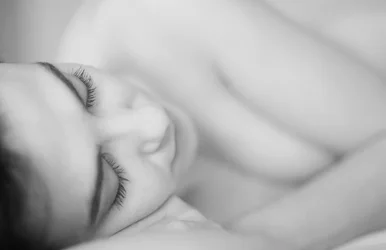
Looks too orange to me. Personally, if I was shooting this (well, if I was shooting this, I'd have some explaining to do about what I was doing with your wife and she was nude...), I'd focus on her eyelashes and go B&W and high key. But that's just my vision of the possibilities here. I've attached an example below to show what I mean.

Lew did a great example of what I was going to effectively recommend: go to the RAW file and try a couple of different versions of the photo by altering the WB. Then look at them. See which one either looks more natural OR achieves the effect you want to achieve. And then you start to learn "okay, when I shoot with this lighting I need this setting." You can even start to play with custom settings.

 

Attachments

  • LDA-308BW-tpf.webp
    LDA-308BW-tpf.webp
    731.6 KB · Views: 144
Last edited:
Looks too orange to me. Personally, if I was shooting this (well, if I was shooting this, I'd have some explaining to do about what I was doing with your wife and she was nude...), I'd focus on her eyelashes and go B&W and high key. But that's just my vision of the possibilities here. I've attached an example below to show what I mean.

Lew did a great example of what I was going to effectively recommend: go to the RAW file and try a couple of different versions of the photo by altering the WB. Then look at them. See which one either looks more natural OR achieves the effect you want to achieve. And then you start to learn "okay, when I shoot with this lighting I need this setting." You can even start to play with custom settings.
Thank you. I have been looking through a lot of nude and partially nude images lately (and no, not porn) and trying to look at the artistic aspects of them. Many are WAY beyond my league for lighting and post processing but I thought I would try it a couple times just to get a idea of attempting those types of more artistic type shots. I did notice the majority of them seem to be in bw (that I saw anyway) just thought I would attempt something a little less tone required and go for the warm white balance. some of the images people have out there for partially nudes and nudes are absolutely amazing, like taking what I attempt to do with a flower photo in bw but ten times better on a person.
Excellent suggestions, thankyou.
 

Create an account or login to comment

You must be a member in order to leave a comment

Create account

Create an account on our community. It's easy!

Log in

Already have an account? Log in here.

Back
Top Bottom