What's new

1st time using RAW: C&C welcome

bunny99123

TPF Noob!
Joined
Apr 24, 2012
Messages
771
Reaction score
110
Location
Sherwood, AR
Can others edit my Photos
Photos OK to edit
Hi,
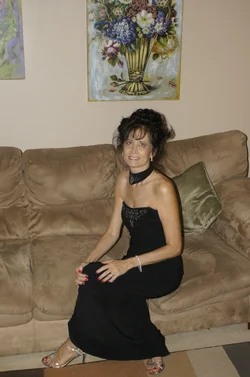
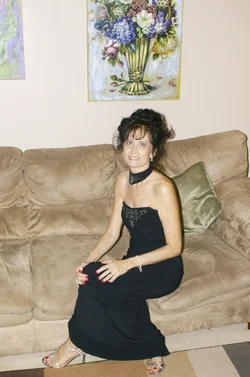
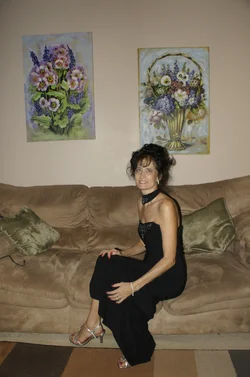
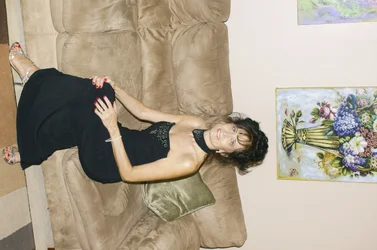
I am learning to make improvements to photographs after I shoot them in RAW. Overwhelmed by it! I took this in RAW. It is taken with a remote timer of myself before an event. Trying to get correct focus is difficult. #1 is the jpeg taken with the RAW. I don't know how to post RAW, since it would not post, so I used the jpeg. I know it is not an adequate comparison. Any pointers would help. I am trying to learn as much as I can, and I appreciate all the help I receive.
Thanks
karen
#1 Jpeg taken when Raw was taken
$_DSC2408.webp

#2 after Raw

$Karen 1.webp

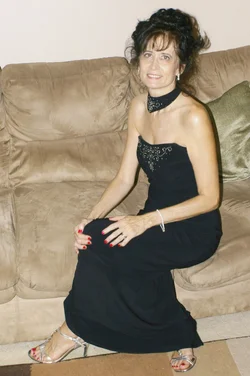
#3 is cropped after corrections
$karen 1 cropped.webp
 

Attachments

  • $_DSC2410.webp
    $_DSC2410.webp
    892.6 KB · Views: 204
  • $Karen 1.webp
    $Karen 1.webp
    1.3 MB · Views: 210
Hi, Bunny. Nice shot! Wow! Who's the model? Zowie!

When your camera makes a JPEG, it probably also "corrects" the exposure. Personally, I don't think the exposure is all that bad, perhaps a little under exposed in the first shot, and over exposed in the second.

Do you have a photo processing software? Which one?
 
I am the model. I thought the one I worked on maybe over exposed. I have CS3 Photoshop 10 and Illustrator and the plug ins. I want to learn how to do RAW in Photoshop, but haven't figured out yet, because I am using a sony software that came with my camera. It has limited options. May have to get a book. Now you know why I feel so overwhelmed. Thanks for your help and commit.
Karen
 
#1 is the jpeg taken with the RAW. I don't know how to post RAW, since it would not post, so I used the jpeg. I know it is not an adequate comparison.

A RAW is not a picture, it's a data file. You need to convert it to JPG in order to post it here.
 
Um.

A RAW is just as much a picture and a data file as a JPEG.

The difference is that internet browsers do not recognize it and cannot display it, since RAW formats arent universal, but depend upon the camera.
 
Ok, I'm not calling anyone out, but some of this is just crap. You can't just give a partial answer to someone who hasn't got a clue. Not fair to them.

So much jumbled information in just one thread.


OP, RAW simply refers to the image untouched. Meaning as your camera captured it. No modifications whatsoever. They are usually file type asociated dependant on the camera. Ie..Nikon uses *.nef my old fuji used *.raw

You must open the file with a program that can read raw files, make your adjustments as needed, then convert to a known filetype. Ie. *.jpg or *.tiff etc.

Where confusion could also set in is from people referring to the program CameraRaw (an adobe program) as "raw". Ie,... "I edited it in Raw, what ya think?"

So there are many uses as it is a very loosely used term, however the basic definition is the untouched data from your camera.

Here's a wiki link just to save you time, tells ya quite a bit about it.

Raw image format - Wikipedia, the free encyclopedia
 
I am the model. I thought the one I worked on maybe over exposed. I have CS3 Photoshop 10 and Illustrator and the plug ins. I want to learn how to do RAW in Photoshop, but haven't figured out yet, because I am using a sony software that came with my camera. It has limited options. May have to get a book. Now you know why I feel so overwhelmed. Thanks for your help and commit.
Karen

Yes, Karen, I know you mentioned that you are the model. Still Zowie!

I do not own CS3, and am not familiar with it. May I assume you got the RAW file uploaded to your computer o.k.? Perhaps a tutorial is where you should start. I think there are some free ones available, so why not look for those first, before you spend money on a book or DVD? At the very least, it will help you sort through all the books to get one that you resonate with.

Additionally, once you have the file in your computer, the software should have enough direction to help you simply start fiddling with the image. Be sure to save the original file so you can start over if you don't like the results.
 
RAW is a digital negative. I recently started shooting RAW and I just use the software that came with my camera DPP (Digital photo Professional). You can convert and save to a jpeg.
 
Ernicus, thank you for the website. It was so helpful. Zowie, you are so funny:) I have been using my software that came with my camera and saving it to jpeg, but there are not many options. Is that normal for Raw software? I know I can use my photoshop to make alterations of Raw, so I am going to spend the weekend watching videos and tutorials about and look up in my photoshop manual how to use Raw in it. I may have to go to my husband's work he has an Apple with the lastest Photoshop. I am determine to learn this, and I know I need lots practice. Thanks everyone for your help:)
 
A few points just to clear things up: As mentioned RAW is a maker-propietary file format which records all of the "raw" (unaltered) sensor data that the camera records. This gives you the greatest latitude for editing allowing for much more highlight and shadow detail. All cameras record RAW, however most consumer non-DSLRs automatically convert the file, in-camera to .jpg or other commonly supported format.

To the OP: I would suggest you download the trial copy of Lightroom 4 from Adobe. It uses the same RAW engine (Adobe ACR) that is in CS, BUT in a much, much more capable form. It is IMO, the best RAW handling application on the market today; you will be amazed at the things that you can with a .nef or .cr2 file using it.

With respect to your posted images, you've made significant improvements to them; this gives you a small taste of what a good RAW handler can do.
 
[...] All cameras record RAW, however most consumer non-DSLRs automatically convert the file, in-camera to .jpg or other commonly supported format. [...]
Err. This makes no sense.

Cameras do not record any file formats. They record picture data. How the data is stored in the camera memory is completely model dependent, might be very complicated, and is completely invisible from the outside. That means the user of the camera does not need to know anything about it at all, ever.


Examples of how picture data in memory of the camera could look like:

Camera memory will be at least one address space, addressed from 0 to n-1, n being the size of the respective part of memory, and typically one address is a byte, but it could also contain larger potions of memory, such as a 24 bit value for a single pixel, or 16 or 32 bit words, or if your A/D chip generates 12 or 14 bit pixel data it could be that, or it could be 36 or 42 bit for the three colors of each pixel, etc. It could also have multiple address spaces, for example one with the 12 or 14 bit pixel data from the A/D chip, the other byte addressed for all other data. It could store pixels together, i.e. first spot for red, second for green, third for blue color of each pixel, or separately, i.e. first all red colors of the pixels, then all green, then all blue. And so on.

Very likely theres also enough space to store multiple pictures in that memory, so where pictures will be stored is dynamic, too, not at the same fixed spot. When taking a picture, the camera will somehow instruct the fotochip to store its data at some address. Or the A/D converter could write it at always the same address and the camera has to copy it first, etc. It will also, somewhere else, store all parameters of the picture it would like to keep.


All kinds of variants are possible. And nobody but the programmer of the camera has to care, because nobody else ever will have anything to do with it.

The only thing the user sees is the final result, the data file stored on the filesystem of your persistent memory stick. File formats are standardized conventions how to store data for later access on some kind of file system. These files are produced from the picture data, which, as just described, might be stored in any number of very complex ways in the camera memory.

Thus, there is no RAW file produced initially. And there is no need to ever create a RAW file if you dont need it. If you need a JPEG, you can convert the picture data in your camera memory directly into the JPEG. Or if you want RAW, you can convert the picture data into RAW. Same for any other file format. All you need is subroutines to create the respective file formats. You never need to create any other file than the one you finally want to have.

Of course its thinkable to store the data of the picture in the memory of the camera in exactly the way it will look later in the RAW file, so storing the RAW file would be just
"create a filesystem file" and "write n bytes starting from memory address m into the new file", but thats very unlikely. For example, most RAW formats are compressed, and the initial data produced by the fotochip is of course not compressed yet.


Oh, and of course you COULD solve this the way you describe, but it would be very slow. The memory on your memory card is much slower than the internal memory of your camera. Thus, if you would first write a RAW file on the memory card, then convert the RAW file into a JPEG, you would be horribly slow and end up having unacceptable performance. Another variant would be creating the RAW file in memory, i.e. without a filesystem, but just like the final file will look like in the filesystem, in memory. But that would be an unnecessary step and slow down the camera, too, though not nearly as much as the first variant. It would also not be easier, but HARDER to program.

Damn its amazing how hard it is to describe something so trivial in general terms to non-programmers. Its actually really very simple, any programmer knows any nontrivial data in memory doesnt look like the data in the datafile.

 
Last edited:
You are eluding that there is not a difference of files be it jpg or raw other than their filetype association, or naming. Which is untrue.

obviously raw is basically a "non existent" file type, as the different manufacturers write the filetype as they choose, ie nikon *.nef cannon *.cr2 , fuji even uses *.raw for theirs, lol. It's simple a made up extension so the end user knows it is the uncompressed file.

The "raw" or uncompressed file is the better one to use as there is more control over the data and it has not been altered in any way. The jpg that the camera creates (and yes...stores on our memory chips...we know) has been adjusted, altered, and compressed based on the settings in our cameras.

So there is a difference. Not quite sure if you intended that or not, but some of your response makes it look as though you are claiming there is not a difference.

Also, while your response is interesting, you posted it as to negate TI's response...and his was pretty dead on balls accurate. The hard part for you might be interpreting it into laymens terms for the rest of the general population.
 
Here's **my** completely non-technical way of explaining it: When you take a picture, each color is recorded on one layer. All the color layers piled in a stack combine together to form your image.

When you shoot in JPEG the image gets compressed somewhat. The color layers all get merged together. When you go to edit a JPEG image, if you adjust one thing (the red for instance) something else has to give, because they are merged together. (Adjust the reds, you'll see the greens get changed too, etc)

When you shoot in RAW, all those layers remain independent of one another, so if you want to adjust just the red, you can- it's not yet stuck to the other layers. You can adjust color, vibrance, saturation all on their own without them adjusting something else.

When you save the image it's usually converted to a JPEG (images merged).

I know it's not very technical and scientific of an explaination, but that's how I think of it.
 
Thank you Solar flare and Ernicus, I know that took awhile to type and explaining it. Momma medic, right on the nail. I do understand the basic of Raw (retired physics and biology teacher). Will down loading the free software. Wanting to know if other software offers more options. I think I have just enrolled in University of Photography. The more I learn the more I realize I don't know:) Thank you all!
 
OP, RAW simply refers to the image untouched. Meaning as your camera captured it.
Raw files get processed a lot before they ever reach the point of being an image a person can see. The image sensor in a DSLR camera is an analog device only capable of recording luminosity, and is not capable of recording color. So all Raw files get recorded on the memory card as grayscale files.

In a Raw converter the Raw file is subjected to a process known as demosaicing. Demosaicing is a process that interpolates the missing color information for each pixel based on a comparison with each pixels neighbors. For most DSLR cameras that comparison is based on the layout of the Bayer Array filter that is in front of the image sensor. Demosaicing includes colormetric interpretation, usually in the CIE XYZ colorspace which is based on human vision, sharpened, tone mapped, antialiased, and some noise reduction is applied.

An important part of the Raw conversion process is applying a non-linear gamma curve to the linear Raw luminosity data, because human vision is non-linear.

For the OP - PsE 10's Raw converter, Adobe Camera Raw (ACR) is heavily de-featured compared to the ACR in CS3. However I would still recommend the following inexpensive books -
Real World Camera Raw with Adobe Photoshop CS5
Real World Image Sharpening with Adobe Photoshop, Camera Raw, and Lightroom (2nd Edition)
 
Last edited:

Create an account or login to comment

You must be a member in order to leave a comment

Create account

Create an account on our community. It's easy!

Log in

Already have an account? Log in here.

Back
Top Bottom