What's new

3rd Professional Photo Shoot-C&C

Kyna

TPF Noob!
Joined
Jan 7, 2011
Messages
175
Reaction score
5
Location
Shell Lake, WI
Can others edit my Photos
Photos OK to edit
Well my weekends are filling up quite nicely :) I just love doing this and I try to learn something new each time.

C&C Please

1.

Addysonedited3.jpg


2.
Addysonedited5.jpg


3.
Addysonedited7.jpg


4.
Addysonedited8.jpg


5.
Addysonedited12.jpg
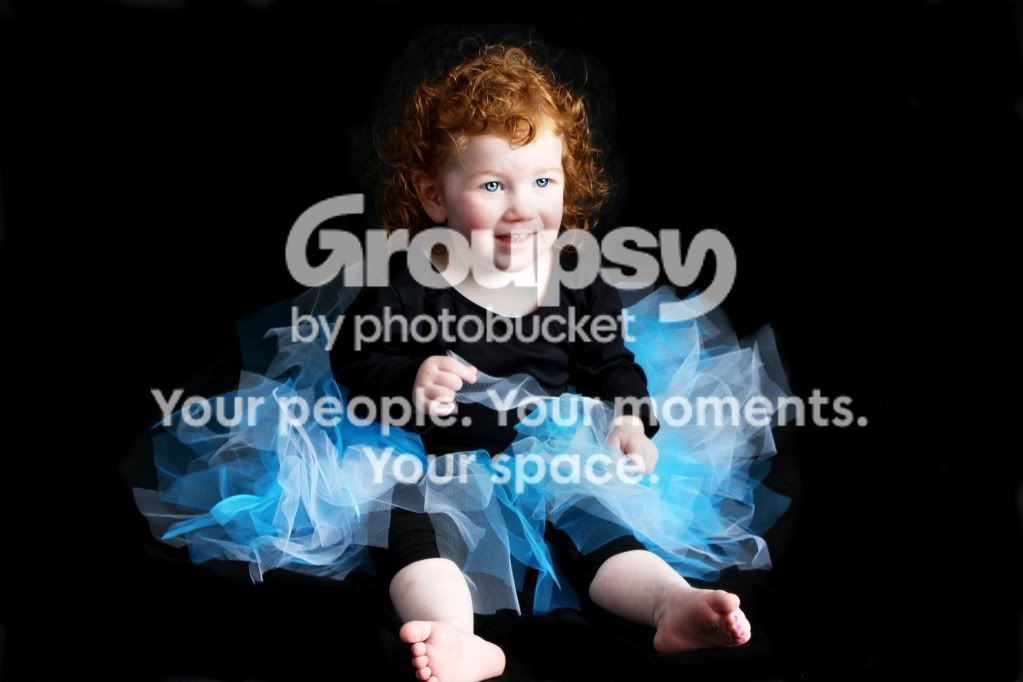
I don't know if you can see it but I had issues with a slight halo affect around her hair. When I darkened the black I couldn't go to close to her curly hair or it would look strange so I burned her hair and the black right around it. I think I got it pretty good and people who didn't know it wouldn't see it......but if you have any ideas on how to do it better?

6.

Addysonedited20.jpg
I don't like selective coloring but the mother requested it.
 
Well I'm not a professional but here are my takes on the set.

1. You shot down on her. Not effective IMO. And again the background seems off kilter to me while she is straight. This makes my brain hurt. Not sure why but I find it odd.

2. Did you crop this? Again you shot down. This is a child portrait no-no. I would soften her skin a bit more.

3. This is the best of the bunch in my opinion. Its a bit centered for my taste. I would have shot it with her more on the left rule of thirds line.

4. Angled shots- I can't even comment on them because personally I find them distasteful. Its not a bad shot but my own personal opinion is angled shots should reflect the purpose of why you angled it. To follow a line or something in the frame and IMO it's not useful here.

5. Not a bad shot, you blew the foot out and cut it off at the edge of the frame. Try to be careful of that. Not sure if you can recover any of that in post but I would try to burn in that foot. Again too centered for my taste but its nitpicky.

6. You got some motion blur going on here hehe. Cute concept though.

Keep practising and thanks for sharing. :hug::
 
I agree with Dee's comments.

I don't know if you can see it but I had issues with a slight halo affect around her hair. When I darkened the black I couldn't go to close to her curly hair or it would look strange so I burned her hair and the black right around it. I think I got it pretty good and people who didn't know it wouldn't see it......but if you have any ideas on how to do it better?
Trying to make adjustments to a background around a subject's hair is almost always a PITA. This, more than anything, is a good point for getting it right 'in-camera'. Rather than have to darken (or lighten) your background, adjust your lighting and/or exposure so that you don't have to adjust your background separately from your subject's hair. Once you figure that out...it's a huge time saver in post production.
 
Motion blur-yes this little lady was a mover.......I was shooting in AV and had alot of issues with motion blur. Looking back I guess I should have been in full manual so I could manually adjust the shutter speed right?
 
I always shoot in manual when I am using flash/strobes. What were you using for lighting? When you use flash/strobes they really help to freeze that motion. Kids are hard, I know I have three of my own and they reluctantly pose for me hehe. Its hard to get them to freeze but using flash or lighting helps.
 
Excellent advice from Dee and Mike. In addition I will add that I think unless we can see why the subject is not looking at us, they should be. In #s 1, 2, 5, and 6 the child seems to be looking somewhere else. I would suggest that perhaps the way to deal with this is the method we use in pet photography. Have the parent directly behind you attracting the child's attention so that they're looking toward the camera. As wel, in almost all of them the face seems soft.
 

Create an account or login to comment

You must be a member in order to leave a comment

Create account

Create an account on our community. It's easy!

Log in

Already have an account? Log in here.

Back
Top Bottom