What's new

A Calm Morning; C&C Please

LeeshyLove

TPF Noob!
Joined
Jun 16, 2011
Messages
10
Reaction score
0
Location
Okanagan
Can others edit my Photos
Photos NOT OK to edit
Edit1.jpg


ISO: 125
20mm
f/6.3
1/160 sec
 
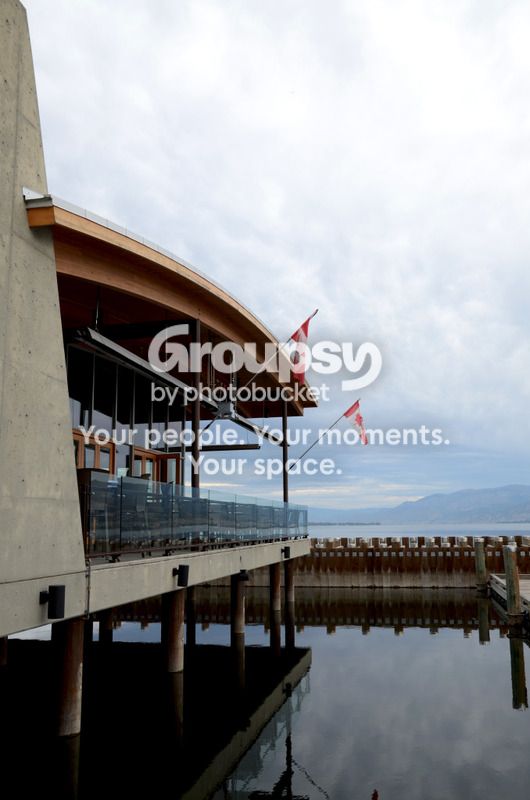
Technically (focus, exposure) it's fine, but to be honest, it's not the most interesting image as there doesn't really seem to be a specific subject. I think you could have done something really interesting with the reflections on the water, but as-is....
 
how might you suggest i go about this next time? what would make it more interesting?
 
Without seeing the scene for myself it's very difficult to suggest alternatives, other than that I think there was potential with the reflections.
 
Where is this? I feel like I have seen it before.

I do agree with Tirediron though, there really isn't an interesting subject in the photo to focus on. Maybe if this was at sunrise or something with the sun in the background or a colored sky it would be more interesting, just a suggestion.
 
Its the hooded merganser in penticton bc
 
This scene begs for HDR.
 
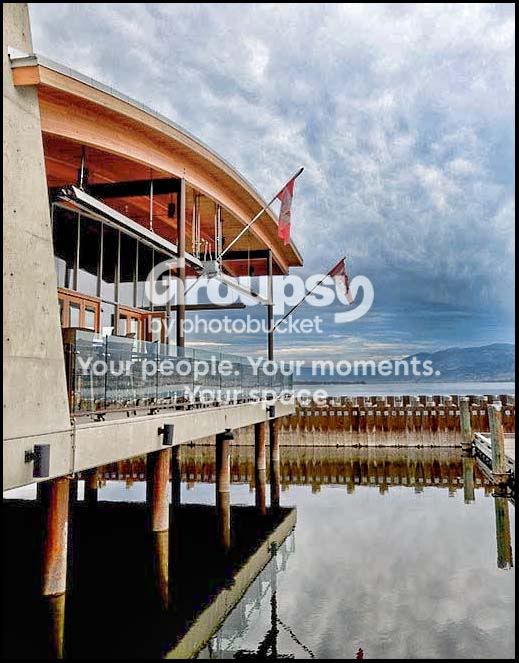
The scene might just have enough dynamic range for a good HDR, but it's close. Two exposures, one for the sky/hills in the background and one for the building/walkways would have been enough.

The sky is about blown. There is a lot of cloud detail that has been lost. Spot metering was used but the EXIF says:

Flash = Flash did not fire, compulsory flash mode

Edit1.jpg


ISO: 125
20mm
f/6.3
1/160 sec

Edit1edit2.jpg
 
Last edited:
Exposure wise and detail in the sky wise, great. There's some noise, though, but that's to be expected when pushing the exposure in shadows and highlights this far, as I'm sure you could lecture is in :)
 
Only in part.

I used CS5 Camera Raw (ACR 6) for my initial edits. ACR 6 is what Adobe put in the Lightroom 3's 'Develope' module for editing. So just those initial edits like Recovery, Fill, Gradient tool, Clarity, etc can also be done in lightroom.

I then did some selections in CS5 for masking purposes, used a couple of adjustment layers, and used some dodge and burn adjustments that Lightroom can't do or just flat doesn't have.

 

Create an account or login to comment

You must be a member in order to leave a comment

Create account

Create an account on our community. It's easy!

Log in

Already have an account? Log in here.

New Topics

Back
Top Bottom