What's new

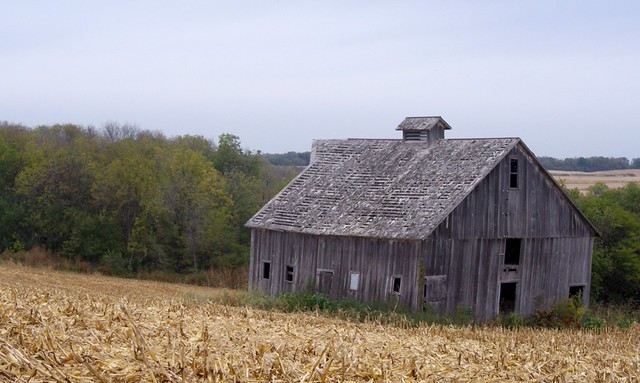
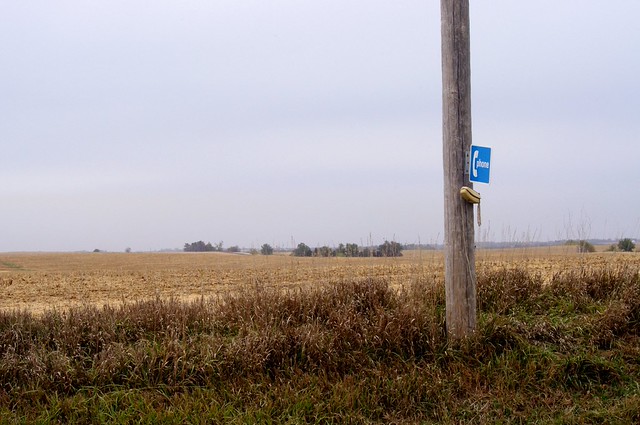
A couple images from rural SE Nebraska. C&C Please

rmagers

TPF Noob!
Joined
Jun 25, 2011
Messages
70
Reaction score
1
Location
Omaha, NE
Can others edit my Photos
Photos OK to edit
1.


2. This just caught my eye as I was in the middle of nowhere.
 
First one is not bad, I do like old worn down farm buildings, don't know why - just me - and that phone in the middle of nowhere - gave me a bit of a chuckle.

My only comment really is that the skies seem to be blown out a bit - no detail, unless that is the way they were/are(?) - I have a similar problem in my part of the western prairies - no clouds - flat, very flat, blue sky most of the day - particularly in the summer and early fall. Also, the colours seem to be a little flat - maybe a bit more saturation - not sure if that is the answer or not. What application are you using for editing and how much editing did you do to these. Also, it could be the conversion to jpg for posting, if you shoot raw, may have some influence on what these look like when you post them. My 0.02¢.

Cheers,

WesternGuy
 
i like the photos. just my opinion, maybe the first in b/w since the sky was not to good, and maybe just a little closer on the phone in the 2nd, so you can really see it. i love it by the way.
have fun
 
I am using GIMP. The only editing that was done was to level the horizon, and and to adjust the color levels a bit. The sky was just that way. A polarizer may have helped.

I do have a one of the phone but liked the landscape in the background to add a little perspective.

I am glad it gave you all chuckle as well. My reaction was the same when first saw it. The strange thing is it appeared to a working phone.

Thanks for the C&C.
 
In #1 the building is tilted even if the horizon is level/straight. When water is the horizon it's always level/straight, but land doesn't always have a level/straight horizon.

But most buildings have straight vertical corners, which is what I used to re-straighten the photo. I cropped away excess image after I had added a transparent light blue gradient to the sky, dodged the end of the barn, burned the side of the barn, increased the exposure of the entire barn a 1/2 stop, and decreased the exposure of the the sky and foliage a 1/2 stop for an overall lighting ratio of 1 stop. Then I added a thin black border.

6271055014_11385326fe_z.jpg


I would have shot #2 with the camera in the vertical orientation.
 
Last edited:
Kmh.. Very well done. I like the version. Thank you for giving the details on what you did. What PP program are using?
 
I love the Platte River valley. I've always wanted to haul my canoe up there.

Nice bucolic barn photo. It needs white balancing and a contrast boost. In your version the barn is blue/magenta.

barnne.jpg


I also darkened the sky (maybe a little heavy handed) by stacking dupe layers and applying a multiply blend and mask. GIMP can do it.

Joe

 
I love the Platte River valley. I've always wanted to haul my canoe up there.

Nice bucolic barn photo. It needs white balancing and a contrast boost. In your version the barn is blue/magenta.

barnne.jpg


I also darkened the sky (maybe a little heavy handed) by stacking dupe layers and applying a multiply blend and mask. GIMP can do it.

Joe

Nice edit. I have been playing with dupe layers and multiply blend and mask with in GIMP. For a free PP program it has some powerful tools. This was my first trip to the Platte River Valley. Moved to Omaha from Louisville KY, in January and am looking forward seeing what Nebraska has to offer.

Thanks for the C&C and the edit.
 
I use Photoshop every day, and so did the above using Photoshop, but I agree GIMP is very capable. Just for the exercise I went back and tried to replicate the same changes using GIMP and I was able to make it work. The trick was getting an effective mask between the sky and foreground. I used GIMP's Color Selection tool to select the sky and then I selected Grow form the Select menu and expanded the selection by 3 pixels. After the mask was created from the selection I applied a Gaussian blur to the mask to blend the edge.

Joe
 

Create an account or login to comment

You must be a member in order to leave a comment

Create account

Create an account on our community. It's easy!

Log in

Already have an account? Log in here.

Back
Top Bottom