What's new

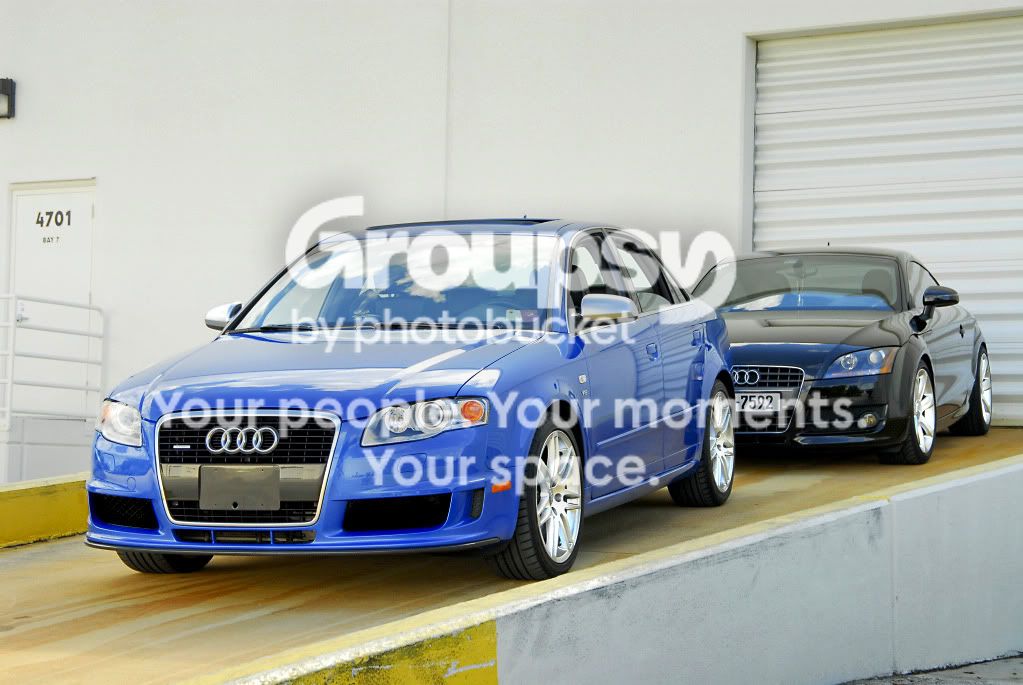
A little shoot of my TT and an S4

Brentmeister7592

TPF Noob!
Joined
Nov 15, 2010
Messages
14
Reaction score
0
Location
South Florida
Can others edit my Photos
Photos OK to edit
Well me and a buddy of mine went out to take a few pictures of our cars. I have never really went out shooting of my car (not sure why), and he just picked up the S4 so we wanted to get a few shot of it in stock mode for progress. Well heres a few of what I came up with... [cool]

C&C is appreciated. I'm all ears :thumbup:

The TT:

edited-8.jpg


edited-11.jpg


edited-18.jpg


Why not get creative?....
edited-14.jpg


The S4:

edited-4.jpg


edited-6.jpg


edited-5.jpg


edited-1.jpg


Audi on Audi Action ;):

edited-13.jpg


edited-17.jpg


edited-19.jpg


A few for fun :lol::

edited-11_2.jpg


edited-7.jpg


HDR_TT_side_2.jpg
 
Last edited:
They all look hdr, and unfortunately that gives you a lot of really distracting reflections.

The last s4 shot is probably my favorite, though cropping out that window on the top left would make the shot much better.

Its an awesome location you got there, keep on shooting!
 
They all look hdr, and unfortunately that gives you a lot of really distracting reflections.

The last s4 shot is probably my favorite, though cropping out that window on the top left would make the shot much better.

Its an awesome location you got there, keep on shooting!

I'm not sure why they all appear HDR, because all of them except the last 3 have very basic post processing. Basically just played with the levels to set the white/black point of each photo.

As far as the reflections, that may be due to the fact that I lacked a polarizer. That is definitely going to be my next investment!
 
They all look hdr, and unfortunately that gives you a lot of really distracting reflections.

The last s4 shot is probably my favorite, though cropping out that window on the top left would make the shot much better.

Its an awesome location you got there, keep on shooting!

Edited the window :thumbup:

edited-1.jpg
 
I really like this one:

http://i175.photobucket.com/albums/w153/Brentmeister7592/edited-11.jpg

although most of the images seem washed out in a way, I'm thinking overexposed slightly. Perhaps use of a lens hood, or a slightly darker exposure would help bring out more of the color and depth in the paint.

For example, this shot:
http://i175.photobucket.com/albums/w153/Brentmeister7592/edited-19.jpg

it seems the blue in the S4's paint is really dull. This could be altered a bit with curves/levels in photoshop. I went through my usual workflow with this image to aid in the presence of the cars.

I opened levels, and since you picked th eblack and white points, I slid the middle arrow over just a tad to darken up the bright background. I then went into curves and did a slight color/contras boost by doing a gentle "S" curve (not unlike this one http://voorste.net/tutorials/Newspaper_to_print/photoshop_curves_s_curve.png ). After that, I did a touch of sharpening with a mild unsharp mask, and then dodged the wheels a bit on highlight mode and burned the two lower grills to make the bodywork more agressive and hide the factory plastic mesh. Let me know if it works for you. It's by no means a perfect workflow but I usually start with all of these things more or less with all of my automotive photography.

audi.jpg
 
The rear windows on some 4 door cars do not go all the way down as a safety feature. It's unfortunate for the fact that it doesn't look as good :P.

Beautiful cars :thumbup:.
 

Create an account or login to comment

You must be a member in order to leave a comment

Create account

Create an account on our community. It's easy!

Log in

Already have an account? Log in here.

New Topics

Back
Top Bottom