What's new

adjusting exposure

paigew

Been spending a lot of time on here!
Joined
Nov 15, 2011
Messages
3,935
Reaction score
1,876
Location
Texas (Hill Country)
Can others edit my Photos
Photos NOT OK to edit
I just watched a tutorial about how to adjust the exposure on my camera. I am having a hard time understanding when and how much I should do this. Can someone show me some examples?
 
Are you referring to using exposure compensation (for such things as shooting a field of snow)? Or just for obtaining optimal exposure in manual and/or semi-manual modes?
 
Are you referring to using exposure compensation (for such things as shooting a field of snow)? Or just for obtaining optimal exposure in manual and/or semi-manual modes?

The second. How do you know if it needs to be adjusted?
 
Well if your shooting in manual mode, then no matter what scene your shooting, your exposure is going to differ. In full manual, the camera won't do any changes, it's all up to you. If your shooting outside in full sun, vs shooting outside in the shade vs shooting indoors, you'll have to adjust accordingly. Your camera should have a built in meter, and it's just a matter of learning how to read it, and knowing what to change based on what your shooting. You may have to adjust your shutter speed, aperture, or even your ISO. If you've not already done it, have a read through your manual to learn how to read your meter and how to do the needed adjustments. Then once you know that, then it's just a matter of learning what to change under what conditions.

 
You first have to understand what 'properly exposed' means. This can be different things to different people but one explanation of a properly exposed image is to set the exposure such that the image contains as much shadow detail as possible without blowing out the highlights. The amount of light falling on your sensor is determined by the aperture of the lens (analogous to how wide the tap is open) and the amount of time the shutter is open (the amount of time the tap is open). The iso setting of the camera then determines the amount of amplification you apply to the resulting electrical signals generated by the sensor (you might equate this to the size of the bucket - but not exactly).

Your camera has a built in light meter and that light meter attempts to guide you in your selection of shutter speed, aperture and iso. In very simple terms it will try to make it so that an average scene will be rendered in an average sort of way. When you operate in manual mode and you half press the shutter look in your viewfinder and find the meter display. Your manual will explain where that is. The meter will indicate if in its opinion you need to decrease or increase the exposure. You do this with a change of aperture, a change of shutter speed, a change of iso, or a combination of any of them. You decide. Aperture and shutter are usually the easiest ones to change while peering through the viewfinder. The object is to get to a combination that the meter is happy with. You can then review the results on your lcd display. You might be well served in learning how to display the histogram and how to read it. Another important subject for you to understand is how your camera's meter operates in its various modes. Remember that your camera, although very sophisticated, is not very intelligent. You, the operator, is responsible to determine if the various decisions it made are correct and to react accordingly.

When you operated your camera in one of the semi-auto modes (actually any mode other than manual is 'auto') you constrain the aperture or the shutter speed and let the camera worry about the rest. You, however, still have to decide if it made the correct choices or not.

Read your manual, it has a lot of useful information in it. Go to the library and read some photography books.
 
With film, we exposed for the shadows and let the highlights look after themselves, because of the way film works.

Because of the way digital cameras work we need to expose for the highlights, and let the shadows take care of themselves.

DSLR cameras have a built-in reflected light meter and several light metering mode to choose from, that help you decide if the exposure needs to be adjusted:
Spot metering - the most accurate because spot mode meters the smallest part of the image frame.
Center-weighted - which meters the entire image frame but gives more attention to the central part of the frame.
Matrix/Evaluative - which just takes an average of the entire image frame.

Understanding Camera Metering and Exposure

Be sure and read all the tutorials at that web site: Digital Photography Tutorials
 
Interesting question. Unfortunately, there isn't an easy answer. Your meter still tries to interpret the main subject that you're focused on, so that it looks like grey. You need to decide if the image is lighter or darker and adjust accordingly by opening or closing the aperture 1/3-1/2 stop. What type of metering you use also depends on the subject. For scenics I prefer matrix as it averages the entire scene, but for everything else I use spot. In tricky situations with a lot of contrast, try bracketing. The odds are one of the 3 pictures will be nearly perfect. There is also one other issue, we can see about 10 stops, while a digital camera can only interpret about 4 stops max. So you're going to have to make a decision on what's important and what's not. You can use a graduated ND filter to help tone down the highlights, or even HDR imaging for a composite picture will work.

The best method is just plain old experience by taking a lot of pictures, and even taking some notes till you get your technique down.

Joel
 
here is a photo I took today. It seems over exposed to me (face really bright). Am I correct? So I should have adjusted my exposure down a 1/3 stop or two?
8545d7d3.jpg
 
Thank you patrice for your in detail response! I wish I could just go to the library :lol:. But as a stay at home mom I don't see that happening. Thank goodness for internet!
And thanks to everyone else for your responses! I will read the website links you guys provided to me. I appreciate all your help!
 
There is also one other issue, we can see about 10 stops, while a digital camera can only interpret about 4 stops max.

Joel.. modern cameras see about 10 to 11 stops of light.. not 4. And humans see about 24 stops max, if my memory serves me correctly! (10 to 14 stops at any single iris opening!)

EDIT: Got me curious about this.. so did some searching http://www.cambridgeincolour.com/tutorials/dynamic-range.htm

The best method is just plain old experience by taking a lot of pictures, and even taking some notes till you get your technique down.

I disagree... I think that taking one picture.. dissecting it, examining it, figuring out what is wrong with it, and then finding out how to fix it... will teach you much more than firing off thousands of pictures without knowing what you are doing! Taking notes on each and every shot IS a good idea... at least until you have conquered that particular shot.
 
here is a photo I took today. It seems over exposed to me (face really bright). Am I correct? So I should have adjusted my exposure down a 1/3 stop or two?
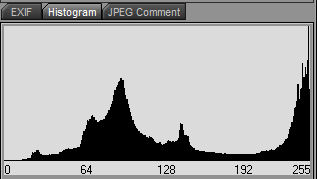
More like a couple of stops. Look at the histogram of the photo. You'll see how a lot of the data is bunched to the right side (the white side) yet the left side hits the bottom of the histogram well before the left side. There is a block of midtones but those are primarily the background (her chair and the wall behind). Everything is shifted to the right, or overexposed. The white values are clipped yet there is no true "Black" in the image. That tells you, right on the spot, that it is well overexposed.

histogram1.jpg
 
here is a photo I took today. It seems over exposed to me (face really bright). Am I correct? So I should have adjusted my exposure down a 1/3 stop or two?
More like a couple of stops. Look at the histogram of the photo. You'll see how a lot of the data is bunched to the right side (the white side) yet the left side hits the bottom of the histogram well before the left side. Everything is shifted to the right, or overexposed. The white values are clipped yet there is no true "Black" in the image. That tells you, right on the spot, that it is well overexposed.

okay I see, I think I need to adjust my camera so I can see the histogram then before I take the photo. I will practice this, thank you.
 
With film, we exposed for the shadows and let the highlights look after themselves, because of the way film works.

Because of the way digital cameras work we need to expose for the highlights, and let the shadows take care of themselves.

What he said. That's very good advice. It's a lot easier to pull detail from the shadows than to compensate for blown highlight details. Once highlights are gone they are gone. Shadows, on the other hand, frequently contain a lot of data that just needs to be brought out. One caveat, however, is that frequently some of the detail in shadows can be noise.
 
okay I see, I think I need to adjust my camera so I can see the histogram then before I take the photo. I will practice this, thank you.
Close. You need to adjust it so you can see the histogram AFTER you take the shot. You can't see it beforehand but you can use what you see after taking a shot to adjust for a second one.
 

Create an account or login to comment

You must be a member in order to leave a comment

Create account

Create an account on our community. It's easy!

Log in

Already have an account? Log in here.

Back
Top Bottom