What's new

advice to were im going wrong

beds

TPF Noob!
Joined
Nov 6, 2011
Messages
39
Reaction score
2
Location
United Kingdom
Can others edit my Photos
Photos OK to edit
hello all

i went to the sea today to get some photos of the sea and the rocks etc, i wanted a slow shutter speed to give that glow effect on the incoming waves.
but every photo i took it just came back a bright white screen, i would change the aperture and the iso but nothing changed in the end product, the only way i could get pictures taken was to adjust the exposure which automatically changed the shutter speed?

is there a way around this?

thank you
 
Sounds like you need to do a little more reading on exposure - Understanding Exposure by Bryan Peterson is a good starting point.


As for your specific situation, what mode were you shooting in and what settings were you trying to use? It sounds like you were using aperture priority mode
 
You were overexposing the photos. If you want to get the cotton effect from flowing water in the daytime, you need to use something like a Neutral Density or Graduated Neutral Density filter which will block the overall light coming into the lens, which will in turn allow for longer shutter times without over-exposing.

Using Neutral Density Filters for Landscape and Waterscape Photography | Alex Wise Photography

"The Ultimate Guide To Neutral Density Filters" by Peter Hill | RedBubble

Edit: One more link perhaps the best one.

Luminous landscape
 
cheers guys, will read up on exposure

i was shooting in Manual mode and also tried shutter priority
 
Hmm you say the camera was automatically changing the shutter speed? In neither of those modes should the camera be automatically adjusting the shutter speed unless you were also using an attached/popup flash on the camera (even then it wouldn't change the shutter speed in manual mode by default).
 
i have a canon 1100d and if i scroll the exposure wheel when im ready to take the shot it adjusts it to the best shutter speed for the shot
 
If you want to smooth out the water by using a longer shutter speed, you need a ND filter to cut down the amount of light entering the camera or choose a different time when you do not have a lot of light in the scene. i.e. Before sun rise or after sun set.

i.e.
I took this shot at 9pm at night in the summer with shutter speed of 20 secs.

4472603729_4c93accd82_z.jpg
 
I think you might be understanding something wrong (or explaining it strangely)- the camera when working itself wouldn't give you pure white shots if it was automatically adjusting the shutter speed to the best possible for the scene. Also in Shutter priority mode the camera shouldn't be changing the shutter speed at all - that is your job; the camera adjusts the aperture and ISO (if you have auto ISO enabled only).

It shouldn't overexpose to pure white unless you'd already put the shutter speed so slow that the aperture could not close down any more and the ISO lower in order to allow for a good exposure.

If you could post an example photo and also post in more detail the method you used that would help
 
Also, you may need to read more about exposure and how to obtain a correct exposure. What is the relationship between shutter speed, aperture and ISO value with the exposure value.
 
I think you might be understanding something wrong (or explaining it strangely)- the camera when working itself wouldn't give you pure white shots if it was automatically adjusting the shutter speed to the best possible for the scene. Also in Shutter priority mode the camera shouldn't be changing the shutter speed at all - that is your job; the camera adjusts the aperture and ISO (if you have auto ISO enabled only).

It shouldn't overexpose to pure white unless you'd already put the shutter speed so slow that the aperture could not close down any more and the ISO lower in order to allow for a good exposure.

If you could post an example photo and also post in more detail the method you used that would help

Its my explaining thats confusing, when shooting in M mode, i set the shutter speed, then the iso and then the aperture, when i look through the camera ready to shoot the little exposure bar will tell me how underexposed or over it is, it is when i manually adjust this that the shutter speed will come back to 1/30th or so and the photo will come out but without the blurred water i was looking for, i think an ND filter is needed after the advice given

In Shutter priority mode my iso wasn't set to auto therefore my fault entirely

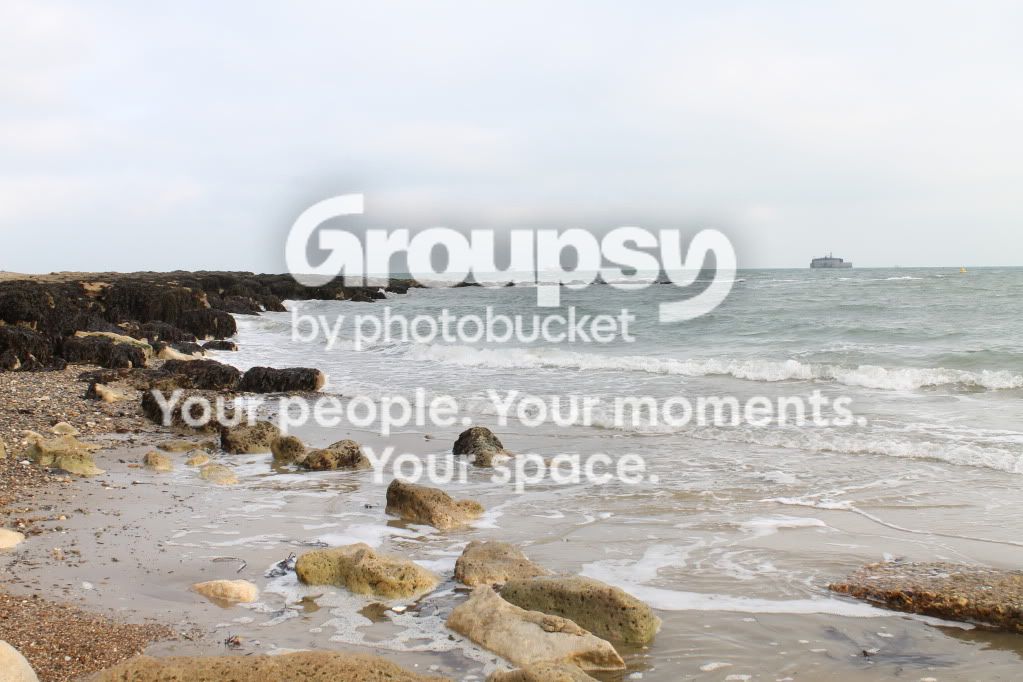
This is a pic i took today,

IMG_1389.jpg


not a great shot but was just hoping to get out and learn about the camera more, which i did! in the background you can see a fort, someone lives in there, wouldnt fancy it myself, its about 2 miles from shore!
 
beds said:
In Shutter priority mode my iso wasn't set to auto therefore my fault entirely

This is a pic i took today,

You don't want your ISO set to auto. What were you setting your ISO to? If you were setting the aperture and the ISO then adjusting for what the meter reads as a correct exposure then you were changing the shutter speed. Raising your ISO can/will give you a higher shutter speed
 
thank you Megan,

i was setting the iso to 400 i think, not to bright out, but not dull either, so setting the iso to around 1000 would need a slower shutter speed?
 
thank you Megan,

i was setting the iso to 400 i think, not to bright out, but not dull either, so setting the iso to around 1000 would need a slower shutter speed?

ISO 100 or the lowest setting on your camera.
 
beds said:
thank you Megan,

i was setting the iso to 400 i think, not to bright out, but not dull either, so setting the iso to around 1000 would need a slower shutter speed?

Setting it to ISO 100 would probably give you a slower shutter speed. ISO 1000 would give you a faster shutter speed. Set your ISO to 100, then choose a smaller aperture (f/11). Then you will have to adjust the shutter speed. If its still too fast (according to the meter) close your lens down even more (f/16).
 
cheers guys, yea 100 is the lowest it goes.

i initially only purchased my camera as i wanted to get into portrait photography, but worth learning every aspect
 

Create an account or login to comment

You must be a member in order to leave a comment

Create account

Create an account on our community. It's easy!

Log in

Already have an account? Log in here.

Back
Top Bottom