What's new

Basic Help

Sorry. Thank you for posting the directions, and I edited the post so that hopefully, it can now be viewed.
 
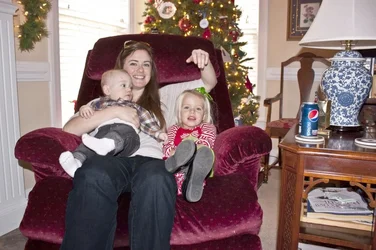
Not much you can do about it now other than crop above the knees. They are just much closer to the camera making them look larger.
 
Shooting from a higher perspective will change the relative distances of the subject (closer) and the knees (farther) relative to the lens.

Also zooming in to a tighter composition will remove much of the background distraction from the subject (since in this case, the background context distracts from rather than adds to the subject of the photo).
 
Hi Ron, welcome to TPF. You are blessed with a nice little family.

As for the photo. There are a number of things that could make this better if you decide to redo the sitting.

Photograph from higher up. Not too much mind, you don't want the impression of looking down on them. At the eye level of your wife would be good or just a bit higher.

Compose the image a little tighter. There are too many unnecessary elements in the photo, especially on the right hand side. Don't know which camera or lens you have but a longer focal length is an easy way to do it without getting too close.

Now, don't get too close, better to crop the image than to stand too close. Getting in close exaggerates the scale of things in the foreground, like her knees and lower leg in this instance.

Pay attention to what is going on in the background. You don't want too much going on there as it detracts from the main subject.

Try and get both kids (adorable, both of them) to 'look at the birdie'.

In a classic sitting down group shot like yours try to vary the height of the eyes of the subjects, as you have done.

Have your wife and the kids sit straight up, or even just slightly leaning forward with their chins just a tiny bit up. If you can get them to pay attention that long.

Just a few things to consider, there are more but it's a start.

Enjoy the rest of the holiday season.
 
Compose the image a little tighter. There are too many unnecessary elements in the photo, especially on the right hand side. Don't know which camera or lens you have but a longer focal length is an easy way to do it without getting too close.

Now, don't get too close, better to crop the image than to stand too close. Getting in close exaggerates the scale of things in the foreground, like her knees and lower leg in this instance.

I hate to pick nits, but I think this one is important enough to warrant it.

"Getting in close" by moving closer without zooming will exaggerate the scale of things.

Getting in close by zooming in without moving will not exaggerate the scale of things.

And getting in close by backing up and zooming in (counter intuitive) will diminish (flatten) the relative scale of things.

I'd suggest Ron try all three as an experiment with his willing subject tonight... to see for himself what the differences are

:-)
 
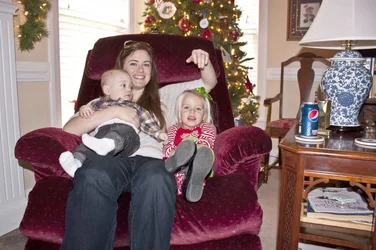
I agree with the compositional points made by previous responders. However if you cannot do it over and you just want to reduce the prominence of her legs just reduce their brightness in Photoshop. Your profile says it is ok to edit your photos so here is about 1 minute's worth of Photoshop on it.
$Untitled-2.webp
 

Attachments

  • $Untitled-2.webp
    $Untitled-2.webp
    134.5 KB · Views: 81
Agree with all the above, and please crop out everything on the right third of the frame....
 

Create an account or login to comment

You must be a member in order to leave a comment

Create account

Create an account on our community. It's easy!

Log in

Already have an account? Log in here.

New Topics

Back
Top Bottom