What's new

Before and After, Critique Please

90AWDSM

TPF Noob!
Joined
Apr 11, 2008
Messages
47
Reaction score
2
Location
Moreno Valley, Ca
Can others edit my Photos
Photos OK to edit
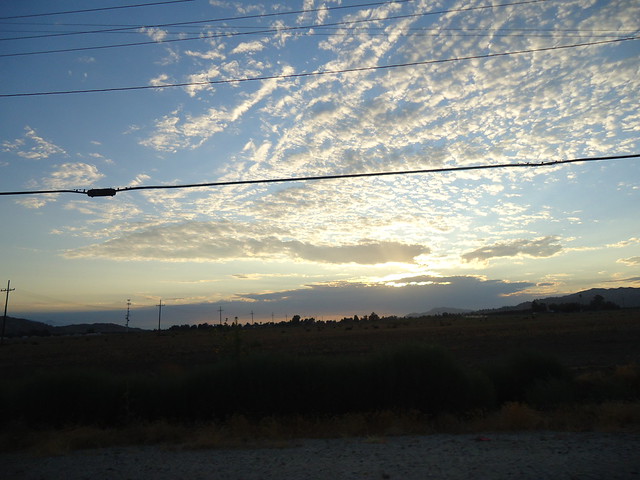
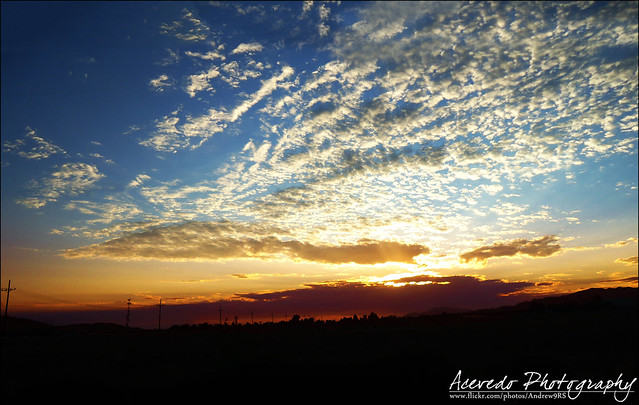
My first time Trying to get rid of a foreign object in a picture. How did I do?


Before


6235155759_aeae5e869c_z.jpg


After


6235129893_7041f840c9_z.jpg
 
Looks good to me - I'm on my phone so I can only see a small image but looks good.
 
It looks like the top center clouds (just a bit to the right) got a little messy, other than that you can't tell the difference. What did you use? I will usually use the Spot Healing Tool, then clone some similar textures over the top of that. Spot healing alone sometimes seems to leave a pattern, rather than a correction.

If you want to be 100% sure that you cannot tell the difference, try a B&W layer mask and adjust the sliders to make certain area's darker and lighter. As you make it dark you can start to see where you used the clone/healing brushes, it will usually show up as a brush sized line that is a little lighter.

After messing with your pic that is the only oddball spot I found so I think you can call it a win :D

edit.jpg
 
Last edited:
It looks like the top center clouds (just a bit to the right) got a little messy, other than that you can't tell the difference. What did you use? I will usually use the Spot Healing Tool, then clone some similar textures over the top of that. Spot healing alone sometimes seems to leave a pattern, rather than a correction.

If you want to be 100% sure that you cannot tell the difference, try a B&W layer mask and adjust the sliders to make certain area's darker and lighter. As you make it dark you can start to see where you used the clone/healing brushes, it will usually show up as a brush sized line that is a little lighter.

After messing with your pic that is the only oddball spot I found so I think you can call it a win :D

edit.jpg

Thank you very much, This is a way of doing things that i would have never thought about. I agree and that was a tough part I was having problems with. No matter what I did to try and correct it, It wasnt coming out as I was planning on so Just let it be. Thanks you for your insight and comments as It will now help me improve my work.
 
I think your problem in this photo was using a brush that was too large. When you get into areas that have high detail, take you time and use a small brush. Typically in the sky, clone/heal different colors seperately. What I mean is don't drag the healing brush across the sky with 1 mouse click. When you are painting over contrasting colors, such as a white cloud on a blue sky, 1 click to the edge of the cloud, release, then click again on the blue sky. This also seems to make life a lot easier.

the more tedious an image is to edit, the more likely you are to sit back and just say "is this really worth it". Sometime's you can spend hours on something and just end up hating it. In this case, it would have been, it is a killer pic ;)
 
Other than the top where you have some repetitive lines it looks really good, I like the enriched colours too.
 
Other than the top where you have some repetitive lines it looks really good, I like the enriched colours too.

Yeah, I need to practice more on Cloning, Healing and all that. My first time trying it out and just from a few replies i've already learned a few things.

Thanks again!
 

Create an account or login to comment

You must be a member in order to leave a comment

Create account

Create an account on our community. It's easy!

Log in

Already have an account? Log in here.

New Topics

Back
Top Bottom