What's new

Beginner Photographer Tips

XTIRebel

TPF Noob!
Joined
Apr 28, 2012
Messages
6
Reaction score
0
Can others edit my Photos
Photos NOT OK to edit
Hi all! :sexywink:

I got a Canon EOS Digital Rebel XTI for my birthday in October. I wasn't that into it.
Now, after playing around with it I got VERY interested. I took picturess of animals, my fish tank, my family, scenery. I even got into editing photos! But I look at other novice's photos and I get discouraged. Their photos are so much better than mine.
I have a 28-80mm lens, btw.

All I am asking for is some tips for a beginner that could really make me better as a photo taker.

Thanks in advance,
XTIRebel.
 
post some shots.. that will show us where you need improvement! That is probably the best way to start....
 
$IMG_0972.webp$IMG_1089.webp$IMG_0531.webp
 
The good news is that you have a perfectly capable camera and lens! You just need to increase your knowledge. You will also benefit from editing/processing your photos if you do not already. If you do not, you are letting the camera take control, which is not good if you want to improve.

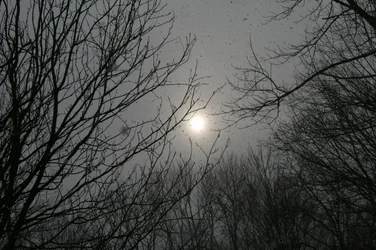
#1 Assuming you were trying to get detail in the moon, the shot is very overexposed. I'm assuming that's the moon and not the sun, not that it matters. It's common for camera settings to overexpose the moon because it is surrounded by black. The camera meter tries to average the scene to a middle gray. So the dark sky becomes grayish and the moon blows out, losing all detail. Try "Spot metering".

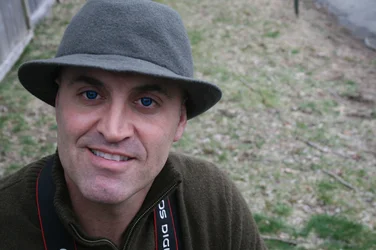
#2 Not bad really. Sharp focus, nice soft light, and the eyes under the hat aren't dark. The image is a bit on the blue side. You can either set your white balance manually (choose an appropriate setting such as "cloudy") or shoot in raw mode and adjust it after the fact. The landscape orientation of the camera doesn't make much sense here as there really isn't anything of interest in the background to balance against the person (you?).

#3 This is a typical on-camera-flash pet shot. Eyes go zombie-like, like red-eye with humans, but a different color because of, I guess, the difference in consistency of their retinas. Also, the light is very flat and harsh... also typical of the pop-up flash. Take this exact same shot next to an open-shade window and you'll get a much better result.

GL.
 
The good news is that you have a perfectly capable camera and lens! You just need to increase your knowledge. You will also benefit from editing/processing your photos if you do not already. If you do not, you are letting the camera take control, which is not good if you want to improve.

#1 Assuming you were trying to get detail in the moon, the shot is very overexposed. I'm assuming that's the moon and not the sun, not that it matters. It's common for camera settings to overexpose the moon because it is surrounded by black. The camera meter tries to average the scene to a middle gray. So the dark sky becomes grayish and the moon blows out, losing all detail. Try "Spot metering".

#2 Not bad really. Sharp focus, nice soft light, and the eyes under the hat aren't dark. The image is a bit on the blue side. You can either set your white balance manually (choose an appropriate setting such as "cloudy") or shoot in raw mode and adjust it after the fact. The landscape orientation of the camera doesn't make much sense here as there really isn't anything of interest in the background to balance against the person (you?).

#3 This is a typical on-camera-flash pet shot. Eyes go zombie-like, like red-eye with humans, but a different color because of, I guess, the difference in consistency of their retinas. Also, the light is very flat and harsh... also typical of the pop-up flash. Take this exact same shot next to an open-shade window and you'll get a much better result.

GL.
Thanks for the detailed reply.

#1: Actually, it is the sun. This was taken in February at my Cousin's Birthday Party. They sky was very cloudy and it was snowing so the sunlight wasn't harsh. Thanks for the knowledge, though! :)

#2: That is my father. He was wearing these creepy contacts he got for Halloween for some reason when I took the picture. So I think my color balance is fine, Red is iffy, though. Or do you mean the whole image is "blue"? I didn't mean to shoot that much land next to him, btw.

#3: Great suggestion, I'll try that!

Thanks a lot! xD
 
Last edited:
Keep working to increase your understanding, knowledge, and your skill level with your camera. Rome was not built in a day. (I heard it took about 200 years,actually...not sure though...not exactly sure when Rome went from "Under Construction to "built"...),and Wikipedia is of no help on this subject...

Go to the library and get some books about photography,art, and design. Look through them, and expose yourself to concepts and theories. Focus on learning the **underlying principles*** of photography, composition, and design. There are a bazillion "how-to" books on photographic topics. These books show finished photos, and tell the reader the how and why and when of being able to make similar pictures. Just for a concrete referral--look at any of the many photography instruction books written by John Hedgecoe. His books are excellent examples of how-to and instructional books that break photographic techniques and approached down in to easy-to-learn mini-lessons.

Photography is first and foremost about LIGHT, lighting, and how to use the light that is available, or how to modify the light, or to create one's own light. Lesson one for you this week: take a day, and shoot TEN PHOTOS that feature objects that are strongly back-lighted. Spend one day trying to find subjects that are back-lighted, and see what you can do! Expose for the shadows and create a lovely glow from behind and the sides--or, deliberately under-expose and create a silhouette...or meet somewhere in the middle.
 
#1 In that case, it's underexposed, but for the same reason. It's assuming the scene is a middle gray (most scenes average out to a middle gray). In this case, adding positive exposure compensation would help.

#2 The entire image has a blue cast. It's certainly not overpowering, but I think warming it up a bit would help.
 
#1 In that case, it's underexposed, but for the same reason. It's assuming the scene is a middle gray (most scenes average out to a middle gray). In this case, adding positive exposure compensation would help.

#2 The entire image has a blue cast. It's certainly not overpowering, but I think warming it up a bit would help.
So I should change my WB when I take pictures in cloudy areas? In #1 an #2 it was cloudy. So what should my WB be at?
 
Cloudy WB can be good on cloudy days; many times, AUTO WB tries to "cancel out" beautiful lighting effects that nature creates! Using Daylight or SUnny or Fine weather wb (three names for the same setting, depending on camera brand!) can make weird light look the way it is supposed to....like say late in the day when the sunlight turns greenish....on AUTO, that weird lighting will look "normalized" if the camera is allowed to correct-away the weird color cast the light actually has.

Late in the afternoon, in the shade, try setting the WB to 6,500 to 7,800 degrees Kelvin...that is the "K" setting under WB controls. Most cameras now offer white balance bracketing when shooting in JPEG capture mode; if one shoots JPEGS, white balance bracketing is pretty handy!!!
 
$IMG_1310[1].webp$IMG_1311[1].webp
Did my first WB experiment:
#1 Is a picture of my tank with a t5 fixture on it taken in Flourescent white light white balance.
#2 is the same picture but in the Auto setting for WB.

does #1 looks over exposed? if so, what do I do now?
 
All I am asking for is some tips for a beginner that could really make me better as a photo taker.

Thanks in advance,
XTIRebel.
I'm new also, and read Byran Peterson's 'Understanding Exposure' and Scott Kelby's 'The Digital Photography Book', great books, I recommend them.
 

Create an account or login to comment

You must be a member in order to leave a comment

Create account

Create an account on our community. It's easy!

Log in

Already have an account? Log in here.

Back
Top Bottom