What's new

Big smear showing on Camera but not on pictures

Ronita

TPF Noob!
Joined
Nov 5, 2013
Messages
7
Reaction score
0
Location
Basildon
Can others edit my Photos
Photos NOT OK to edit
Quite upset with myself and need advice please. Took my camera out today to take some pictures. I see spme dirt while focusing on my subject, so i took the lens off and found it was not the lens but the camera itself (canon 450D). I wiped the inside of the camera with an alchohol wipe. Then looked again and there was a dirty great big smear visible to me. I cant get rid of it. It does not however show up on pictures with any of my lenses. But everytime i take a picture i can see it. :thumbdown:
 
Okay, The 450D has a viewfinder, is it the glass on the viewfinder?

Have you travelled with your camera recently? it could be condensation due to traveling to or from a location with a high humidity.

other than that you've said this does not affect your images? so that narrows it down that it is Not the lens, sensor or glass, but I'd double check your mirrors also.

If its not any of these hopefully someone else can help you!

- Doug
 
Quite upset with myself and need advice please. Took my camera out today to take some pictures. I see spme dirt while focusing on my subject, so i took the lens off and found it was not the lens but the camera itself (canon 450D). I wiped the inside of the camera with an alchohol wipe. Then looked again and there was a dirty great big smear visible to me. I cant get rid of it. It does not however show up on pictures with any of my lenses. But everytime i take a picture i can see it. :thumbdown:

My guess is since your seeing it in the viewfinder but it's not showing up on the pictures most likely it's the mirror itself that has the smear. You could try cleaning it yourself but honestly for what it costs you to have it done at a camera shop I'd recommend taking it to a camera shop. That way you don't run the risk of damaging anything.
 
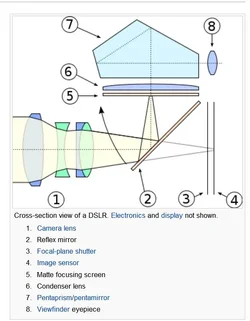
As mentioned, it could be the mirror, eyepiece or focusing screen. As all of those are not part of the photographic image capture.
@ 2, 5 & 8 in the diagram
Digital single-lens reflex camera - Wikipedia, the free encyclopedia

check your eyepiece first - the part you put your face up too. Could be as simple as a finger print smudge on it.
 
That was very helpful thankyou astronikon Its a long streaky smear an there is two of them/ Im out of alcholhol wipes do you know of the next best thing?
 
Last edited:
NO--IT IS NOT the mirror!!!! The mirror's surface NEVER, ever "shows up" through the viewfinder. The mirror is NOT the issue. The problem is much more likely the viewfinder screen inside the camera. Or, the eyepiece on the back of the camera. The mirror can be flat-out filthy and scratched, and you cannot see it when looking through the camera. NEVER clean the mirror...do not even touch it with any kiund of wipe,pad,cloth,brush, or whatever.

The eyepiece of the camera is another very likely place to check. A smudge there can make the view through the camera pretty unpleasant.
 
NO--IT IS NOT the mirror!!!! The mirror's surface NEVER, ever "shows up" through the viewfinder. The mirror is NOT the issue. The problem is much more likely the viewfinder screen inside the camera. Or, the eyepiece on the back of the camera. The mirror can be flat-out filthy and scratched, and you cannot see it when looking through the camera. NEVER clean the mirror...do not even touch it with any kiund of wipe,pad,cloth,brush, or whatever.

The eyepiece of the camera is another very likely place to check. A smudge there can make the view through the camera pretty unpleasant.

interesting. I never knew that.

But most of the "dust" and other stuff I get I usually use a rocket blower to get it out of the focusing screen / pentaprism area.

My smudges have been on the eyepiece - thus the reason I mentioned it. It's kinda hard to smudge the other areas inside the camera body (unless you have curious kids).
 
I think you need to reevaluate your DSLR cleaning methods.

This is what I do with my lenses:
1. Rocket blower - Point the lens downward and blow upwards to allow the dust to fall out
2. If it's absolutely necessary, microfiber cloth - Gentle circular motions. Soak the cloth in cold water for a few hours, rinse it, and hang it to dry before using it again.
3. If it's somehow still dirty, microfiber cloth with lens cleaning fluid

Failing to use the rocket blower to blow any sharp particles away can result in scratches. Actually touching a lens to clean it shouldn't be done unless it's absolutely necessary.

I suspect that the focusing screen may have become damaged during the cleaning process. I've looked up your problem and it seems to be a common problem that the focusing screen is permanently smudged after coming into contact with alcohol.

Edit: Derrel's logic is sound and he has been cleaning cameras for far longer than I have. It makes sense. I've only ever physically cleaned the mirror once on an old SLR I had bought on eBay and I've had zero problems with things on my mirror since then.
 
Last edited:
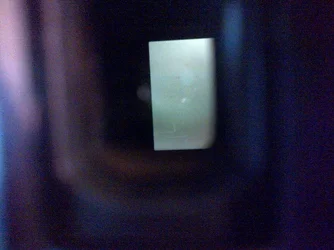
Is there any way of posting a picture on here? i have took a pic with my phone to show what it looks like
 
This is the problem but as i say they dont show up on any pictures i take
 

Attachments

  • $IMG-20131105-00263.webp
    $IMG-20131105-00263.webp
    157.8 KB · Views: 278
on the bottom left you have to look closley i did it on my phone so not totally clear but you should get an idea
 
Last edited:
So if the mirrow is dirty it will not show in the viewfinder, is that similar to your lens being scratched and it does not show in the photo`s?

John.

$dslr internal parts.webp
 
Yes it shows in viewfinder as in pic above but no it doesnt show on images. i took lots of pictures with all my lenses including close up macro on all different backgroungs (white, black, red etc) and it didnt show up on any of them. This is very puzzling
 
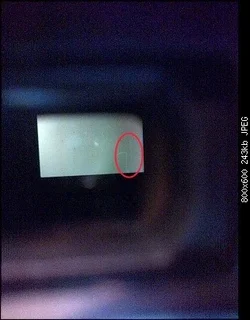
Is the smear the big i have circled in red?

Have you had a look at the focusing screen, number 5 in my photo.

J$IMG-20131105-00263.webpohn.
 

Create an account or login to comment

You must be a member in order to leave a comment

Create account

Create an account on our community. It's easy!

Log in

Already have an account? Log in here.

Back
Top Bottom