What's new

Brand New

pentaxer

TPF Noob!
Joined
Nov 13, 2010
Messages
3
Reaction score
0
Location
Hamilton, ON
Can others edit my Photos
Photos OK to edit
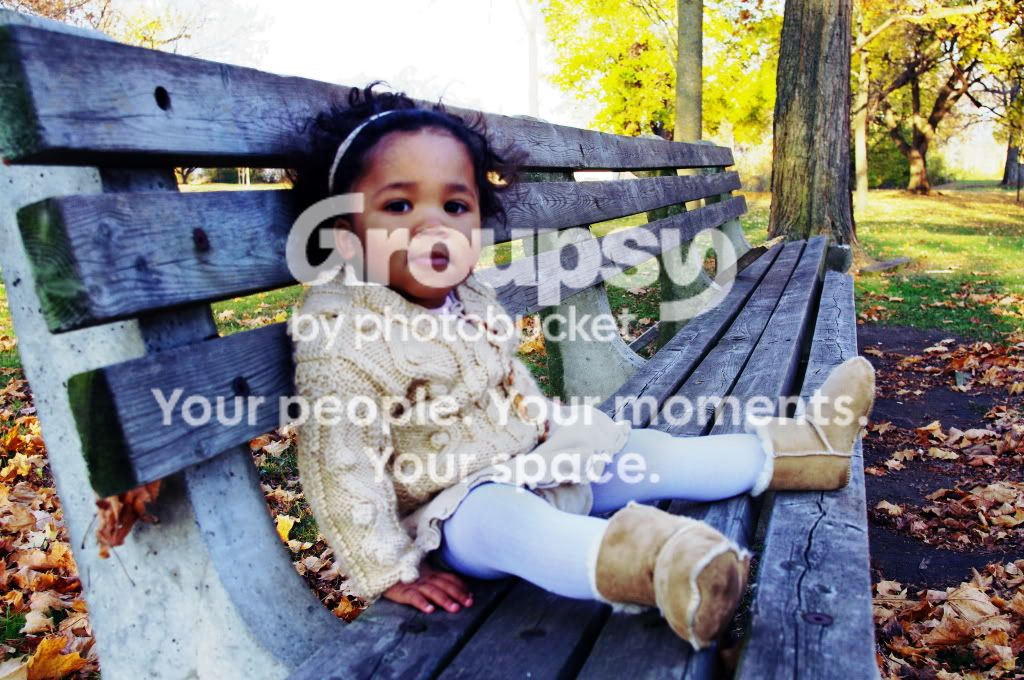
Hi! I'm brand new here, and brand new to my dslr. I've had some friends pose so I can get some practice and feel more comfortable behind the camera - all in the auto settings right now until I'm more comfortable. I've been using some auto fixing settings in Gimp as well. This is a friend's daughter... what are your thoughts - composition, colour, exposure etc. I'm open to help! I think I may have over processed them...

http://i1191.photobucket.com/albums/z462/maluhia38/ad38.jpg

http://i1191.photobucket.com/albums/z462/maluhia38/ad14.jpg

http://i1191.photobucket.com/albums/z462/maluhia38/ad25.jpg

http://i1191.photobucket.com/albums/z462/maluhia38/ad35.jpg
 
Welcome.
As a first suggestion, please put pictures directly into your post (click on the camera+photo icon and put the URLs you just pasted there into the dialog). People here do not like to click... :) .
 
Welcome.
As a first suggestion, please put pictures directly into your post (click on the camera+photo icon and put the URLs you just pasted there into the dialog). People here do not like to click... :) .

I tried to do that, and I kept getting a box with a red X in it instead of my pictures. I don't know what I'm doing wrong.
 
ad38.jpg
 
Welcome.
As a first suggestion, please put pictures directly into your post (click on the camera+photo icon and put the URLs you just pasted there into the dialog). People here do not like to click... :) .

I can click just fine and you do not speak for me nor any of the others here, thank you.
 
I can click just fine and you do not speak for me nor any of the others here, thank you.

As you know, beginners here are often suggested to do that, sometimes in a very rude way. I just wanted to avoid a new user the usual treatment.
 
Welcome.
As a first suggestion, please put pictures directly into your post (click on the camera+photo icon and put the URLs you just pasted there into the dialog). People here do not like to click... :) .

I can click just fine and you do not speak for me nor any of the others here, thank you.

Nor do you. Thank you very much.
 
Thanks for that and the comments. I'm hoping to spend a lot more time around here, learning the ropes :)
 
Thanks for that and the comments. I'm hoping to spend a lot more time around here, learning the ropes :)

I forgot to tell the sky is overexposed.
Also the third picture has some focus problem (and is perhaps overprocessed). How did you focus? My camera defaults to automatic focus point selection, which is not good, as you do not know where it will be. Better to choose one point (central), focus while half-pressing the button, and the move to compose while maintaining the button pressed. In portraits, normally focus is on eyes (they will shine, and this baby, with those dark eyes, will gain much).
 
I really love the last picture. That little girl is adorable!
 
I like the idea of the bench going off into the distance. I would Photoshop it to get rid of the trees on the right 1/2, keep/recreate the grass, the distant bush and the white blown out sky = less competing background. Maybe even get rid of the distant bush leaving very thin horizon bushes
 

Create an account or login to comment

You must be a member in order to leave a comment

Create account

Create an account on our community. It's easy!

Log in

Already have an account? Log in here.

New Topics

Back
Top Bottom