What's new

C & C on B&W conversion with LR3

mc1979

No longer a newbie, moving up!
Joined
Mar 30, 2011
Messages
270
Reaction score
52
Location
Al
Can others edit my Photos
Photos OK to edit
Ok, so I posted color images of a practice shoot with my son the other day, today I'm posting these two to see what you think of the B & W conversion. I'm using LR3 and just trying to get the hang of this.

As stated in previous post, these were shot with 50mm f/1.8G .. I have since learned that I'm staying away from shooting this lens wide open! It's just so darn hard not to do it! LOL So I know there are issues with the shallow DOF. That is why I'm mainly asking for critique on the conversion. Any other comments are also welcome!

1.
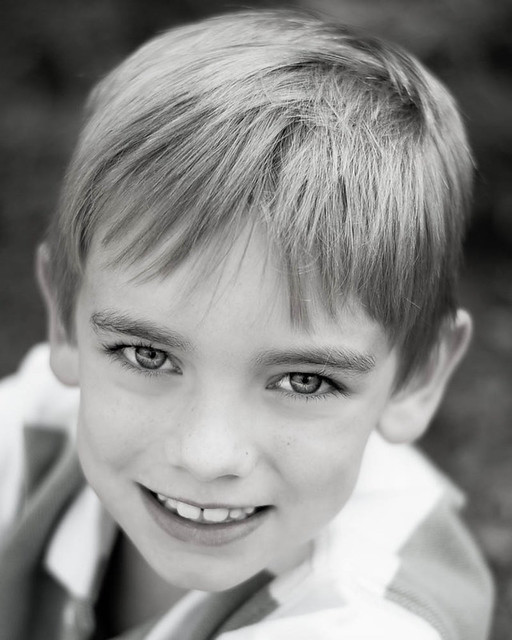
Jaybw-3 by mchatham79, on Flickr

Exposure: 1/500
Aperture: 1.8
Focal Length 50mm
Iso: 100
Flash: not fired
Program: Manual


2.
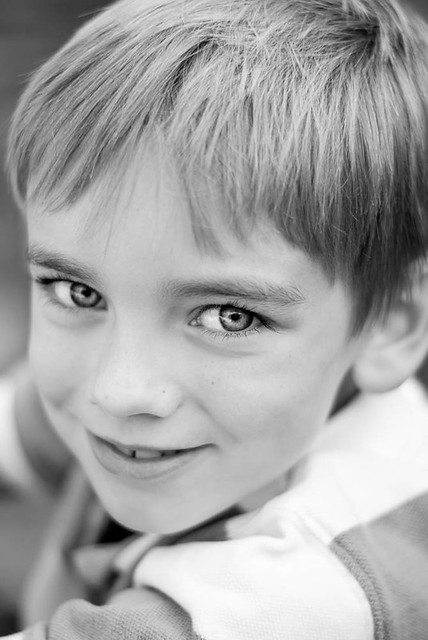
Jaybw-2 by mchatham79, on Flickr

EXIF same as above

And don't ask me how I screwed up this post but I was trying to copy and past EXIF data from Flickr and got this little box around my post..LOL
 
for some reason on #1 i can still see red around his lips. Maybe my eyes are playing tricks on me. I like the conversion.
 
for some reason on #1 i can still see red around his lips. Maybe my eyes are playing tricks on me. I like the conversion.

dang...I see it too now! Ok, I must have not backed the slider all the way down! Is this typically how conversion takes place? I desaturated, then increased blacks, and contrast. I believe I adjusted some exposure and WB too. I just can't remember now. But I'm assuming like all things, there are several ways to achieve this.
 
if you are using LR3 there should be a button next to HSL called B&W. Click that and it should make it B&W. Then you can fine tune it under the b&w sliders and also the curve tone
 
if you are using LR3 there should be a button next to HSL called B&W. Click that and it should make it B&W. Then you can fine tune it under the b&w sliders and also the curve tone

Yeh I could have done that, honestly I don't know why I didn't. It also has alot of presets already installed for B&W, but I don't really like any of those. But I have just clicked on those before and played around with the sliders. I guess I was trying with this to do it from scratch so to speak..LOL

Can't believe I didn't see the lips until you pointed it out!
 
And don't ask me how I screwed up this post but I was trying to copy and past EXIF data from Flickr and got this little box around my post..LOL
On the page where you compose your post, you can click on the "Switch editor to WYSIWYG mode' up in the left hand top corner (A/A) to turn it off, and delete the Table HTML markup code.

The holy grail of B&W is controlling contrast. #1 here is ok, but #2 comes up a bit short.

Unfortunately, Lightroom/Camera Raw also come up a bit short relative to having tools for converting to B&W. Lightroom is an incomplete editing solution and is intended to be a compliment to the full blown Photoshop, not a substitute for it.

Photoshop's range of selection tools, masking, and layers capabilities are very useful when doing B&W conversions.
 
Last edited:

Create an account or login to comment

You must be a member in order to leave a comment

Create account

Create an account on our community. It's easy!

Log in

Already have an account? Log in here.

Back
Top Bottom