What's new

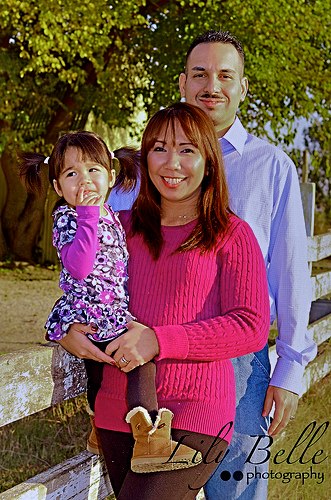
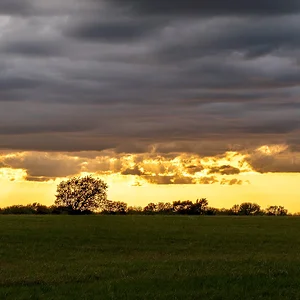
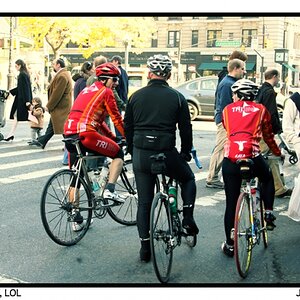
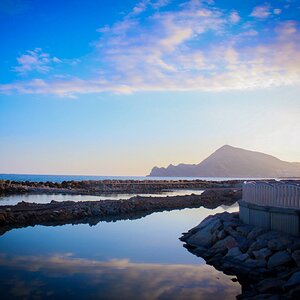
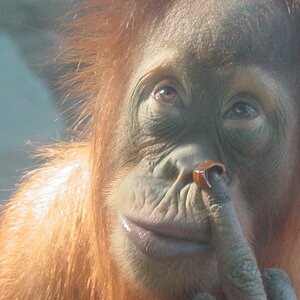
C & C please. Weekend shoot with friends.

I guess I can get carried away, since I am more partial to the "warm" look and forget to incorporate the red sun into the equation, resulting in too warm of pictures.

Thank you Photo Guy. I liked before I posted them, now I find so much wrong with them.

ha, they're nice shots, they just needed the white balance adjusted, which is a relatively easy fix. It's hard to keep a balanced opinion of your own photos sometimes, I think we all tend to sway from one extreme to another too much.
 
I guess I can get carried away, since I am more partial to the "warm" look and forget to incorporate the red sun into the equation, resulting in too warm of pictures.

Thank you Photo Guy. I liked before I posted them, now I find so much wrong with them.

ha, they're nice shots, they just needed the white balance adjusted, which is a relatively easy fix. It's hard to keep a balanced opinion of your own photos sometimes, I think we all tend to sway from one extreme to another too much.

All the more reason I should have been shooting RAW in the first place.
 
I guess I can get carried away, since I am more partial to the "warm" look and forget to incorporate the red sun into the equation, resulting in too warm of pictures.

Thank you Photo Guy. I liked before I posted them, now I find so much wrong with them.

ha, they're nice shots, they just needed the white balance adjusted, which is a relatively easy fix. It's hard to keep a balanced opinion of your own photos sometimes, I think we all tend to sway from one extreme to another too much.

All the more reason I should have been shooting RAW in the first place.

True, though I think you could still fix the jpegs white balance using the temperature control in whatever PP software you use and they'd be okay. It's always better to fix that in RAW, but it can be done to JPEG as well. It just very slightly degrades the image, but in many cases, you don't even notice the degradation, especially with the better programs.
 

better. Do you have a highlight reducer as well? The guy is pretty badly clipped. Hard to do that much about it in harsh sunlight, but it can possibly be helped out some.

here's what I got:


WBhelp by franklinrabon, on Flickr

edit: I probably should have dodged up the woman's face some as well, it's a little too dark in my edit. I was so deep in fixing the histogram, I didn't actually look at the faces, lol.
 
I have more photos to edit so I will keep that in mind. I use the highlight reducer in almost all my editing in some way, but I will play with it a little more.

yeah, that one is pretty clipped out, highlight reducer can't do much about it. Also, be aware that lowering the temp usually makes the highlights stand out even more, especially if the highlighted areas have a blue tint to them already (as they did here with the guy's shirt). Any time I cool a picture down, I almost always have to bump up the highlight reduction a few notches.
 
I would also consider getting a diffuser. Although it would be difficult to use with just one person, it would help with the issue of one side of their face being lit by 'cool' sunset color, and the other side being lit by the rather 'warm' bluish tint of the fill flash.
The diffuser gives you a very even continuity in the amount of light hitting your subjects.

That's just a method I've used, however. There are other ways of taking photos of course. :lol:

And about the white balance issue, sometimes the colors are just too far balanced to one color to be corrected. I've run into situations where I tried to correct a VERY warm orange image, or a VERY blue image, and I just could not get it to look natural. I would really try and get the photo as correct as possible in-camera. That way, you can edit to enhance, instead of editing to fix.
 
pics look fine but all the dead grass ruins them. You need green were you have nothing but brown. Not much else you could do though.
 
I'm a newbie too...how can you tell by looking at these photos that if an 8X10 is printed 2" in the long side will be cut out?
 
I'm a newbie too...how can you tell by looking at these photos that if an 8X10 is printed 2" in the long side will be cut out?

Because the camera shoots in a 3:2 ratio. Any print you make that includes the entire photo as you see it on the screen has to be multiples of those numbers - 4x6, 6x9, 8x12... So to get an 8x10, you have to crop 2 inches from the 12" side (or long side) of the 8x12. This goes for any other standard frame size, you have to crop the image to get it to fit whatever size your frame is. This is why it's usually a good idea to shoot a little loose if you're taking pics of something people might want to frame.
 
Last edited:
I'm a newbie too...how can you tell by looking at these photos that if an 8X10 is printed 2" in the long side will be cut out?

Because the camera shoots in a 3:2 ratio. Any print you make that includes the entire photo as you see it on the screen has to be multiples of those numbers - 4x6, 6x9, 8x12... So to get an 8x10, you have to crop 2 inches from the 12" side (or long side) of the 8x12. This goes for any other standard frame size, you have to crop the image to get it to fit whatever size your frame is. This is why it's usually a good idea to shoot a little loose if you're taking pics of something people might want to frame.

It can also mean that you just have to print to a larger size and cut off the white portion. It doesn't necessarily mean you'll lose part of the image, just that the image will be smaller.
 

Create an account or login to comment

You must be a member in order to leave a comment

Create account

Create an account on our community. It's easy!

Log in

Already have an account? Log in here.

Back
Top Bottom