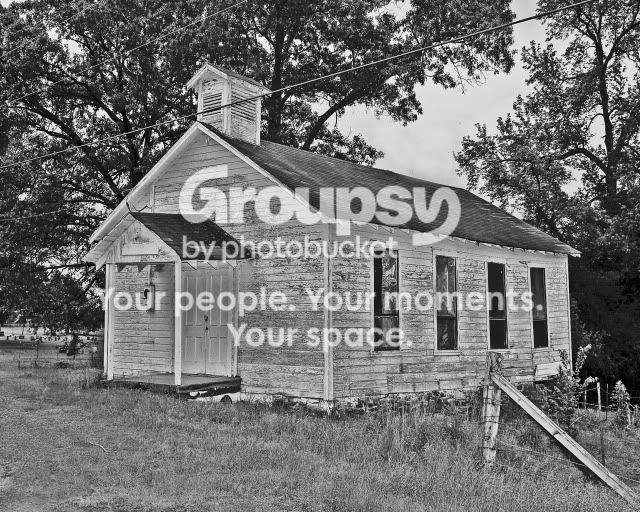
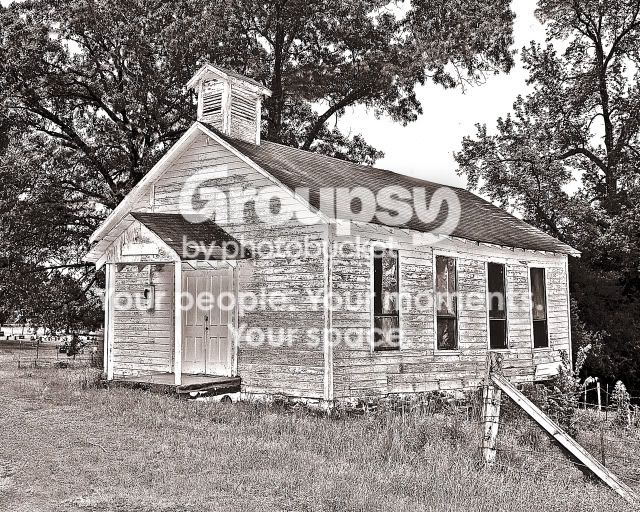
I agree, clone out the powerlines for sure. i would also suggest stepping back the processing a little. I think a traditional black & white or sepia would work well, but this sort of soft, blue-grey doesn't do the image justice IMO.
I agree, clone out the powerlines for sure. i would also suggest stepping back the processing a little. I think a traditional black & white or sepia would work well, but this sort of soft, blue-grey doesn't do the image justice IMO.
Good job with the power lines. I like the way the first one looked better (temperature wise) I think the image is MUCH stronger now without the power lines!
I'm bothered that there are almost no shadows on the building, almost like you shot it with on-camera flash. I think I see halo's as well, on the roof and the door. Not sure what's going on here, but the PP is a turnoff for me.
The sky was very overcast. It was shot in monochrome in raw. After mentioning about it being "over sharpened" I went back and looked again and I agree.
Raw records the colors, and the camera converts the Raw to monochrome.
You have much more control of the density and contrast if you don't use the camera monochrome setting and convert to B&W using image editing applications like Photoshop.








![[No title]](/data/xfmg/thumbnail/41/41779-303c41fcb3e37507cbe986d76dbfcf85.jpg?1734176085)
![[No title]](/data/xfmg/thumbnail/41/41780-5efe87aed04575de7c09b065d70763ae.jpg?1734176085)

![[No title]](/data/xfmg/thumbnail/42/42017-05f80a89ca2890969b5dc7cc47872581.jpg?1734176398)
![[No title]](/data/xfmg/thumbnail/38/38732-8364f5190d3f325e8ee02d23404a610c.jpg?1734172600)

![[No title]](/data/xfmg/thumbnail/37/37605-90c8efaef5b7d1f52d4bf8e7dfd33673.jpg?1734170732)