What's new

Cable Bridge - B&W & HDR

NicholasPetrilli

TPF Noob!
Joined
May 2, 2013
Messages
14
Reaction score
4
Location
Richland Washington
Can others edit my Photos
Photos OK to edit
I'm still very unsure about shooting at night, I was really struggling with deciding to use a longer exposure or a higher ISO setting. Using the HDR feature on my camera really helped but I'm not too fond of the blurry water.
I love the feedback I've been given on my other posts, extremely helpful for a beginner. :D
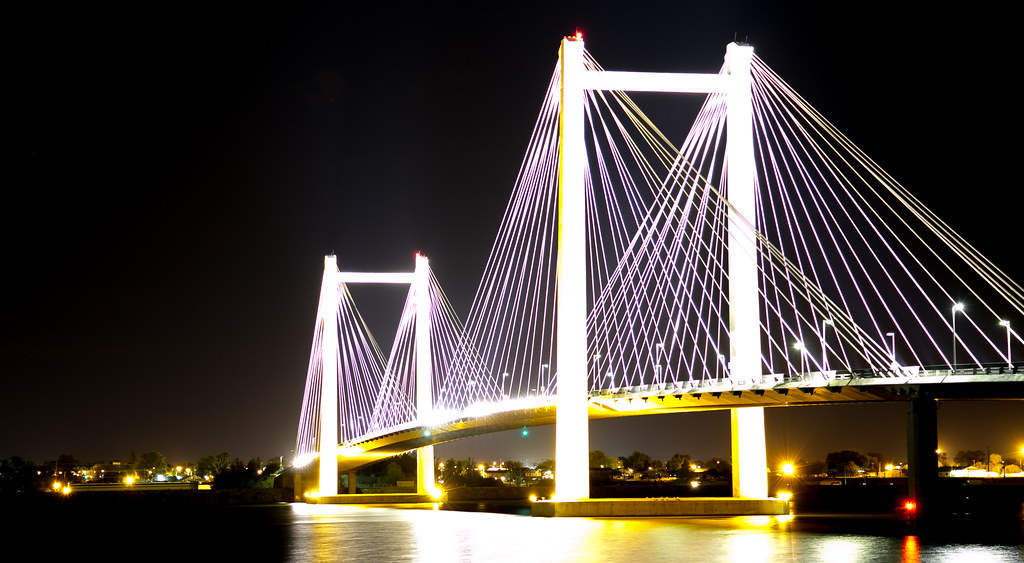


20130516-QC1A3790 by Nicholas Petrilli, on Flickr
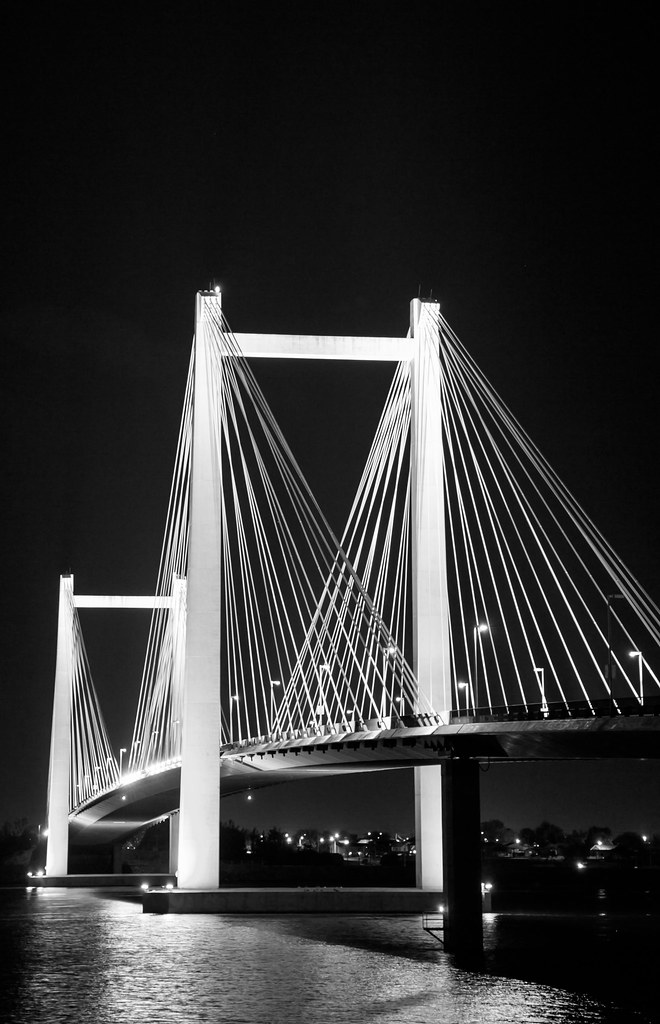


20130516-QC1A3786 by Nicholas Petrilli, on Flickr
 
For my taste, #1 looks overexposed on the bridge columns.

#2 looks better and is a far better composition as well.
 
Well, if you used the HDR feature of your camera, it is likely it's the cause of the blurry water. Blurry water is not a bad thing, it just depends on the outcome you are looking for. The HDR setting used a slow enough shutter speed to smooth out the water, (or "blurr" if you wish). Look around at other photos that have long exposures...water looks very smooth.
Try taking a 10-15 or even 30 second exposure to see the differences in the water.
And yes, your first shot is overexposed.
 
Well, if you used the HDR feature of your camera, it is likely it's the cause of the blurry water. Blurry water is not a bad thing, it just depends on the outcome you are looking for. The HDR setting used a slow enough shutter speed to smooth out the water, (or "blurr" if you wish). Look around at other photos that have long exposures...water looks very smooth.
Try taking a 10-15 or even 30 second exposure to see the differences in the water.
And yes, your first shot is overexposed.

I have a Canon 5D Mark III and this was honestly the first time I've ever used HDR, I was a little unsure on how to configure the HDR settings but with time I'll have more chances to experiment. I have about 200 pictures from this shoot so I'm sure I can muster up one that's less exposed.

Does anybody have any tips on composition for this type of photography?
I honestly hiked down the river bank until I could get the entire bridge in my viewfinder without any foliage in the corners. :lol:
These were all taken at about 1AM in the hope of fewer cars being on the bridge. Sadly many of the shots were ruined by cars and a couple semi-trucks.
I was also stopped by the police, apparently Parks close at 11PM and I wasn't allowed to be out there.
 
Embrace the cars. Car blur can add a spectacular effect to the photo. A busy bridge is, well, busy!
Time how long it takes the car to pass across your frame. See if you can match the shutter speed and settings to allow the car to pass the length of your frame, or at least a good bit through it.
Post some of those "car-ruined" photos you spoke of above.
 
Also, I don't know your background in photography, so...

At night, for this type of shot, I would opt for a low ISO, because of the bridge lighting. It is possibly why your columns look blown out. Your shutter speed will adjust automatically if you are shooting in aperture priority. Shoot somewhere above f/11 for full clarity of he bridge.
 
Use a low ISO to offset noise, pick an aperture (I use f16 for cityscapes) and shoot a series of photos such as the beginning shot and the ending shot are both well within the resulting histogram. People tend to get hung up about getting detail in the dark but don't think about the highlights which must not be clipped either. The bright areas of a HDR photo will burn you more often than the dark areas. I will routinely have 8 to 9 exposures at 1 stop intervals for a night scene like this.

If your shooting HDR your best friend is your cameras histogram display.

I am always being stopped by the police or security guards, an occupational hazard. I usually don't have a problem with them, I give them my card and explain what I'm doing but I still subscribe to the notion that it's better to ask forgiveness than to ask permission.
 
Also, I don't know your background in photography, so...

At night, for this type of shot, I would opt for a low ISO, because of the bridge lighting. It is possibly why your columns look blown out. Your shutter speed will adjust automatically if you are shooting in aperture priority. Shoot somewhere above f/11 for full clarity of he bridge.

Thanks for the pointers, they may seem simply to you guys but knowing this information will really help my shots. Given I have almost no experience, all information is good information and it's very appreciated. :)

I ran into some issues with this shoot, in particular when trying to use a lower ISO and longer exposure.
I have a fairly inexpensive tripod and honest to god the little bit of wind was moving it enough to blur the image even with a 2 second exposure so I was forced to use higher ISO and shorter exposure.

I'm going to take these images from the North side of the river next so i'll be sure to post those :)
Hopefully there will be less wind.
 

Create an account or login to comment

You must be a member in order to leave a comment

Create account

Create an account on our community. It's easy!

Log in

Already have an account? Log in here.

New Topics

Back
Top Bottom