What's new

Can you photoshop a photo to look like this?

Senor Hound

TPF Noob!
Joined
Apr 23, 2008
Messages
1,425
Reaction score
0
Location
La la land...
Can others edit my Photos
Photos OK to edit
If I took a regular photo I have in photoshop, could I "distress" it enough to look like this amazing photo?

http://farm1.static.flickr.com/36/112271318_e70d3fd528_o.jpg

I don't think the photo is great because its so beaten up. I think its great because of its powerful image (considering its time, which was 1840).

Anyway, that's not really the point. The point is if I wanted to try and make my images look like they're 150 years old, could I do this in Photoshop? If so, how?
 
I'm no Photoshop expert so I can't tell you how, but I'm quite sure that you can make pictures look like that.
The image of Hippolyte Bayard's Self Portrait As a Drowned Man which I have in front of me is a lot more BW then Sepia coloured though... have to check which one's the original.
 
I'm no Photoshop expert so I can't tell you how, but I'm quite sure that you can make pictures look like that.
The image of Hippolyte Bayard's Self Portrait As a Drowned Man which I have in front of me is a lot more BW then Sepia coloured though... have to check which one's the original.

Isn't it beautiful? Its so powerful, especially considering I hear its the FIRST staged photograph. I also saw on Wikipedia where he sold his exposure technique (he created it) to the French Academy of Sciences... to buy better equipment! Its funny how this obsession we photographers have with better equipment has been around for 170 years!!!

Thanks for the photoshop tutorial. It wasn't exactly what I was looking for, but it is close enough that I can figure out how to do it on my own now... THANK YOU!!!
 
[...] if I wanted to try and make my images look like they're 150 years old, could I do this in Photoshop? If so, how?

Yes, that can be done in Photoshop. By an expert. Whether you (or I...) could do it remains to be seen of course.
For starters I would add heavy grain, turn it B/W, then add loads of sepia, see how far that got me, and take it from there.
 
Brushes are going to be your best friend if you want this effect.
 
or you could buy a film camera, take a picture, tape the negative to the bottom of your shoe and then walk around for a day. I've tried this, and its much easier then photoshop....though it does take more time....
 
it's definitely something you can do in photoshop with enough practice
 
or you could buy a film camera, take a picture, tape the negative to the bottom of your shoe and then walk around for a day. I've tried this, and its much easier then photoshop....though it does take more time....

I love this idea.
 
Yes it can be done in PS. You just have to play with it alot to do it.
 
I've done a lot of photo restorations ... and the trick often is not to make the image look too new.

Now, in the case you have, that's a pretty extreme imperative - since you apparently want to take a new image and make it look that old.

Here's one tip I've resorted to: Use spray paint, mud, sand, grass clippings ... whatever! and make a mess on a piece of plain paper. Then photograph that, and experiment with layering, softening, smudging, etc. until you've simulated the look you want.

It's fun! Messy sometimes. Very time consuming. But also very satisfying when you pull it off.
 
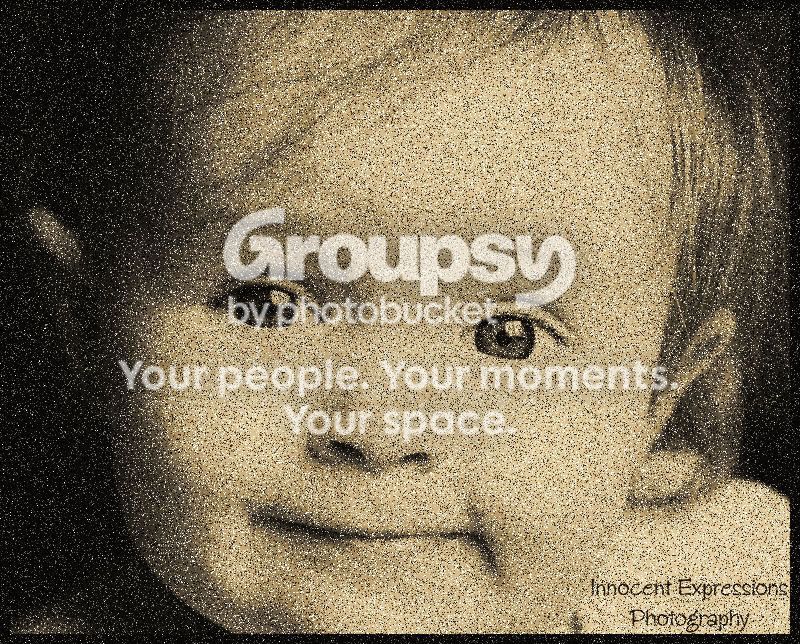
I just did this with a pic "borrowed"...

did it in paint shop and took me like 5 min.. it might need more adjestments but I was just playing around..

added noise... turned to aged newspaper and then played with midtones/highlights...

bluebaby1.jpg
 

Create an account or login to comment

You must be a member in order to leave a comment

Create account

Create an account on our community. It's easy!

Log in

Already have an account? Log in here.

New Topics

Back
Top Bottom