What's new

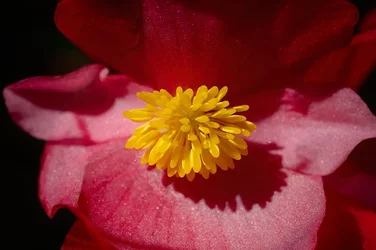
Center spread stamen

jcdeboever

Been spending a lot of time on here!
Joined
Sep 5, 2015
Messages
19,860
Reaction score
16,082
Location
Michigan
Can others edit my Photos
Photos OK to edit
I want to get better and more creative with my flowers. I like this image well enough but I want to make it more dynamic. Any insight into this would be appreciated. Maybe it cant be. I like it well enough but I want it to scream different.

DSC_0356ee.webp
 
Try separating elements into layers (Background, foreground petals, background petals, stamen) and using different methods of effects and blending to reunite the layers.
 
I have no clue to what you just said. I use gimp and I am at a loss. Sounds good.
 
layers 1.webp
layers 2.webp


Kind of like this. Use the selection tools to select elements of the image and then use "Selection>Promote selection to new layer" to make it a new layer and name it accordingly.
Then apply effects, textures etc. and or recombine the layers in different ways such as hard light, soft light, multiplication, subtraction, etc to find things you like.
Just play with it and learn as you create hands on.
Add glow, vignette and anything that you think improves the image.
It's your vision.
 
Oh, cool. I see.
 
Maybe try taking the shot from the side or from a different viewpoint than the straight on into the flower. Shots from the side or the back that don't necessarily show the whole center (or even any of the center) can be more interesting. Also consider incorporating more environment into the shot instead of using the dark background. Backlighting also really brings them to life. Just my thoughts on the subject... been in a bit of a flower rut myself so not sure I'm the best one to be commenting on this.
 
Maybe try taking the shot from the side or from a different viewpoint than the straight on into the flower. Shots from the side or the back that don't necessarily show the whole center (or even any of the center) can be more interesting. Also consider incorporating more environment into the shot instead of using the dark background. Backlighting also really brings them to life. Just my thoughts on the subject... been in a bit of a flower rut myself so not sure I'm the best one to be commenting on this.
I like the suggestion of going at it from a different angle. I will try that as it is possible to revisit. Thank you Sharon. I may try it next week. Appreciate the direction.
 
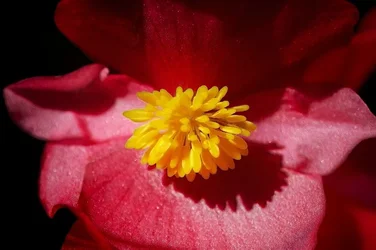
DSC_0356ee.webp DSC_0356eeb.webp

Just messing about. :)
Pushed things a LOT farther than normal to illustrate the point more clearly.

OK, I mis understood the OP, I thought you wanted to change this photo into something different, not shoot a different photo. Sorry for the misunderstanding.
 
To me the image seems flat. I tried to approach it using luminosity masks to separate highlights, shadows and midtones, then bump/adjust each separately. I don't think I did it the justice that someone more accomplished might do. I suspect that in order to hold the pink would require selecting and masking those areas as Advanced suggested, but this will give you an idea. Not sure that Gimp offers these features, and the way you keep raising the bar it might be time to move up to PS. Also as Square Peg said changing your lighting, angle, and crop could help also.
DSC_0356ee 1.webp
 

Create an account or login to comment

You must be a member in order to leave a comment

Create account

Create an account on our community. It's easy!

Log in

Already have an account? Log in here.

New Topics

Back
Top Bottom