What's new

Did I improve? (Outdoor Model Photos)

NickLane

TPF Noob!
Joined
Jan 10, 2012
Messages
34
Reaction score
1
Can others edit my Photos
Photos NOT OK to edit
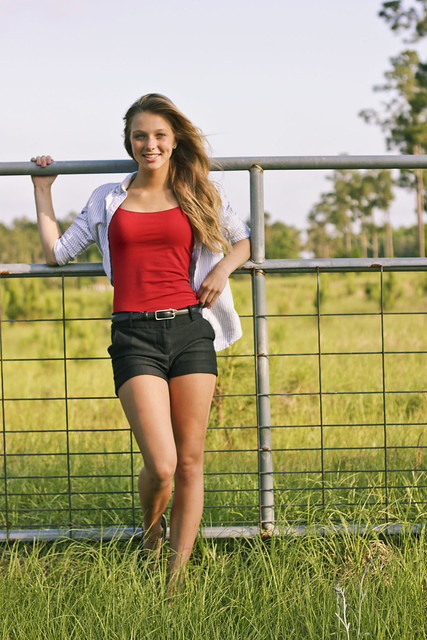
How's everyone doing! It's been a while since I posted but, I believe that I have improved dramatically since my last posts. Let me know if there is anything that I can do to improve, I am open to everything. Also I have a shoot tomorrow so hints would be appreciated! :D
6926311598_341bf1759d_z.jpg

Photo 1:
Canon T2i
Shutter Speed 1/800 sec
Focal Length 50mm
ISO 100
F/3.2
No Flash
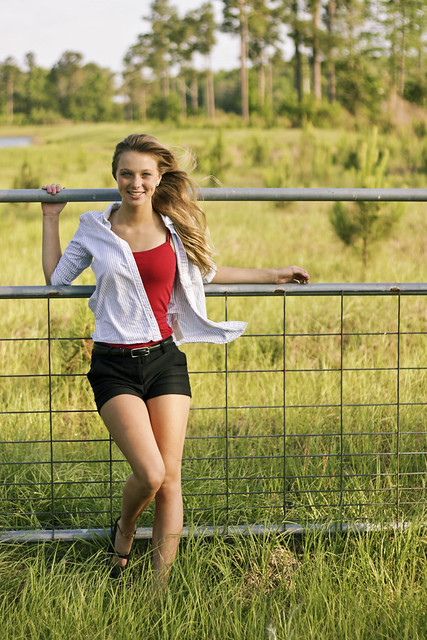
6926287478_bf55168cf0_z.jpg

Photo 2:
Canon T2i
Shutter Speed 1/1250 sec
Focal Length 50mm
ISO 100
F/2.2
No Flash
 
Last edited:
Nice pics. If I was to make an attempt to nitpick-

Might be tilted.

If you show knees, I've been taught you may want to show feet too.

Her flat against the camera works better in pic 2 they way her legs are positioned.

In pic 2 hair and shirt looks great in the wind, not sure how about how you had her hand positioned.

Raccoon eye (both pics) may have been fixed using fill light or reflector camera left
 
It would be nice if you post some before and after shots. I like the second shot better because its aligned properly, doesn't look as warm and her pose appeals to me more. Thats a pretty bad scar too maybe you could Photoshop it out? Do you know what happened to her if you dont mind me asking?
 
I apologize for not having seen your earlier thread. These are pretty good images. Everything about them is "decent."

Suggestions for improvement:

  • Consider flash. These are taken in pretty harsh light. Flash will help you fill in and soften out those shadows. It will also keep you from having to shoot with the sun at your back (and in your model's face) which is causing her to squint.
  • Tighten up your crop a bit. You've done a good job with rule of 3rds here, but it just feels like too much empty space. Your model deserves more attention.
  • The fence in the first one is at a slight angle. You can pull off an angled shot from time to time (as long as its not every shot in a set), but a "slight" angle just looks like a mistake. You can fix this easily in post by cropping/rotating.
 
It would be nice if you post some before and after shots. I like the second shot better because its aligned properly, doesn't look as warm and her pose appeals to me more. Thats a pretty bad scar too maybe you could Photoshop it out? Do you know what happened to her if you dont mind me asking?

She fell off some bleachers, she's quite clumsy haha. and I uploaded the wrong on I'm editing the links right now.
 
I apologize for not having seen your earlier thread. These are pretty good images. Everything about them is "decent."

Suggestions for improvement:
  • Consider flash. These are taken in pretty harsh light. Flash will help you fill in and soften out those shadows. It will also keep you from having to shoot with the sun at your back (and in your model's face) which is causing her to squint.
  • Tighten up your crop a bit. You've done a good job with rule of 3rds here, but it just feels like too much empty space. Your model deserves more attention.
  • The fence in the first one is at a slight angle. You can pull off an angled shot from time to time (as long as its not every shot in a set), but a "slight" angle just looks like a mistake. You can fix this easily in post by cropping/rotating.

Ok thank you, Ill make sure to look out for any off-angle objects in the background. As for the flash, mine is broken as soon as I find some money I'll purchase a new one.
 
Nick, the Beginner's forum is no longer a C&C or photosharing forum, unless you have a specific photographic technical question about your images.

Use the - Photo Galleries- Photos submitted by members for general display or critique. - section instead. I have moved your thread to the People Photography, Photo Gallery, on that basis.
 
Did you use any reflectors?

No I did not, I will probably use one tomorrow. I will post the results.

Yeah, I should have mentioned reflectors. The great thing about them is they don't have to be expensive. Hit up your local office supply or art supply and grab some white poster board.
 
Did you use any reflectors?

No I did not, I will probably use one tomorrow. I will post the results.

Yeah, I should have mentioned reflectors. The great thing about them is they don't have to be expensive. Hit up your local office supply or art supply and grab some white poster board.

Something that's really sad is that I have 2 huge reflectors that were just sitting at home... haha I will use them tomorrow though.
 
No I did not, I will probably use one tomorrow. I will post the results.

Yeah, I should have mentioned reflectors. The great thing about them is they don't have to be expensive. Hit up your local office supply or art supply and grab some white poster board.

Something that's really sad is that I have 2 huge reflectors that were just sitting at home... haha I will use them tomorrow though.

That would have been just the trick. Get some light on the right side of her face to reduce some of the shadows and align it with the fence and you have a winner.
 
Very nice shoot. I like #2 more but flash would have made them look better. Not a lot of flash, just a touch to lift the shadows from her face. I would like to see more form this shoot
 

Create an account or login to comment

You must be a member in order to leave a comment

Create account

Create an account on our community. It's easy!

Log in

Already have an account? Log in here.

New Topics

Back
Top Bottom