What's new

Did I save this image?

Did I succeed?

  • Yes

    Votes: 5 100.0%
  • No

    Votes: 0 0.0%

  • Total voters
    5

Demers18

TPF Noob!
Joined
Nov 11, 2011
Messages
1,330
Reaction score
265
Location
Sudbury
Can others edit my Photos
Photos OK to edit
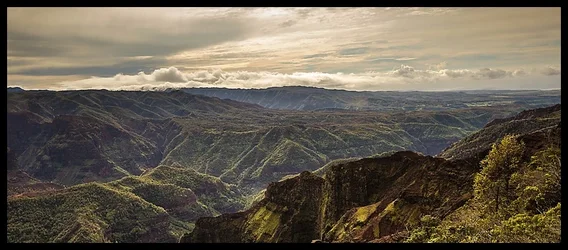
Would like to get your though on wether or not I was able to "save" this image successfully or not.

Fire away

8423077938_710a27e853_b.jpg
[/URL] Waimea Canyon - Kauai, Hi by lee demers, on Flickr[/IMG]

Original:

8424766212_652426be3d_b.jpg
[/URL] Original test by lee demers, on Flickr[/IMG]
 
Last edited:
I really like it! It might not be something I hang in the living room, but its very pleasing to look at. However, IMHO the sky could be a hit brighter.
 
File...>....Save As....>....JPG...enter filename.....Click "Save"

Which part was causing you the most problems? :sexywink:
 
On a more serious note..the focus is good, the contrast appears to be ok, a few parts of the sky look a little blown out, If you have the RAW file i'm sure you can bring them back in LR. On the whole, I like it.
 
File...>....Save As....>....JPG...enter filename.....Click "Save"

Which part was causing you the most problems? :sexywink:


LMAO! Smart ass!

No the issue with his image is that the sky was blown out and the foreground was too dark. I'm curious to know if you feel the adjustments made worked, needs more or if you have any tips on how I could improve it and finally should I just dump it.
 
File...>....Save As....>....JPG...enter filename.....Click "Save"

Which part was causing you the most problems? :sexywink:

I need to brush up on my emoticons....to me this is just a "wink"....but the description calls it a "sexy wink"... WTF!....I found that out after i posted it btw. sorry.
 
File...>....Save As....>....JPG...enter filename.....Click "Save"

Which part was causing you the most problems? :sexywink:


LMAO! Smart ass!

No the issue with his image is that the sky was blown out and the foreground was too dark. I'm curious to know if you feel the adjustments made worked, needs more or if you have any tips on how I could improve it and finally should I just dump it.

Sorry, I never saw the original image (dont know if you posted it in here or not) so it was a bit difficult to compare, I feel the image is good, the only thing i felt worth mentioning was the slightly blown out sky, and it looks like the detail is still all there, I think if it was me i would have maybe tone mapped those highlighted sections of the sky just to add a little bit of contrast. it doesn't need much, some may say its fine the way it is.
 
File...>....Save As....>....JPG...enter filename.....Click "Save"

Which part was causing you the most problems? :sexywink:

I need to brush up on my emoticons....to me this is just a "wink"....but the description calls it a "sexy wink"... WTF!....I found that out after i posted it btw. sorry.

It's all good. don't be sorry, I like the sarcastic humour.
 
Good point Keith!

I've added the original above.

Edit: also upon doing this I've noticed there is haloing above the mountains. I'll need to go back and fix that, if it's possible.
 
So matter what you do to try and "save" the image the composition has some issues.

The horizon is extremely tilted and also placed dead center.
 
So matter what you do to try and "save" the image the composition has some issues.

The horizon is extremely tilted and also placed dead center.

I don't see how you think the horizon is tilted? I'm at the top of the canyon and the direction I'm shooting towards is going down vertically. But I do agree with the horizon being dead center, which can be fixed with a crop. Aside from those two flaws, did I manage to save the image from being blown out?
 
I think the sky is still too bright and there is too much of it. A crop will lead the eye to the mountains, which should be the dominant feature.
to answer your question I think you did.

Rob
 
Fixed tilt, it was very tilted, the horizon. Put the horizon on the thirds instead of dead center. Did a little sloppy burning through mid tones and shadows, put a slight S curve in it ( I like contrasty).

I don't have large file size so obviously fixing the tilt took away from the file size, so I ended up with this as I did not want to bring it in from the sides any.

My take on it anyway.


$8423077938_710a27e853_b-1.webp
 
It looked to me like the terrain fell off to the right into a valley, and is not a level horizon.
 

Create an account or login to comment

You must be a member in order to leave a comment

Create account

Create an account on our community. It's easy!

Log in

Already have an account? Log in here.

New Topics

Back
Top Bottom