What's new

Drop Dead Daylily

mimi54

TPF Noob!
Joined
Jul 28, 2014
Messages
8
Reaction score
0
Location
Tennessee
Can others edit my Photos
Photos OK to edit
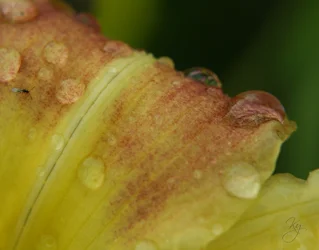
I just love nature and the way it looks up close. I would like some honest feedback on this photo please...:confused:
 

Attachments

  • $Daylily drops.webp
    $Daylily drops.webp
    206.8 KB · Views: 104
Not sure about the bug, but nice water drops on the flower. You have some technical problems. The photo is too dark and too flat and auto white balance is not your friend. You have your edit tag set to NOT OK -- if you change it I can help and show you how the photo would look with those items corrected.

Joe
 
Not sure about the bug, but nice water drops on the flower. You have some technical problems. The photo is too dark and too flat and auto white balance is not your friend. You have your edit tag set to NOT OK -- if you change it I can help and show you how the photo would look with those items corrected.

Joe

Yeah, I'm not sure about bug either. He crawled in just as I was taking the shot. Knocking him off would disturb my rain drops. I knew the photo was a little dark, but it looked even darker after I posted it. I will change the setting if you would be so kind as to help. Thanks for your feedback!

 
Not sure about the bug, but nice water drops on the flower. You have some technical problems. The photo is too dark and too flat and auto white balance is not your friend. You have your edit tag set to NOT OK -- if you change it I can help and show you how the photo would look with those items corrected.

Joe

Yeah, I'm not sure about bug either. He crawled in just as I was taking the shot. Knocking him off would disturb my rain drops. I knew the photo was a little dark, but it looked even darker after I posted it. I will change the setting if you would be so kind as to help. Thanks for your feedback!

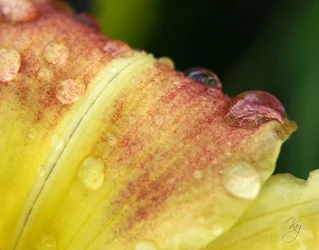
How's this?

$daylily.webp

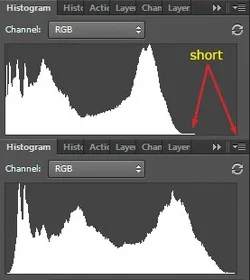
I see you're pretty new here -- welcome to TPF. I don't know if you have or use any kind of editing software for your photos. Folks here can help with that if needed. Here's the tech definition of your trouble with this photo:

$hist.webp

The top histogram is the photo as you posted it. It falls very short of the graph's right corner. At the right corner is white (bright yellow as well). Those bright colors are missing and they're needed in your photo. The bottom histogram is the adjusted version of your photo that I posted here. I shifted everything over and spread it out more. Spreading it out more is why you see that it has more contrast. That's 80% of what I did. Then I erased the bug and shifted the overall color. There's no real reference in your photo as to what the right color should be but I photograph a lot of flowers myself and the foliage greens in your version didn't ring true for me. You had the camera set to auto white balance -- that means the camera is going to guess -- they don't guess all that well with subjects like this.

Joe
 
It looks awesome Joe! This is the kind of feedback I was looking for. I do use photoshop, but on this shot I had not used it. I will work on this! Thanks for your help and I'll be back for more.
 

Create an account or login to comment

You must be a member in order to leave a comment

Create account

Create an account on our community. It's easy!

Log in

Already have an account? Log in here.

New Topics

Back
Top Bottom