What's new

Feeling Like My Portraits are a Bit Flat - Please advise!

PeK77

TPF Noob!
Joined
Nov 21, 2013
Messages
89
Reaction score
2
Hi gang!
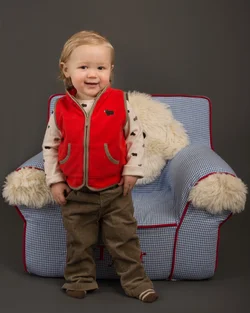
I shot the photo below using 2 umbrellas and it seems to me to be a bit flat as far as lighting goes - do you agree?

Is this because the umbrellas are spreading out the light evenly across the whole scene? I do have a small soft box and am thinking about trying that with a bounce card.

Thanks in advance!
 

Attachments

  • $Tyler 2014-01 Portrait.webp
    $Tyler 2014-01 Portrait.webp
    289.2 KB · Views: 196
Lighting can be what you want it to be, I think it looks ok.

I believe the further back the lighting is, the more flat it will be, for higher contrast go in closer,. But its been awhile since Ive worked with a light kit so I could be remembering that wrong.

Practice with a teddy beAr, see what set ups create what effects, you know?
 
Yes. Since you have two lights, make one your "key" light, and the other the "fill" light.

Also, perhaps select a plainer chair or some other prop, as this chair is distracting.
 
Did you use one umbrella on each side? I would try playing with turning the power down a little on one to them, so it acts more like a fill, rather than keeping them the same power/distance.
 
Lighting can be what you want it to be, I think it looks ok.

Thanks, Bossy! I dig the end result - I just see so many super sharp awesome photos that I'd love to be able to achieve the same.
I guess experimenting is the best way to work all of this out. Its a 2 light setup - maybe i'll try to add a 3rd for the head highlight as well.
 
Yes. Since you have two lights, make one your "key" light, and the other the "fill" light.

Also, perhaps select a plainer chair or some other prop, as this chair is distracting.

Thanks, Designer. I wanted to add that he was sitting in the chair (as it was a gift) and he struck this pose so I had to go with it. Thought it was a cool pic.
 
Did you use one umbrella on each side? I would try playing with turning the power down a little on one to them, so it acts more like a fill, rather than keeping them the same power/distance.

For the record, I should know better. Ha ha ha. This was a tighter space - the last time I got a much better result I was able to move the fill light back quite a bit more.
 
For the record, I should know better. Ha ha ha. This was a tighter space - the last time I got a much better result I was able to move the fill light back quite a bit more.

Are you using variable power lights? Because if not, you wouldn't need more room to use it, you just need to turn the power down, haha.
 
For the record, I should know better. Ha ha ha. This was a tighter space - the last time I got a much better result I was able to move the fill light back quite a bit more.

Are you using variable power lights? Because if not, you wouldn't need more room to use it, you just need to turn the power down, haha.

I am - I thought there was a significant enough setting difference when I was shooting and it looked nice through the viewfinder. I'm going to make it a rule to allow more space to work from now on. Working in such a tight space is not fun.
 
moving the light back will make it a small light source...
 
Yup. Just as e.rose wrote; turn the power down on the fill light, don't move it.

A hair light can be quite fetching, but with children, it is difficult to get them to hold still at just the right place under the hair light.
 
Yup. Just as e.rose wrote; turn the power down on the fill light, don't move it.

A hair light can be quite fetching, but with children, it is difficult to get them to hold still at just the right place under the hair light.

This is true. I have enough trouble keeping them in focus when I choose a small DOF.

Have a great day, guys!
 
Yes, the lighting effect you achieved is pretty "flat"...soft, even lighting, with minimal shadows. Using two umbrellas (or two light sources) is one way to create low-contrast lighting that does not show a lot of texture. A classic method is over/under lighting, with one main light source above the lens axis, and a second light right below, which basically "fills in" the small micro-shadows created by the main light source on top; this works at the macro- and micro-contrast levels, and it's an old, old way to light people to minimize skin texture so as to alleviate the need to do a lot (or any) retouching or airbrushing. Same with the classic side-by-side, double-light source method, which is useful when photographing older people who have a lot of skin wrinkles that do NOT need "defining".

Toddlers of this age often have virtually perfect skin. If you are shooting in a smallish, low-ceilinged place, like say a room with 8 foot high ceilings, a pair of umbrellas can create a big wall of light, but they can also create a lot of what's called ambient spill, which bounces off the ceiling and walls and such, and creates a very high,high level of fill-in lighting. I've seen this many times with photos of infants and toddlers, who are literally, very "small subjects", smaller even than a smallish umbrella. If you want more shadowing, and more texture, and more 3-dimensional lighting on little kids, ditch the second umbrella in this type of situation. I mention "the situation", because say, in an apartment living room as opposed to say, a high school gymnasium, a single 42-inch umbrella in the apartment acts like a relatively large light source, whereas in a gymnasium, there is almost zero fill light created from ambient spill.

 
A bit of sharpening o raise the local area contrast and I think it looks better

jqd4.jpg


Hi Traveler,
What kind of sharpening tool did you use? Also, was it just a basic contrast adjustment to the whole image?

Thanks in advance!
 

Create an account or login to comment

You must be a member in order to leave a comment

Create account

Create an account on our community. It's easy!

Log in

Already have an account? Log in here.

Back
Top Bottom