What's new

Few of the Girls

Fairdale

TPF Noob!
Joined
Apr 6, 2013
Messages
38
Reaction score
8
Location
Fairdale
Can others edit my Photos
Photos OK to edit
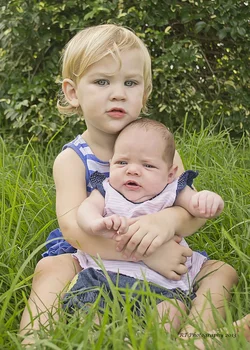
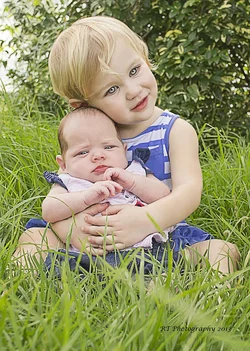
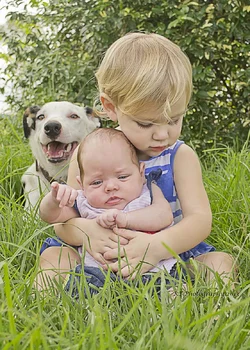
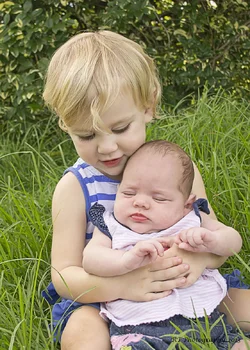
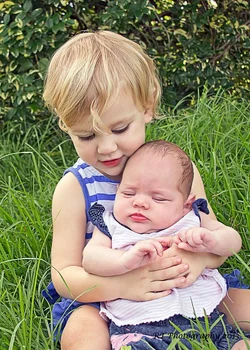
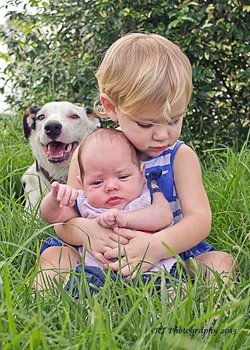
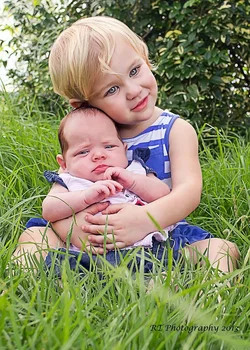
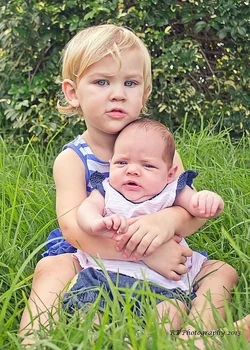
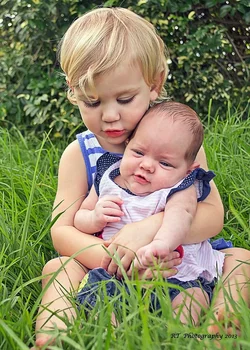
I had about 5 minutes where my two girls where happy at the same time today here is the result any CC is more then welcome

1)
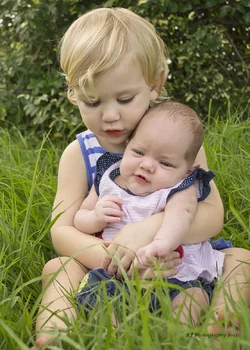
$DSC_1488.webp

2)

$DSC_1490.webp

3)

$DSC_1497.webp

4) even the the dog had to join in

$DSC_1499.webp

5)

$DSC_1500.webp

Thankyou for looking
 
Cute photos, but ease up on the eyes. They look over processed and unnatural. You have a great looking kids.
 
I agree...especially in #3. I love that your dog smiles for photos :) Cute kids!
 
Agree with the above; nice set, well done, but I would suggest in future shooting with longer focal lengths from a greater distance. On children in these positions, the distortion inherent in shorter focal lengths isn't so apparent, but the too-in-focus background resulting from the greater DoF is definitely a detractor, 'though a very minor one. I also see a slight green cast to these; perhaps tweak the WB a little and/or drop the green channel just a tad?
 
These are uploaded in Adobe RGB colorspace, web browsers almost always need sRGB to display properly, otherwise the images look dull and faded.

Even in PS, these look oddly pale and greenish and flat.
Except for the eyes.
Pictures taken in deepish shade need to be edited to make them look 'normal'

 
Cute photos, but ease up on the eyes. They look over processed and unnatural. You have a great looking kids.

Thanks for that I will do that as it was my first go at doing anything like that with the eyes
 
I agree...especially in #3. I love that your dog smiles for photos :) Cute kids!

Thanks I will redo the eyes and the dog it was hard to keep it out of the shot, there was quite a few photo's of it running in font of me or trying to sit on the Georgia (the older girl) the dog just loves been right with the girls when ever they go anywhere outside.
 
Agree with the above; nice set, well done, but I would suggest in future shooting with longer focal lengths from a greater distance. On children in these positions, the distortion inherent in shorter focal lengths isn't so apparent, but the too-in-focus background resulting from the greater DoF is definitely a detractor, 'though a very minor one. I also see a slight green cast to these; perhaps tweak the WB a little and/or drop the green channel just a tad?

These are uploaded in Adobe RGB colorspace, web browsers almost always need sRGB to display properly, otherwise the images look dull and faded.

Even in PS, these look oddly pale and greenish and flat.
Except for the eyes.
Pictures taken in deepish shade need to be edited to make them look 'normal'


I do normal use my 200mm lens for most of my photos but been out side and it was the first time Georgia had cuddle Ava outside I wanted to be in arm reach as she has a thing about cuddling her around the neck all the time. I don't know way they had been up load in RGB instead of SRGB as I always use SRGB and have my Photoshop set up in SRGB so I have re-edit with all the CC that has been given to see and hopeful if will up look with the SRGB as they all have been saved with that color.

Thank you very much for your help
 
I have had another go at editing these photos with not as much on the eyes and hopefully loosing the greenish tint let me know what you think. Thank you all very much for you help

1)

$DSC_1500-1.webp

2)

$DSC_1499 copy.webp

3)

$DSC_1497-1.webp

4)

$DSC_1490-1.webp

5)

$DSC_1488-1.webp

Now I have upload on here they seem to be a lot more pinker in the face of Ava or is that just me?

Thanks for Looking
 
The eyes in the 3rd photo are still too much processing. She looks a bit vampire-ish. Just let the natural beauty of her eyes stand out with a slight enhancement in color and sharpness. Right now they are still glaringly processed.
 
All the photos look over processed in my opinion.. Sort of an HDR look and over sharpened. If that's the look you're going for then you achieved it.. But on people it looks unnatural in my opinion. Be more subtle with the sliders ;) Cute kids though!
 
I have had another go at editing these photos with not as much on the eyes and hopefully loosing the greenish tint let me know what you think. Thank you all very much for you help

1)

View attachment 42316

2)

View attachment 42315

3)

View attachment 42314

4)

View attachment 42313

5)

View attachment 42312

Now I have upload on here they seem to be a lot more pinker in the face of Ava or is that just me?

Thanks for Looking


These still look too red and oversharpened.
 
Thank you all for you very helpful hints I will keep working on my editing in photoshop when I get my new computer next week and up and running you all have been very helpful, and thank you all for taking the time to comment and to help me learn where I can improve my photography
 
What software are you using? It looks to me, like you are using too much 'Clarity', especially for this type of shot.
 

Create an account or login to comment

You must be a member in order to leave a comment

Create account

Create an account on our community. It's easy!

Log in

Already have an account? Log in here.

New Topics

Back
Top Bottom