What's new

First attempt at portraits - Would like honest C&C - Thanks!

Unspoiled

TPF Noob!
Joined
Sep 1, 2009
Messages
82
Reaction score
5
Location
Gilbert, AZ
Can others edit my Photos
Photos OK to edit
I haven't posted on here for a while so I figured that I should jump back in head first!!!

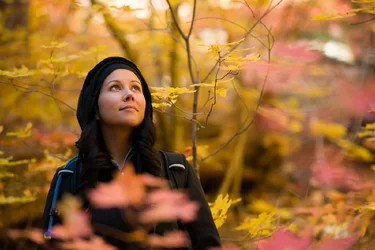
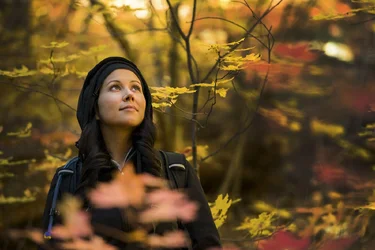
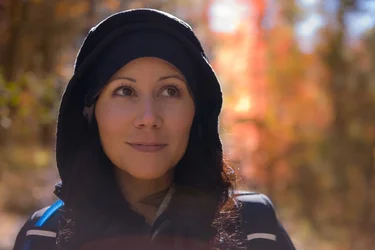
Here are a couple of shots that I would like some feed back. These were taken on a hike and the light was nice. I worked with her on posing and position. I'd like feedback regarding composition, WB, exposure, processing, etc. I never seem to be happy with my WB and color. I know where I want to go... but having trouble getting there. I have been using a ColorChecker passport with mixed results (monitor is also calibrated). Please feel free to point out any other areas that I can improve. Thank you for your time!

View attachment 59196
View attachment 59197
 

Attachments

  • $Portrait_1.webp
    $Portrait_1.webp
    114.6 KB · Views: 182
  • $Portrait_2.webp
    $Portrait_2.webp
    161 KB · Views: 175
The first one has a lot of lens flare, and her face is in dull, flat lighting, and overall, the lighting is poor. Low-contrast, weak color, and looks underexposed.

The second shot is a excellent example of how to use the entire frame, shooting a horizontal environmental portrait that actually SHOWS some "environment".... Damned good job on shot #2. I like the use of the out of focus foreground bokeh in shot #2--putting the fall leaves in front of her dark jacket is a nice example of the photographer deliberately using bokeh as a compositional building block (I wrote a blog post about using bokeh as a compositional building block some years back). The spindly yellow maple tree behind her with its scrawny little branches makes her stand out in 3-D relief, and then the wooded area with other fall leaves...and having her looking UPWARD, while being kept low in the frame gives us a line of gaze, another classic compositional device, used very well. her skin-tones are heavily influenced by the yellow leaves, and that's a good thing. Her face is highlighted by the sky's light, and underneath her chin is darker, which causes the face to stand out very well.

A LOT of people do not understand when to compose a shot horizontally with a 3:2 aspect ratio camera like most d-slrs shoot in. Your second shot is a fantastic example of how to shoot a horizontally oriented environmental portrait that is really well-done, and makes total sense in every single aspect of the composition. Even the small, bright light-colored patch of sky in the upper right hand corner makes "sense".

Bravo!
 
Thanks Derrel! I agree on the first one... I'm honestly not a big fan of the back lit shots that you see a lot of today... I wanted to try my hand at it to see if I could pull it off myself. Her face is under exposed and I noticed the lens flare in post. I wasn't super excited about that one but I got a lot of positive (biased) feedback. Thanks for the feedback.

Thanks for the compliments on the second one. I actually toned down the reflection of the yellow on her face... It looked a little fake to me. Thank you!
 
They have maple trees in AZ?

I like the second one alot. I feel like there is something slightly off on the processing.
 
They have maple trees in AZ?

I like the second one alot. I feel like there is something slightly off on the processing.

$Portrait_2a.webp
 
They have maple trees in AZ?

I like the second one alot. I feel like there is something slightly off on the processing.

View attachment 59200


We do! That was up in Sedona along the Oak Creek Canyon.

Thanks for the feedback runnah! It looks like you dropped the shadows and maybe took a touch of magenta out on the edit? Trying to develop my eye to see the differences too!
 
I would agree that I like #2 very much. Well done on it.
 
Thanks for the feedback everyone! I want to do more portrait work so hopefully I'll get more up here soon.

Thanks!
 
Yes #2 is awesome. I love how you had her lift her face to bring more light to it. Beautiful colors. I SOOO wish our leaves changed colors here.
 
We do! That was up in Sedona along the Oak Creek Canyon.

Thanks for the feedback runnah! It looks like you dropped the shadows and maybe took a touch of magenta out on the edit? Trying to develop my eye to see the differences too!

Well I learned something today.

I darkened the edges to make her pop more as your eye is normally attracted to the brightest thing in an image. In this case the area to the right was brighter.
 

Create an account or login to comment

You must be a member in order to leave a comment

Create account

Create an account on our community. It's easy!

Log in

Already have an account? Log in here.

Back
Top Bottom