What's new

First photos with new camera - CC welcome

cepwin

TPF Noob!
Joined
Dec 4, 2011
Messages
195
Reaction score
5
Location
virginia
Can others edit my Photos
Photos OK to edit
I decided to take my new nikon out for a spin. Here are two images, one of my dog (one of my favorite subjects) and another of a field by my house. I ran both of them though photoshop.
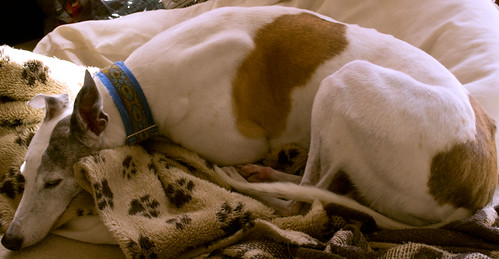


editedited by cepwin, on Flickr
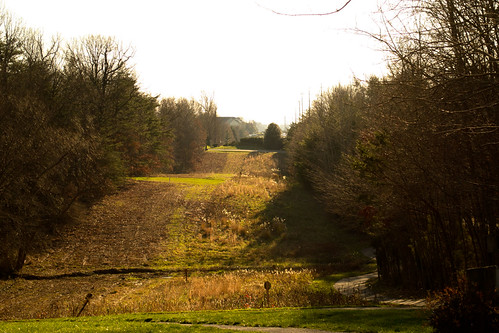


field by cepwin, on Flickr
 
very cool .. dig the last shot.. 1st the dog is adorable but the angle of the shot isnt very exciting.

did you shoot these a RAWs?
 
Thanks for the feedback! Yes they were taken in raw
 
The sky in the last one is blown out. Other than that I like it a lot. Consider getting a GND (Graduated neutral density)Filter. It will separate the skies exposure from the ground exposure.
 
Thanks reissigree...yes that's definitely the case..I noticed it too. I'll have to look into the filter. I have UV filters but not GND.
 
Same with me! I want to buy a good one when I do but they're like 80 bucks.
 
Many photographers have 2, 3, or 4 filter sets of both ND and GND filters (4, 6, or 8 filters. 8 filters being about $650 worth of ND/GND filters).

Consider a .3, .6, and .9 set of ND or GND filters can be combined to also provide 1.2, 1.5, and 1.8.

Add a 1.2 to the .3, .6, .9 set and there are more permutations of combinations, adding 2.1, 2.4, 2.7, and 3.0

Or you can just make 2 exposures, one for the sky, the second for the land, and combine the 2 using an image editing application like Adobe Photoshop Elements 10, that costs about $70.
 
GND's work great..but always hate putting them on. i usually expose the sky seperate and stitch it in later in post ... photoshop is my GND.. wide landscape shots are hard to expose in 1 shot.. need to take a few of them and make it work, basic HDR technique without the whole "oh thats a nice HDR shot" effect.. subtle = win
 
I think #2 would be greatly improved by a sky with some interesting clouds and closer to sunrise/sunset (or before sunrise/after sunset). I like the strong feeling of depth coming from the repeating patterns of the two 'hills'.

#1 is too busy in my opinion. It also appears to have been shot straight down. Eye-level is usually more effective. The light coming in the upper right of the frame is a good quality light... I wonder what it would look like if you get get his face in that light?
 
Thank you all for the feedback. Yeah, it's kind of a cool "feature" by my house. I believe it's actually a natural gas easement but it has a nice effect...it does look even better at sundown/sunrise (I did try capturing it at that time w/my cybershot but it was incredibly grainy.) Wow...you can really spend a lot on filters...I did recently pick up photoshop elements for $50 on an Amazon sale and am learning to use it Yes, I should experiment with a combined image and see what I come up with. Yes, Edie is a "busy" subject so I see where she'd be better on a plain dark background...basically I went up and found her sleeping and took a picture...then played with it in elements a little. It could be interesting to see if I could take her and combine her with a simple background (either photoshop or catching her with a simple background) and see what that produces. I want to get a shot of my bird (pionus parrot) with the new camera but I have to set it up as I can't hold him and the camera at the same time.
Thanks again!
 
One thing I'm not crazy about in #1 - I'm feeling claustrophobic just looking at it. There's zero room in front of the dog's face. Might just be me, but I'd like to see more background. Very cute dog, though!
 

Create an account or login to comment

You must be a member in order to leave a comment

Create account

Create an account on our community. It's easy!

Log in

Already have an account? Log in here.

New Topics

Back
Top Bottom